Web development is the work of building, launching, and maintaining websites, and it covers everything from the layout you see on screen to the server and database working quietly behind it. Whether you want to learn the skills yourself, hire someone to do it, or simply understand what your developer is telling you, this guide explains the basics in plain English. You’ll see how websites work, what a front end developer does, which skills to learn first, and how to find web developers near you.
You don’t need a computer science degree to follow along. Each section builds on the last, and the table of contents below lets you jump to whatever you need.
What Is Web Development?
Web development is the process of creating websites and web applications that people open in a browser. A blog, an online store, a booking form, and a company homepage are all the result of web development.
The work usually falls into three buckets:
- Building the pages and features visitors see and use
- Connecting those pages to servers, databases, and other services
- Maintaining the site afterward by fixing bugs, applying updates, and keeping it fast and secure
You’ll also hear “web dev” as shorthand and “website development” when the focus is a single site rather than a larger application. In everyday conversation, they mean nearly the same thing.
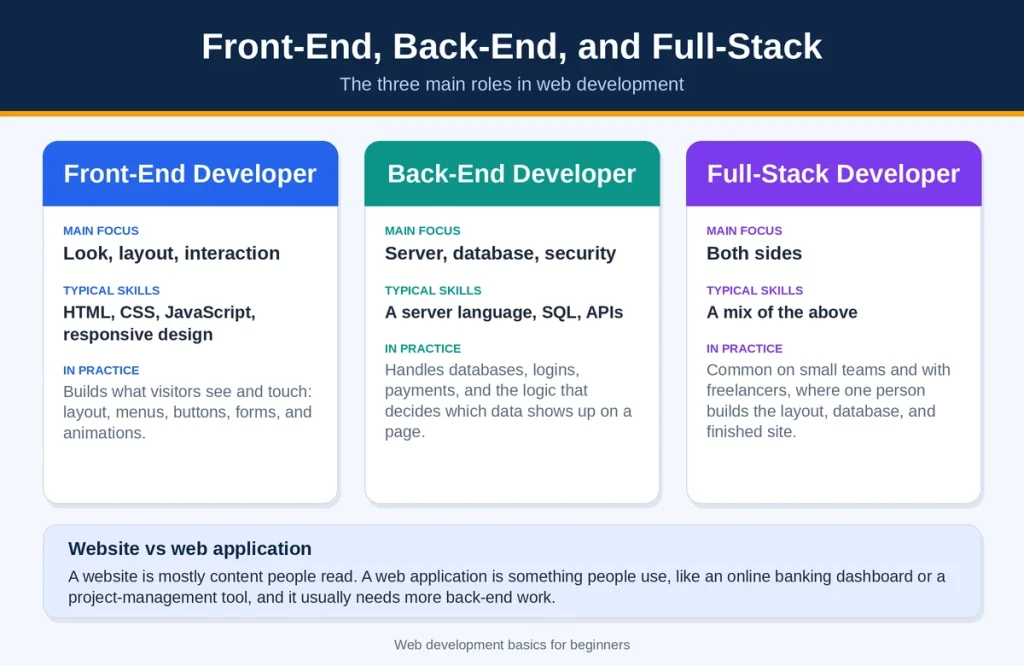
One distinction is worth knowing early. A website is mostly content that people read. A web application is something people use, like an online banking dashboard or a project management tool. The skills overlap, but applications usually need more back-end work.
How a Website Actually Works
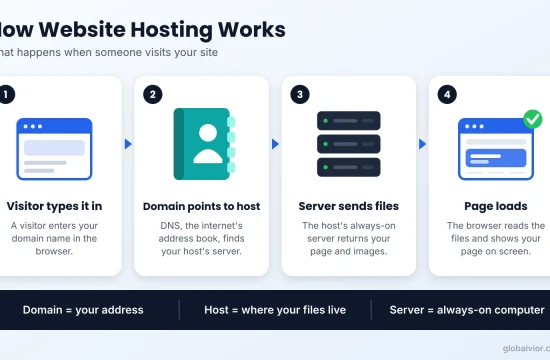
Before writing any code, it helps to picture what happens when someone visits a page.
- A visitor types a domain name, such as example.com, into a browser.
- The Domain Name System (DNS), which works like the internet’s address book, finds the server where the site lives.
- The browser asks that server for the page.
- The server sends back files: mainly HTML, CSS, JavaScript, and images.
- The browser reads those files and draws the page on screen.
Three pieces make that possible: a domain (the address), hosting (the server space where your files sit), and code (the instructions the browser follows). If you still mix up the first two, our explanation of web hosting vs. domain name clears it up.
| Layer | What it does | Common tools |
|---|---|---|
| Domain | Gives your site a readable address | Domain registrar |
| Hosting | Stores your files and serves them to visitors | Shared, VPS, or cloud hosting |
| Front end | Shows what the visitor sees and clicks | HTML, CSS, JavaScript |
| Back end | Runs logic, databases, and user accounts | PHP, Python, Node.js, SQL |
Front-End, Back-End, and Full-Stack Development
Most web development roles fall into one of three groups.
What a Front-End Developer Does
A front-end developer builds the parts of a site that people see and touch: layout, menus, buttons, forms, and animations. The US Bureau of Labor Statistics (BLS) describes front-end web developers as the people who build a site’s look and bring in graphics and other content using languages such as HTML and JavaScript.
In practice, a frontend developer spends a lot of time making sure a page behaves well on phones, tablets, and desktop screens.
What a Back-End Developer Does
Back-end developers work on the server side. They handle databases, logins, payments, and the logic that decides which data shows up on a page. When you sign in to an account and see your own orders, the back-end code did that.
What Full-Stack Means
A full-stack developer works on both sides. That’s common on small teams and with freelancers, where one person might build the layout, set up the database, and publish the finished site.
| Role | Main focus | Typical skills |
|---|---|---|
| Front-end developer | Look, layout, interaction | HTML, CSS, JavaScript, responsive design |
| Back-end developer | Server, database, security | A server language, SQL, APIs |
| Full-stack developer | Both sides | A mix of the above |
Web Development vs Web Design
Design decides how a site should look and feel. Development makes it work. Designers think about color, typography, spacing, and how a visitor moves through a page. Developers turn those decisions into working code.
On small projects one person often does both. On larger ones they’re separate jobs. If you’re hiring, it helps to know which one you’re actually shopping for, because a great designer isn’t automatically a great developer, and the reverse is also true.
Skills Every Beginner Needs
Technical skills
- HTML for page structure
- CSS for styling and layout
- JavaScript for interactivity
- Git for tracking changes to your code
- Browser developer tools for inspecting and debugging pages
Non-technical skills
- Problem-solving. Much of the job is working out why something isn’t behaving.
- Attention to detail. One missing bracket can break a page.
- Clear communication. You’ll explain technical choices to clients and designers.
BLS lists communication, creativity, attention to detail, and problem-solving among the qualities that matter for this kind of work, so these aren’t just nice extras.
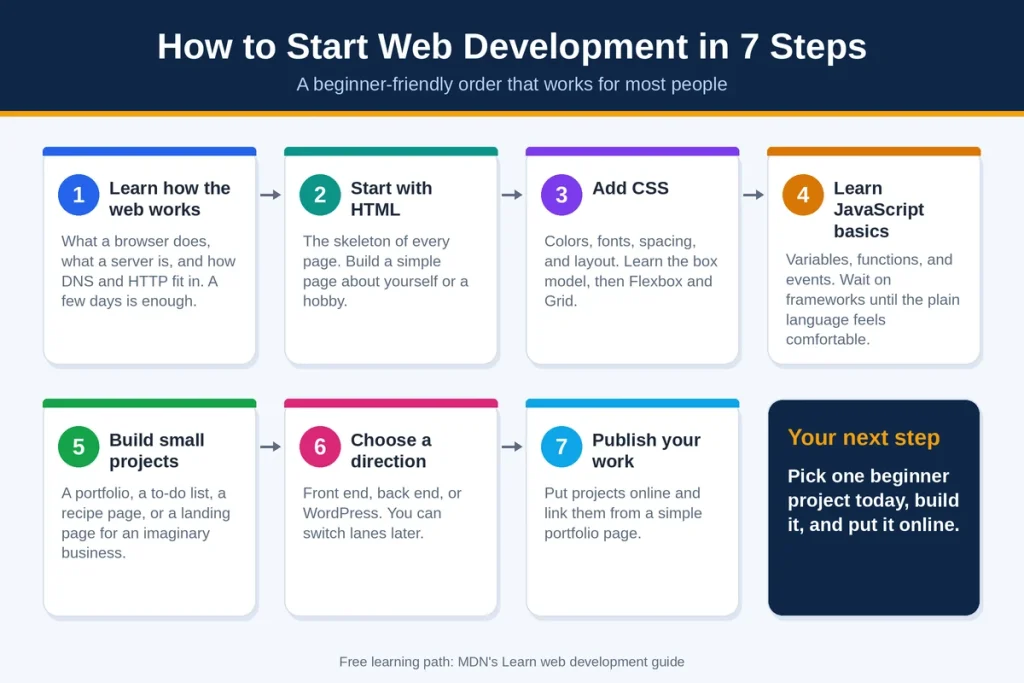
How to Start Web Development in 7 Steps
There’s no single correct order, but this sequence works well for most people.
Step 1: Learn How the Web Works
Spend a few days on the basics: what a browser does, what a server is, and how DNS and HTTP fit in. You don’t need to memorize anything. You just need a mental picture of how a request travels from a visitor to a server and back.
Step 2: Start With HTML
HTML is the skeleton of every page. It defines headings, paragraphs, links, images, lists, and forms. Build a simple page about yourself or a hobby.
Use meaningful tags such as <header>, “and”<main> instead of piling everything into generic boxes. Screen readers and search engines both rely on that structure.
Step 3: Add CSS
CSS controls colors, fonts, spacing, and layout. Learn how the box model works, then move on to Flexbox and Grid, the two main tools for arranging content. Design for a phone screen first, then widen the layout for larger screens.
Step 4: Learn JavaScript Basics
JavaScript makes pages interactive. It powers menus that open, forms that check your input, and content that updates without a full reload. Start with variables, functions, and events. Wait on frameworks until the plain language feels comfortable.
Step 5: Build Small Projects
Tutorials teach syntax. Projects teach thinking. Try a personal portfolio, a to-do list, a recipe page, or a landing page for an imaginary business. Each project forces you to search for answers, and that habit is something working developers rely on every day.
Step 6: Choose a Direction
Once the basics click, pick a lane:
- Front end: go deeper into JavaScript and a framework
- Back end: learn a server language and how databases work
- WordPress: focus on themes, plugins, and fixing site problems
You aren’t locking yourself in forever. Plenty of developers switch lanes after a year or two.
Step 7: Publish Your Work
Put your projects online and link them from a simple portfolio page. BLS notes that web developers and digital designers may not need specific education credentials if they can show their ability through past work or projects, which makes a portfolio your strongest asset.
Free learning path: MDN’s Learn web development guide walks through getting started, core front-end topics, frameworks, and accessibility, and it aims to take you from beginner to comfortable rather than to expert.
Tools You Will Use
You can start with a surprisingly small toolkit.
| Tool | What it’s for |
|---|---|
| Code editor (such as Visual Studio Code) | Writing and organizing your code |
| Browser developer tools | Inspecting HTML and CSS, debugging JavaScript, checking performance |
| Git and GitHub | Tracking changes, backing up code, sharing projects |
| Web hosting | Making your site available to the public |
| A CMS | Managing content without touching code every time |
Hosting is the tool beginners underestimate most. If you’re unsure where to put your first site, read our guide on how to choose a web host. Once a site grows past basic shared plans, our roundup of the best VPS hosting shows what the next step looks like.
Web Development With WordPress
WordPress is a content management system (CMS), which means software that lets you publish and manage a site from a dashboard. Many website owners choose it because they can get online without writing everything from scratch.
Even then, a little web development goes a long way. Custom CSS, theme tweaks, and plugin troubleshooting all draw on the same skills covered above, and they save you from paying for small fixes.
If you’re starting from zero, follow our step-by-step guide to start a WordPress website. When page speed becomes a concern, take a look at our list of the fastest WordPress themes. If you’re weighing WordPress against other options, our content management software guide compares the broader field. And if you ever need to switch providers, here’s how to migrate a WordPress site.
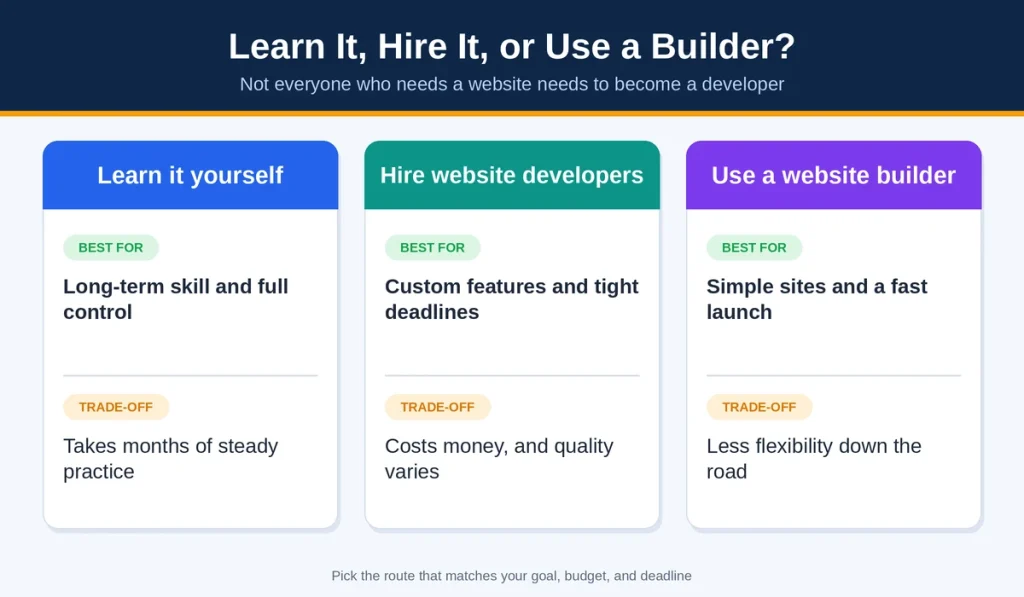
Learn It, Hire It, or Use a Builder?
Not everyone who needs a website needs to become a developer. Here’s how the three routes compare.
| Option | Best for | Trade-off |
|---|---|---|
| Learn it yourself. | Long-term skill and full control | Takes months of steady practice |
| Hire website developers | Custom features and tight deadlines | Costs money, and quality varies |
| Use a website builder | Simple sites and a fast launch | Less flexibility down the road |
If a drag-and-drop route sounds closer to what you need, our guide to the best AI website builders is a good place to compare tools before you commit.
Careers and Pay in the US
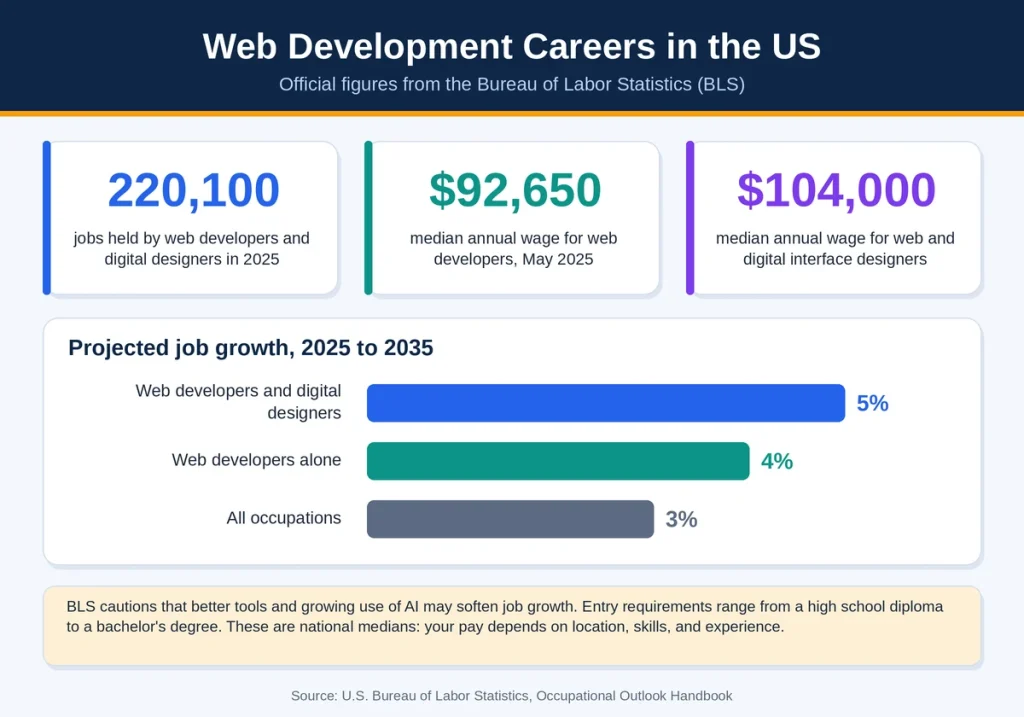
If you’re thinking about web development as a career, BLS publishes official numbers in its Occupational Outlook Handbook. Current edition:
- Web developers and digital designers held about 220,100 jobs in 2025.
- Employment is projected to grow 5 percent from 2025 to 2035, compared with 3 percent for all occupations. For web developers alone, the projection is 4 percent.
- The median annual wage for web developers was $92,650 in May 2025. Web and digital interface designers had a median of $104,000.
- Entry requirements range from a high school diploma to a bachelor’s degree.
BLS also cautions that better development tools and growing use of AI may soften job growth, because those tools can make workers more productive and let people in other roles handle basic tasks. Treat the figures as national medians. Your own pay will depend on location, skills, and experience. You can read the full data on the BLS Occupational Outlook Handbook page for web developers.
How to Find Web Developers Near Me
Many people search for “web developers near me” because they’d like someone local to meet face to face. Local isn’t required, since plenty of website developers work remotely, but it can make communication easier.
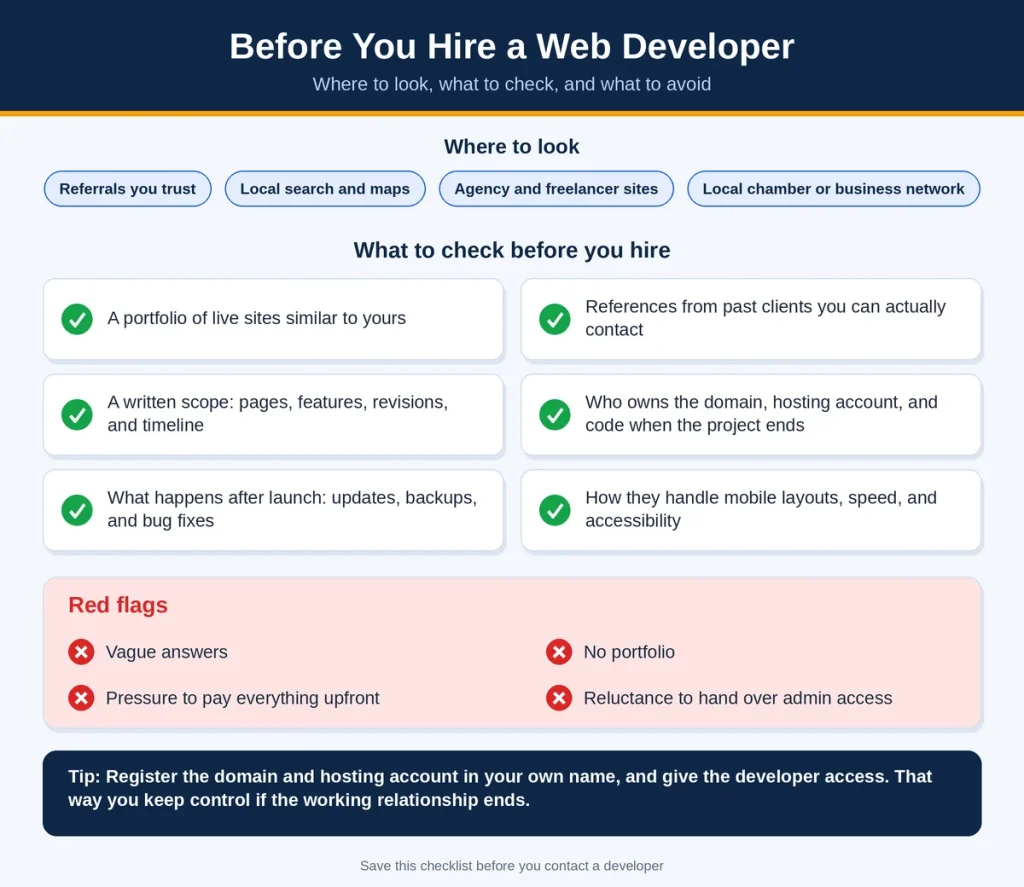
Where to look
- Referrals from other business owners you trust
- Local search results and map listings
- Agency and freelancer websites with live examples
- Your local chamber of commerce or business network
What to check before you hire
- A portfolio of live sites similar to yours
- References from past clients you can actually contact
- A written scope covering pages, features, revisions, and timeline
- Who owns the domain, hosting account, and code when the project ends
- What happens after launch: updates, backups, and bug fixes
- How they handle mobile layouts, speed, and accessibility
Ask a front end developer or agency to open a live site they built and explain what they did on it. Vague answers are a warning sign. So are no portfolio, pressure to pay everything upfront, and reluctance to hand over admin access.
Tip: Register the domain and hosting account in your own name, and give the developer access. That way you keep control if the working relationship ends.
Speed, Mobile, and Accessibility
Good web development isn’t only about making a page appear. Three quality areas separate a decent site from a good one.
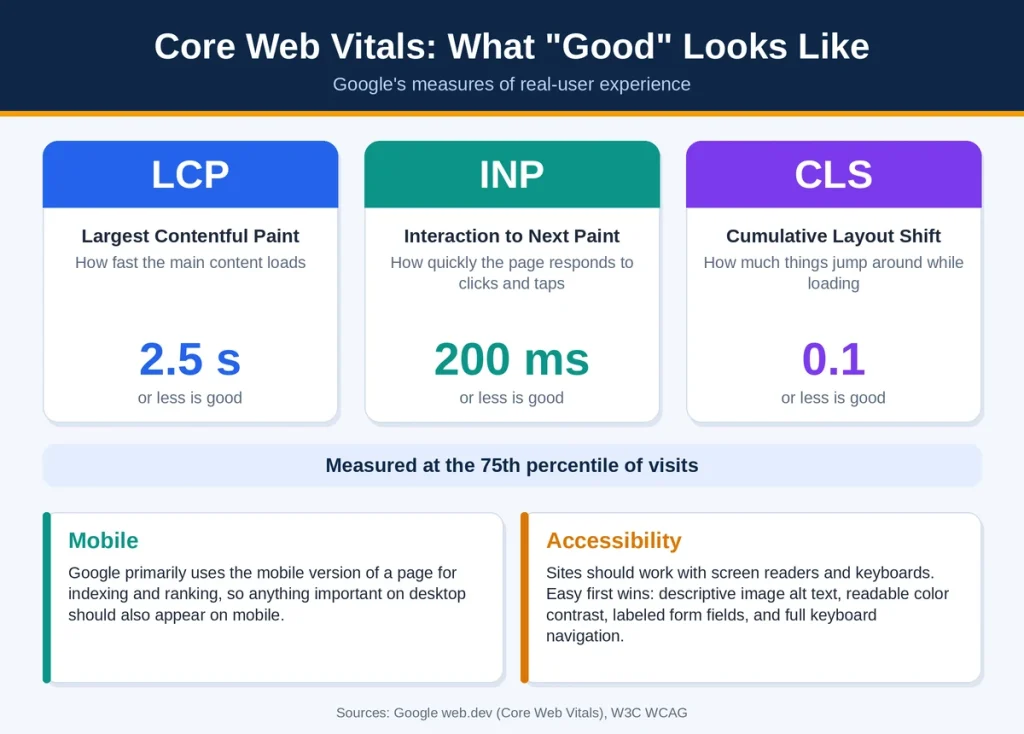
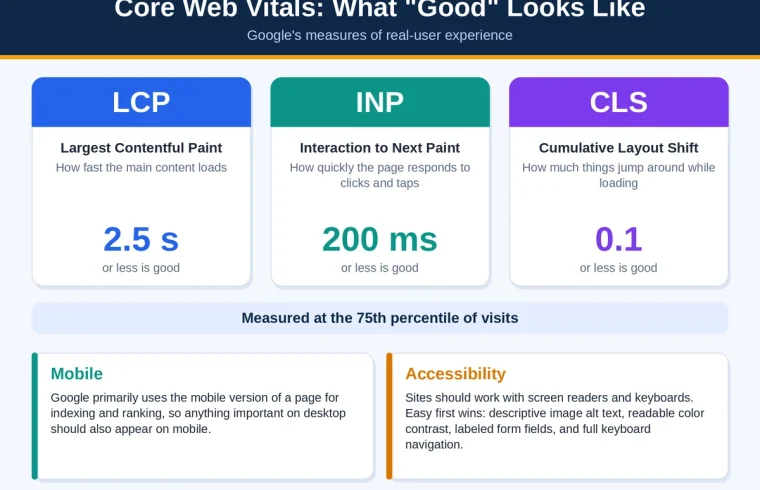
Speed. Google’s Core Web Vitals measure real-user experience. A page is considered “good” when its Largest Contentful Paint (how fast the main content loads) is 2.5 seconds or less, its Interaction to Next Paint (how quickly it responds to clicks and taps) is 200 milliseconds or less, and its Cumulative Layout Shift (how much things jump around while loading) is 0.1 or less, measured at the 75th percentile of visits. Google explains how those thresholds were chosen on web.dev.
Mobile. Google primarily uses the mobile version of a page for indexing and ranking, so anything important on desktop should also appear on mobile. Google’s mobile-first indexing best practices list what to check.
Accessibility. Websites should work for people who use screen readers, keyboards, or other assistive tools. The W3C’s Web Content Accessibility Guidelines (WCAG) are the main international standard. Easy first wins include descriptive image alt text, readable color contrast, labeled form fields, and full keyboard navigation.
Common Beginner Mistakes
- Jumping into frameworks too early. Learn plain HTML, CSS, and JavaScript first.
- Watching tutorials without building. If you can’t make something without the video, you haven’t learned it yet.
- Ignoring mobile. Many visitors will arrive on a phone.
- Piling on plugins or libraries. Every extra piece adds weight and something to maintain.
- Skipping backups and version control. One bad edit shouldn’t cost you a week of work.
- Never publishing. A finished, imperfect site teaches more than a perfect one that stays on your laptop.
FAQs
What is web development in simple words?
Web development is building and maintaining websites. It includes the visible parts, like layout and buttons, and the hidden parts, like servers and databases.
Is web development hard to learn?
It’s learnable, but it takes steady practice. HTML and CSS are friendly places to start, and JavaScript is where many people hit their first real challenge.
It depends on how many hours you put in each week and what you want to build. Many beginners can make simple pages after a few weeks of regular practice, while getting comfortable enough for client or job work generally takes longer.
What does a front end developer do?
A front end developer builds what visitors see and interact with, such as layouts, menus, forms, and animations, using HTML, CSS, and JavaScript.
Do I need a degree to become a web developer?
Not always. BLS says educational requirements range from a high school diploma to a bachelor’s degree, and a strong portfolio can stand in for formal credentials.
How do I find web developers near me?
Ask for referrals, check local search results, and review portfolios. Then confirm references, scope, ownership of your domain and code, and what support you get after launch.
Is web development a good career?
BLS projects 5 percent growth for web developers and digital designers from 2025 to 2035, which is faster than average. It also notes that AI and better tools may soften that growth, so building skills beyond the basics is wise.
Final Thoughts
Web development comes down to understanding how a request travels from a browser to a server and back, then learning HTML, CSS, and JavaScript well enough to shape what comes back. Start small, build real projects, and publish them. If coding isn’t for you, you can still make better decisions by knowing what to ask website developers before you hire.
Your next step is simple: pick one beginner project today, build it, and put it online.