Wix Cost and Website Pricing in 2026
If you’re planning to build a website, understanding the Wix cost is an important part of choosing the right platform. Wix provides a free website builder along with several paid plans for individuals, small businesses, online stores, and professional service providers.
The total cost depends on the plan you choose, the features you need, and whether you pay for additional services such as a business email, domain renewal, or third-party apps.
A small business website can start with a relatively low monthly subscription. An online store or a website with advanced business features will usually cost more.
How Much Does Wix Cost Per Month?
Wix offers different subscription plans for different types of websites. You can start with its free plan and upgrade when you need a custom domain, more storage, or online payment features.
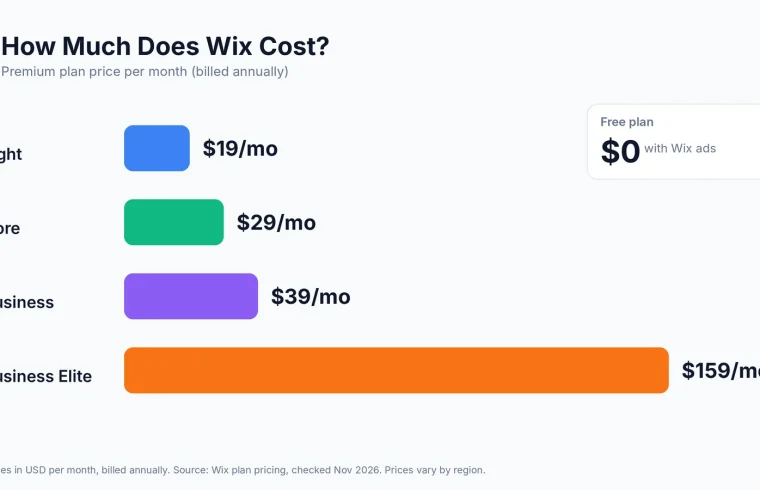
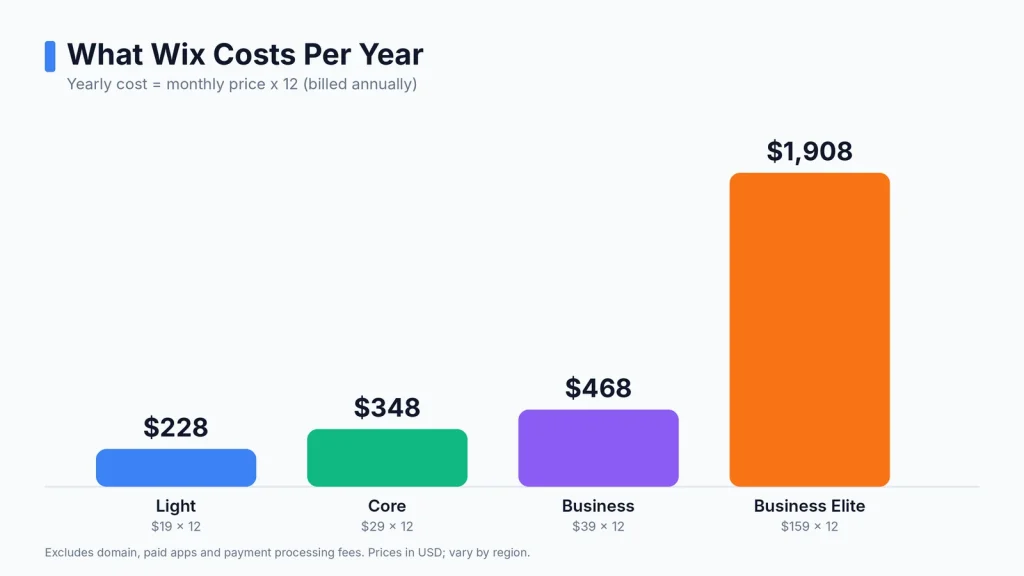
The following are indicative US annual-plan prices shown on Wix’s pricing information. Prices and offers can change depending on location and billing period.
| Wix plan | Monthly equivalent | Best for |
|---|---|---|
| Free | $0 | Testing and learning |
| Light | $17 | Personal websites |
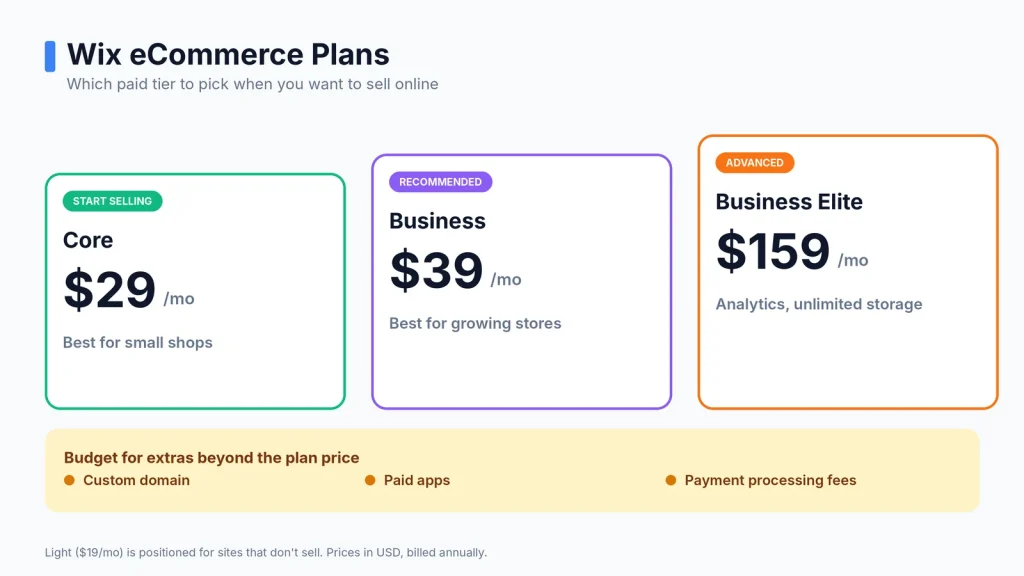
| Core | $29 | Small businesses |
| Business | $39 | Growing businesses |
| Business Elite | $159 | Larger businesses |
Paid subscriptions are generally billed upfront for the selected subscription period. Check the final checkout price before purchasing. wix.com.
Wix Premium Plans Explained
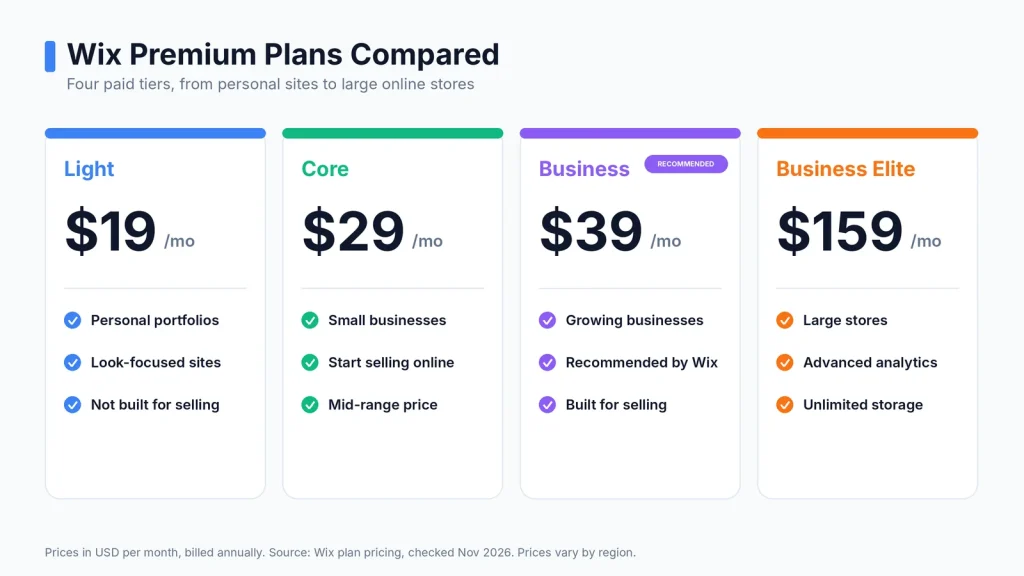
Choosing the right plan can help you avoid paying for features you don’t need. Here’s what each main Wix plan offers.
1. Wix Free Plan
The free plan is a good starting point if you want to learn how Wix works or test a website idea.
It includes:
- Wix website editor
- Free Wix hosting
- Website templates
- Basic design tools
- Wix-branded website address
However, the free plan has limitations. You cannot use all the benefits of a paid custom-domain website, and Wix branding remains visible.
Who should choose it?
Beginners, students, and anyone who wants to experiment with website development before spending money.
2. Wix Light Plan
The Light plan is designed for personal websites, portfolios, and basic business websites.
It includes:
- Custom domain connection
- Removal of Wix branding
- 2 GB storage
- Unlimited bandwidth
- Basic marketing tools
This plan is suitable if your website mainly provides information about your business and does not need online payment functionality.
Who should choose it?
Freelancers, consultants, personal brands, and small service providers.
3. Wix Core Plan
The Core plan is a better option for businesses that need more than a basic website.
It includes:
- 50 GB storage
- Unlimited bandwidth
- Basic eCommerce features
- Online payment acceptance
- Scheduling and service tools
- Up to five collaborators
You can use this plan to create an online store, accept bookings, and manage customer activity.
Who should choose it?
Small businesses, service providers, and entrepreneurs who want to sell products or services online.
4. Wix Business Plan
The Business plan offers additional storage and advanced features for businesses that need more tools to manage and expand their websites.
Its main features include:
- 100 GB storage
- Standard marketing tools
- Standard eCommerce features
- Online payment acceptance
- Scheduling and service tools
- Up to 10 collaborators
It can be useful when your business needs more room for products, content, marketing, and customer management.
Who should choose it?
Growing online businesses, established service companies, and store owners.
5. Wix Business Elite Plan
Business Elite is designed for businesses that need advanced website features and more room to grow.
It includes:
- Unlimited storage
- Advanced eCommerce features
- Advanced marketing tools
- Multi-cloud hosting
- Advanced developer platform
- Up to 100 collaborators
This plan may be unnecessary for personal websites and small businesses with basic website requirements.
Who should choose it?
Larger online stores, established companies, and businesses with advanced website requirements.
What Other Costs Should You Consider When Using Wix?
Your Wix plan subscription is just one of the expenses you’ll need to consider when calculating the overall website cost. Depending on your website requirements, you may need to pay for additional services.
1. Domain Name Registration
A custom domain gives your website a professional address, such as yourbusiness.com.
Wix includes a one-year domain voucher with selected annual or multi-year paid plans. After the first year, you’ll need to pay the standard annual renewal fee to keep your domain active.
Before buying, check the domain renewal fee and confirm that Wix supports the domain extension you want to use.
2. Business Email
A professional email address, such as info@yourbusiness.com, helps customers recognize your business.
Wix offers business email through Google Workspace. This is a separate subscription from your website plan, so include it in your budget if you need custom email accounts.
You can also read Wix’s business email information.
3. Premium Apps and Integrations
Some websites need extra functionality that isn’t included in their basic subscription.
Examples include:
- Appointment booking tools
- Advanced forms
- Marketing integrations
- Customer management tools
- Specialized eCommerce features
Some apps are free, while others require monthly or yearly payments. Check the billing terms before installing a paid app.
4. Online Payment Processing Fees
If you sell products or services, payment processing fees are another expense.
For example, Wix Payments lists the standard US credit and debit card processing rate (excluding American Express) as 2.9% plus $0.30 per transaction.
Other payment methods have different rates. These charges are separate from your Wix website subscription.
5. Website Development and Professional Design
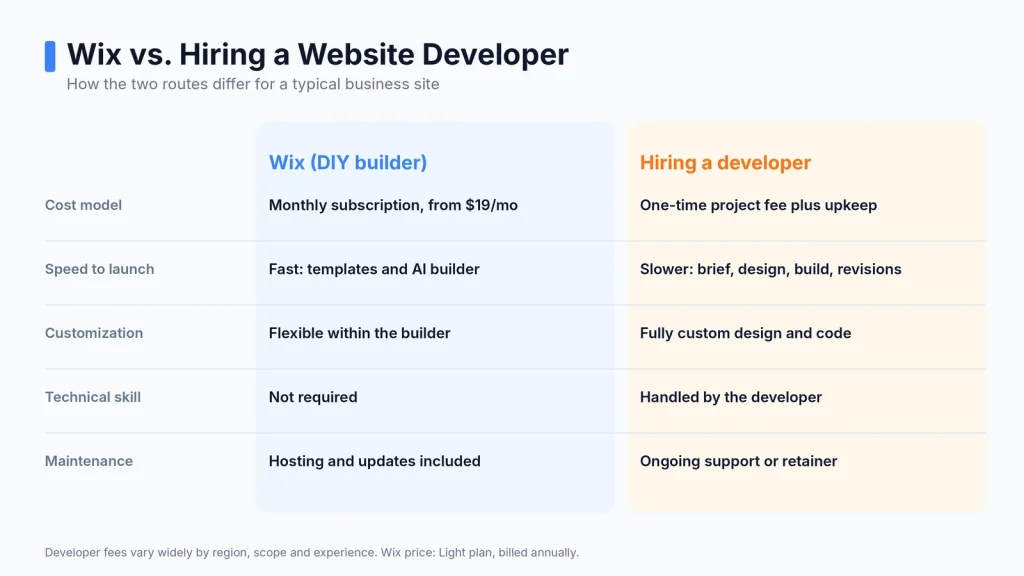
You can build a Wix website yourself using its templates and drag-and-drop editor. However, some businesses prefer to hire website developers for a more customized result.
Professional services may include:
- Website design and layout
- Custom functionality
- Online store setup
- SEO configuration
- Website content and image preparation
- Ongoing maintenance
The cost depends on the project, the developer’s experience, and the amount of work involved. Ask for a detailed quote before hiring someone.
How Much Does It Cost to Build a Wix Website?
The cost for Wix depends on the type of website you’re planning to create. A simple portfolio has different requirements from an online store or a business website with booking features.
Here are some practical budgeting examples using the listed annual-plan monthly equivalents.
| Website type | Suggested plan | Starting subscription budget |
|---|---|---|
| Personal portfolio | Light | $17/month |
| Small business website | Light or Core | $17–$29/month |
| Service booking website | Core | $29/month |
| Small online store | Core | $29/month |
| Growing eCommerce business | Business | $39/month |
| Large business website | Business Elite | $159/month |
These figures cover the plan subscription only. They do not include domain renewals, paid apps, professional development, business email, taxes, or transaction fees.
For example, a small consulting business may only need the Light plan if it wants to display its services, contact details, and portfolio. A business that accepts online payments should consider Core or a higher plan.
Is Wix Worth the Cost for a Small Business?
Wix can be a practical option for a small business that wants to build and manage its own website.
Its visual editor allows users to create pages without writing code. Templates and built-in business tools can also reduce the amount of technical setup required.
However, Wix may not be the right choice for every project.
Wix may be a good choice if:
- You want to build a website without coding.
- You prefer a visual website editor.
- You need built-in booking or eCommerce tools.
- You want to manage website content yourself.
- You don’t want to manage a separate hosting server.
You may want another platform if:
- You need extensive control over server settings.
- You want to use a large range of WordPress plugins.
- You need a highly customized development environment.
- You want more control over hosting and website migration.
If you’re comparing website platforms, take a look at our guide to WordPress domain hosting. You can also read WordPress hosting services to understand the alternatives.
Wix vs. Hiring Website Developers
Another factor to consider is whether to build your website yourself or hire a professional.
Wix is designed for people who want to manage website development without handling the technical side of hosting and coding.
Hiring website developers can make sense when you need a custom layout, specialized features, or a website designed around a specific business process.
| Factor | Wix DIY website | Professional development |
|---|---|---|
| Initial setup | You build it yourself | Developer handles the setup |
| Design | Templates and editor | Custom design available |
| Technical skills | Basic skills | Depends on the project |
| Custom functionality | Limited by platform and tools | Depends on platform and budget |
| Ongoing cost | Plan and additional services | Hosting, maintenance, and support may apply |
The best option depends on each business’s specific needs, budget, and website requirements. If your requirements are simple, building the website yourself can reduce initial expenses. If the project needs specialized functionality, professional web development may be worth the additional cost.
How to Reduce Your Wix Website Costs
You don’t need to purchase the most expensive plan to create a useful website. A few simple decisions can help you manage your budget.
Choose a Plan Based on Your Needs
Start by listing the features your website actually needs. If you only want to display business information, you may not need an eCommerce plan.
Avoid Unnecessary Paid Apps
Before installing an app, check whether Wix already provides a similar feature. Free tools may be enough for your current requirements.
Check Annual Billing Carefully
Wix often displays monthly equivalent prices for annual subscriptions that are charged upfront. Compare the full payment amount with monthly billing before choosing.
Review Renewal Prices
Some introductory offers apply only to the first subscription period. Check the renewal price for your website plan, domain, and additional services.
Build Your Website Yourself
If you have time to learn the Wix editor, you can save money by handling basic website development yourself. Hire a professional only when you need skills or functionality beyond your experience.
Frequently Asked Questions About Wix Cost
Is Wix free to use?
Yes. Wix offers a free plan that lets you create and publish a website. However, it includes Wix branding and does not provide the same custom-domain features as paid plans.
What is the cheapest Wix Premium plan?
The Light plan is the lowest-priced standard paid plan in the US pricing reference used in this article, at approximately $17 per month with annual billing.
Does Wix include web hosting?
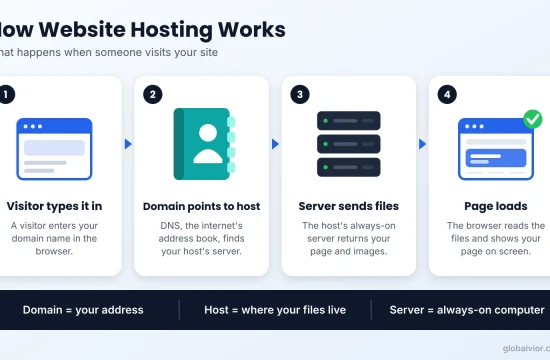
Yes. Wix includes website hosting with its plans. You don’t need to purchase a separate hosting account to publish a Wix website.
I sell products with Wix?
Yes. You can sell products and accept online payments with eligible plans, such as Core, Business, and Business Elite.
Does Wix charge transaction fees?
Payment processing fees apply when you accept payments through Wix Payments. The rates depend on the payment method and the location of your business.
Is Wix cheaper than WordPress?
It depends on your requirements. Wix combines website building and hosting in one subscription. WordPress software is free, but you may need to pay separately for hosting, a domain, themes, plugins, and development services.
Can I change my Wix plan later?
Yes. You can upgrade your Wix plan whenever your website needs additional features or resources. Check the billing terms before changing subscriptions.
Final Thoughts: Is the Wix Cost Worth It?
Wix offers several pricing options for people who want to create personal websites, business websites, and online stores.
The Free plan is useful for testing the platform. Light works for basic websites, while Core and Business provide more features for companies that need online payments and eCommerce tools.
Before choosing a subscription, consider the total cost, including domain renewal, business email, paid apps, and payment processing.
The best plan is the one that covers your website’s actual requirements without adding unnecessary expenses.