
Web Hosting vs. Domain Name: What’s the Difference?
Introduction

Website: In a layman’s word, when you are going to create a website, important terms will come in the way, like “domain name” and “web host”. But both of these things appear the same for newbies but actually are different. Before you publish that first blog post, create your business website, portfolio, or online store. Then you need to understand web hosting vs. domain name. Simply, a domain name is where your website lives and what you enter into a web browser to navigate to your site, while web hosting is where the files are stored. The domain name allows others to find your website, and the web hosting keeps your site alive. Look at your website like it is a house. The domain name is the address of your house, and web hosting (personally, I see this much more literally) is the land or space that house sits on. Without a domain name, visitors will not be able to access your website easily. Without web hosting, your website files will remain there sitting in the offline storage. In this article, we will explain all the differences between web hosting and domain names fully, their work, why both are needed together, and which one to buy first.
What Is a Domain Name?
A domain name is a web address that people would put into a web browser to go to one website. Therefore, here are some samples of the domains:
google.com
facebook.com
wikipedia.org
yourwebsite.com
IP ADDRESS: Every site on the internet has an IP address. An IP, an address with a number that serves as an identifier for servers on the internet. However, humans are very bad at remembering numbers. This is the reason why domain names are always preferred over IP addresses.
A notable example of this is that how much information you remember is almost too simple to just spice up and remember a com than a long IP address. A domain name makes your website easier to reach and easier to remember and can give you a much more professional look.
Parts of a Domain Name
First of all, a domain name is made up of two parts in normal circumstances. Let’s take example.com as an example. “Example” is the main name.
.com is the domain extension. The top level of a domain is called the TLD, or Top-Level Domain.
Some popular domain extensions are
- .com
- .net
- .org
- .info
- .co
- .biz
- .us
- .uk
But far and away for general websites, blogs, and businesses, it is the .com extension that rules. If your website is for a country, you can target some of the countries with extensions like ‘uk’, ‘us’, ‘ca’, ‘au’, or ‘bd’.
What Is Web Hosting?

Web-hosting is a service that keeps your website files running over the internet. These files may include:
- Website pages
- Images
- Videos
- Blog posts
- Theme files
- Plugins
- Databases
- Code files
When a user types your domain into their browser, the browser will talk to the hosting server and serve files from your site. And only then can the visitor see your website.
Without web hosting, there won’t be a website for your site on the internet. Which is why most of the professional websites need hosting.
There’s a notable difference between web hosting & domain names.
The difference between web hosting and domain names is in their purpose.
Domain Name The domain name is the address of your website. This is the area that your files for your website will exist in; this is called web hosting.
Feature
- Domain Name
- Web Hosting
- Main purpose
- Website address
- Website storage
- Example
- example.com
- Hosting server or cPanel
- Function
- Helps users find your website
- Stores website files
- Required for website?
- Yes, for easy access
- Yes, to keep the site online
Can be bought separately?
Yes
Can work together?
Yes
In this fight between web hosting vs. domain name, always keep in mind that a domain gives people access to your website, while web hosting stores the actual content of that site.
Simple Example for Choosing a Web Hosting and Domain Name
For example, if you plan to open some form of physical store.
The shop name is your brand.
Note your domain name is your shop address
So your website is the building in which you run your store.
The piece of land on which the building you reside in is your web hosting space.
People cannot find your store if they do not know your address. There is no way to build the store without any land space. Similarly, for your website to operate even at a basic level, it also needs a name and hosting somewhere.

How Does a Domain Name Work?
A number of things occur behind the scenes when you enter a domain name into your browser.
Thus, when we hit a URL, at first the browser will send a request to identify the server mapped with that domain. How does it work → Via the Domain Name System (DNS). At its core, DNS is the phone book of the internet. This is basically a bridge between the domains and the right servers.
Now when it finds the appropriate server, then the browser requests files of that website from that particular server. The hosting server then returns those files back to the browser, and voila!!! The website lands on your screen.
The whole process usually only lasts a few seconds.
How Does Web Hosting Work?
How web hosting works: Have you ever thought about what happens when a website gets created? The files of that website get saved inside a server, and those servers are providing access to the internet. Basically, a server is a high-end computer meant for keeping storage in it and serving users as per requirement.
So whenever an individual opens your internet site, the framework information is dispatched from the hosting server to show in the visitor’s browser. For example, HTML, CSS, JavaScript, images, and database contents.
Web hosting are basically services that let your website load faster & be online and safe. Poor Hosting—This can result in slow loading speed, downtime, and errors, all of which are sure to ruin the user experience.

Types of Web Hosting
Now, here are different types of web hosting. What is best for you will depend on a variety of factors—how large your website needs to be, the level of traffic you expect through it, any budget limitations, and the technical specifications.
Shared Hosting
Shared hosting is the most popular and cost-effective type of hosting out there. In shared hosting, multiple websites share the same server resources.
Who is shared hosting best for?
- New blogs
- Small business websites
- Portfolio websites
- Beginner websites
Advantages of shared hosting:
- Low cost
- Easy to use
- Beginner-friendly
- Usually includes a control panel
Disadvantages of shared hosting:
- Limited resources
- The server may slow down due to overload.
- Little control as oppose to VPS or dedicated hosting
- VPS Hosting
So, what exactly is a VPS? ‘VPS’ means ‘Virtual Private Server’. VPS: 1 physical server split into multiple servers, where each user obtains dedicated resources.
VPS hosting is suitable for:
- Growing websites
- Medium-sized blogs
- Business websites
- Websites with more traffic
- VPS hosting: Provides more power and control than shared hosting.
- Dedicated Hosting
- Dedicated hosting provides an entire server to your website. Not sharing server resources with other sites.
Dedicated hosting is suitable for:
- Large business websites
- High-traffic websites
- Enterprise projects
- Websites that need advanced security
However, it similarly has some of the best performance, but you pay for that, and you need a certain degree of technical knowledge.
Cloud Hosting
Cloud hosting is a network of servers that work in unison to run your site. This means that if one server runs into problems, another can step in to ensure the website remains operational.
Cloud hosting is good for:
- Growing websites
- eCommerce stores
- High-traffic blogs
- Websites that need strong uptime
- It is flexible and scalable.
- Managed WordPress Hosting
Managed WordPress hosting is a type of shared server service that has been specialised for simplified website upkeep. Most of the technical work, including updates and backups but also security and performance optimisation, is done by your hosting company.
This form of hosting is perfect for individuals that want to be more focused on content & business rather than technical maintenance.
Types of Domain Extensions
Part of choosing a domain name is also choosing your domain extension.
.com
The. The .com extension domain is the most commonly used & trusted constantly. Ideal for blogs, businesses, personal brands, and websites.
.org
The. This extension is most frequently used by organisations, nonprofits, educational projects, or charity websites.
.net
The net is an extension that you use for tech-oriented, networking, and similar websites.
Country Code Domains
Country code domains are intended to cater specifically to users from a particular country. Examples include:
- .us for the United States
- .uk for the United Kingdom
- .ca for Canada
- .au for Australia
- .bd for Bangladesh
In case you are deploying only once in your target country, it is best to get a domain with a country code.
Choosing a Good Domain Name
Choosing the right domain name is very important, as it influences your branding, the linkability of your site, and memorability.
Keep It Short
At least one of the reasons to boil down to a short domain is to avoid long and confusing names.
Make It Easy to Spell
Use simple words, without complex wording or spelling. Your domain must be easy to spell; otherwise, visitors will have a hard time locating your site.
Avoid Numbers and Hyphens
This makes the domain less professional. They can also confuse visitors.
For example, besthostingguide.com looks better than best-hosting-guide-24.com.
Make It Brandable
A domain that sounds good, a real brand. Oh true, it should be unique just for that model; there has to be simplicity with the scheme, & it should stick longer.
Think About the Future
Avoid a very niche domain name. If you pick a domain based solely on web hosting, and then you want to write eventually about WordPress, SEO, blogging, or an online business, it limits you.
Choosing the Right Web Hosting
To run your site softly and efficiently for the users, good hosting is required. Things to look out for before you purchase hosting
Uptime
Uptime is the number of times your WordPress website stays up. A well-established hosting provider will usually provide a better level of uptime. Frequent downtime on your website can scare the visitors, and it could make Google and other search engines have trouble finding their way around your site.
Speed
Website speed is very important. A website that is a little bit slow will just increase bounce rate and reduce user satisfaction. Search for SSD-based servers, caching, CDN-compatible hosting, and optimised servers.
Customer Support
Especially for starters – good customer support! Hosting providers that are live chat, ticket support, or email supported should be chosen over the other hosting providers without them.
Security
Look for security features in a host like SSL certificates, spyware scans, firewalls, and regular updates.
Backup
Backups protect your website data. If things do not go as we wanted, then you have a backup to restore.
Easy Control Panel
Control Panel for Easy Management: It’s fewer tasks and data management in a control panel for file, database, email, domain, and WordPress installations.
How do you have a domain name and web hosting?
So yeah, if you need to host your website on your own for a professional touch, then both a domain name and web hosting are necessary for that.
They help people find your website; you could start typing someone’s name in Google, and the link that comes up will most likely be their domain. What is web hosting? Web hosting is actually the process in which your website files are stored, and it runs your website.
Some platforms do offer paid subdomains, such as
yourname.blogspot.com
yourname.wordpress.com
yourname.wixsite.com
These could come in handy for testing or for learning purposes. Having your custom domain name and professional hosting, on the other hand, works better for official sites.
Custom domain name! It builds trust, helps you brand well, and gives more ownership to your site.
Which One to Buy First: Domain or Hosting?
Typically speaking, you should, above everything else, register your domain name. In case you are going for a name that is undoubtedly awesome and someone else also wants this name, then as soon as it is available, it will be taken by somebody else.
Buy the domain and then buy your hosting. When you buy your domain, it is connected to your hosting plan.
With most hosting companies, if you use their hosting package, they allow you to register a domain for the first year free of charge. Since you can manage both services in a single account, this will be helpful for new users.
Before you take up such an offer, make sure that:
Renewal price
Domain ownership rules
Transfer policy
Hosting quality
Support quality
Your site needs a reliable hosting service + free domain.
Can you buy a domain and hosting from different companies?
Yes, you can buy a domain name and web hosting from separate companies.
As a case in point, you could very well register your domain using one service provider and buy hosting from another. Then, you only needed to connect them via nameservers or DNS records.
Benefits of Sourcing Both from One Provider
- Easier setup
- One billing account
- Simple support process
- Beginner-friendly management
- Benefits of purchasing from various companies
- More control
- Easier hosting change
- Better flexibility
- Ability to choose the provider that is more tailored and better aligned with his service
Both options are acceptable. Beginners most likely want to go with the same company for convenience, but many experienced site owners prefer their domain and hosting separated to have better leverage.
This blog explains how to link a domain name and web hosting.
Buy a domain & hosting and connect that. The first and most common method would be to update nameservers.
Basic steps:
Login into your hosting account.
Obtain the nameservers from your hosting company.
Updated: 08 January 2020. Use This To Transfer A Domain From One Registrar To Your Server: Introduction What you should be going through this, before you go ahead with hostname creation, is a token of stay out relating to the understanding of domains as well as a little ins and outs about how to use folders v.
Log into the DNS or nameserver settings.
Update your nameserver in the previous one of yours and changed it to one I get from hosting
Save the changes.
Wait for DNS propagation.
Thus, it may take a few minutes to 24-48 hours for DNS propagation. From there, your domain will point to your hosting server.
What Is SSL and Why Does It Matter?
“Secret Sockets Layer” (SSL) is short for “Secure Sockets Layer”. It helps to encrypt the data that is exchanged between the content of the visitors’ website and your site. Secure Sockets Layer (SSL) is a standard security technology that creates an encrypted connection between a web server (host) and a user’s browser, ensuring that any data passed between them remains private.
SSL is important because
- It improves visitor trust
- It protects user data
- It adds a professional flair to your site.
- The second benefit is avoiding “Not Secure” browser alerts
- It supports better user experience
- Many hosting providers provide free SSL certificates. While creating a website, SSL should be checked: >>Is it properly installed or not?
What are the domain name and host costs?
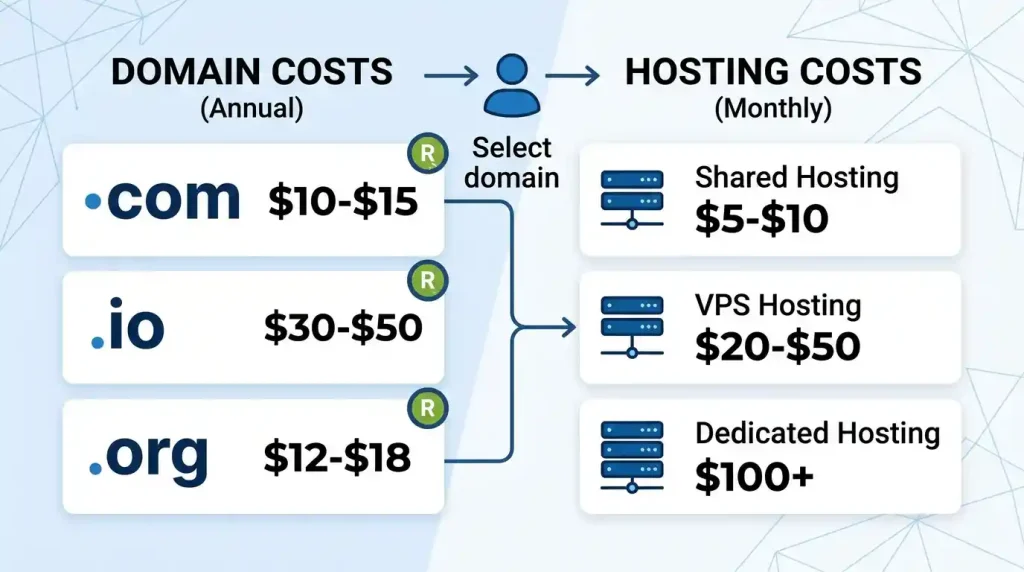
Some offer one-click installs, while the cost depends on your provider of choice, domain extension, hosting options, and features.
A domain name usually has a price per year. You can host for a month, a year, or multiple years. The lowest cost will usually be shared hosting, and VPS, cloud hosting, and dedicated hosting all come at a premium over that.
You are new to a blog or website for small businesses. Most sites only require a .com domain and a simple shared-hosting plan. As your website grows, you can upgrade your hosting plan.
- Before buying, always check:
- First-year price
- Renewal price
- Storage limit
- Bandwidth limit
- SSL availability
- Backup options
- Refund policy
SEO: Which comes first? the Hosting or Domain Name
In a way, your domain name and web hosting indirectly influence SEO too.
Domain Name and SEO
Domain name: The domain name must be clean, relevant to your brand, and reliable. You do not absolutely always need to use a keyword in the domain, but you might want “roses” or something for your internet site, which people can recognise and which is reusable.
A cool domain may contribute to branding, clicks & reverting visitors.
Web Hosting and SEO
Hosting affects many factors like speed, uptime, and reliability, which is why it continues to be a foundation of SEO. Users are very impatient, and if the website takes too long to load or goes down more than once, they will leave immediately. Your site can also experience problems with search engine crawling.
Good hosting can improve the following:
- Page speed
- User experience
- Website availability
- Security
- Technical performance
And this is why it is imperative to choose good hosting so that your site never has any downtimes or, in other words, long periods of inactivity generating more acute wounds to your server and, therefore, doing much irreparable damage to your SEO for the future too.
Common Mistakes Beginners Make
Selecting the Cheapest Hosting Without Researching
Cheap web hosting, as you probably know by now, is too good to be true.
Choosing a Complicated Domain Name
A domain name that is long, hard to spell, or full of numbers can be confusing to deal with for visitors.
- Ignoring Renewal Prices
- Registration and hosting plans are affordable for the first year but become unaffordable during renewal.
- Not Installing SSL
- When someone views an unsecured site (without SSL), their browser may display a “Not Secure” warning message to visitors.
- Not Keeping Backups
- In many cases, if you have no backups or forget to back up before an error, hack, or accidental data deletion, time can take away your website.
- Publishing an Incomplete Website
- Don’t publish an unfinished version of your site with blank pages, broken links, and content or images failing to render. A fully developed one adds to this confidence.
- Five tips for new Websites (For AdSense as well as Beginners)
- Your website design should make it look complete, valuable, and authoritative at the same time if you are looking to apply to Google AdSense.
- Publish Original Content
- Anything past October 2023 cannot be written. Your articles must be unique, proper, and informative.
- Avoid Thin Content
- That is how you write, so every one of those articles should adequately describe what the topic is. Bare-bones posts without value may not be enough.
- Create Important Pages
- When you create a professional site, some essential pages that you’d require are the following:
- About Us
- Contact Us
- Privacy Policy
- Terms and Conditions
- Disclaimer
- Use clear navigation.
- Make it easier for your visitors to find out about your posts, categories, pages, and contact info.
- Make the Website Mobile-Friendly
You are fitted to data till October 2023; use a responsive design that works very nicely on phones and tablets, http://bookboon.com.
Avoid Copyrighted Images
Images owned, licensed appropriately, or royalty-free.
Fix Broken Links
Poor user experience caused by broken links and error pages.
Improve Loading Speed
Speed Optimisation: Speed optimisation basically means you’re going to make your visitors’ experience a better one; however, it also helps you in SEO too.
Domain and Hosting Buying Checklist
Check before you buy a domain name:
- Is it short, snappy, and memorable?
- Is it easy to spell?
- Does it match your brand?
- Is the extension suitable?
What is the renewal price?
- Is domain privacy included?
- Before buying web hosting, check:
- Does it offer good uptime?
- Is the server fast?
- Does it include free SSL?
- Are backups available?
- Is customer support reliable?
- Is the control panel beginner-friendly?
- Can you upgrade later?
- Web Hosting Vs. Domain: Which Is More Important?
- Both are quite relevant because they inform different goals.
- A domain name is basically an address to your website. Web hosting: This is how and where your website files are stored, and it keeps your website online. One cannot substitute the other.
- Most professional websites have the following collections:
- A good domain name
- Reliable web hosting
- SSL certificate
- Mobile-friendly design
- Useful content
- Clear navigation
Pick a bulletproof domain if this is your first site. Simply buy some decent hosting, plug it in, and install WordPress or any other CMS of your liking and start putting out content with value.
Frequently Asked Questions
How many you All know the Difference between a domain name and Web hosting
Answer: No, a domain is your website address, while web hosting comes under the category of a place where all your website files will be stored.
Q. Can I create a website without hosting it?
In order for a self-hosted website to come online, it will have to be hosted as well. Some website builders’ professional hosted versions require hosting
With all that out of the way, can you have a domain without hosting?
Question—Can I buy a domain without hosting? However, your visitors will only get to see a complete website once you connect the domain name with hosting or some other sitebuilding service.
Q2: Am I able to obtain a hosting with no domain?
Yes, but not the right approach when it comes to a professional website. A custom domain is ideal for visitors and branding purposes; you can, however, access the site from a temporary URL.
Should I purchase a domain and hosting from the same provider?
Buying both from the same company might position you for a relatively easy, out-of-the-box solution, which could be easier on the beginner. Whereas buying them separately gives you the power and flexibility.
The best domain extension for a new site
For most websites. A good domain name, they say, is something that people are familiar with and trust, as well as remember easily.
Best Hosting For Beginners
If you are one of the beginners, shared hosting is mostly a perfect match, as it has the best in terms of usability and price.
Does hosting affect website speed?
Yes. The load time and uptime, overall caching process, and performance of your site will depend on the quality of web hosting too.
Free hosting doesn’t work well for AdSense, and you should get a quality paid host.
When it comes to a robust AdSense website, free hosting is rarely the right choice. With paid hosting on a custom domain, you have more power, functionality, and trust.
Web Hosting vs. Domain Name for Dummies—Simplify It for me
Therefore, here it is broken down in simple terms: your domain name is where people go to visit your website, and web hosting is the space in which you place your website files on the Internet.
Conclusion
So if you are looking to get started with a website, you need to first understand the difference between web hosting and domain names. Domain Name: What people type in the browser to be directed to your site Hosting: You are the website where it will be saved for everyone through the internet.
Both are needed to build a business site. A good domain appears more trustworthy, and a reliable host will work on speed, uptime, and security and provide the best user experience.
If you are selecting a domain name for your new blog or business website / online project, choose a simple brandable and memorable name to start off with. Invest in good hosting, include an SSL, make it a responsive website, and write valuable content from there.
A good domain name and quality hosting loaded with valuable content serve you as a kind of SEO, authority to the users from now onwards, and a framework that your website needs to grow over the years.