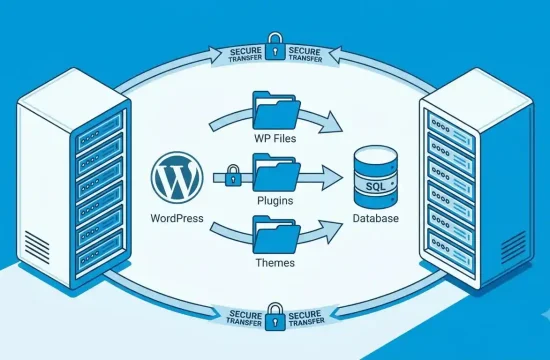
Managing digital content is an essential part of running a modern website or business. From publishing blog posts and updating product pages to organizing contracts and internal documents, organizations need reliable tools to create, store, edit, and distribute information.
Content management software helps individuals and businesses handle these tasks without managing every piece of content manually. However, not every platform is designed for the same purpose. Some tools focus on website publishing, while others support complex enterprise documents, approval workflows, and information governance.
Choosing the right solution depends on what you want to manage, who needs access, and how your organization works.
In this guide, you will learn what content management software is, how CMS software works, how Joomla compares with other website platforms, and where Documentum fits into enterprise content management.
Table of Contents
- What Is Content Management Software?
- How Does a Content Management System Work?
- Types of Content Management Software
- Best Content Management Software Options to Consider
- What Is Documentum?
- Joomla as a Content Management System
- CMS Software vs. Enterprise Content Management
- Essential Features to Look For
- How to Choose the Right CMS
- Frequently Asked Questions
1. What Is Content Management Software?
Content management software is an application or platform that helps users create, organize, edit, store, and publish digital content.
The type of content depends on the platform. A website-focused system may manage articles, pages, images, and menus. An enterprise platform may manage contracts, technical documents, business records, and files that require controlled access or formal approval.
A content management system, commonly known as a CMS, is one of the most familiar forms of content management software.
For example, a blogger may use a CMS to publish articles, while a company may use an enterprise content platform to organize policies and controlled documents across departments.
Why do businesses use content management software?
Businesses use these tools for several reasons:
- Centralised content: Keep information organized rather than scattered across disconnected folders and systems.
- Collaboration: Allow multiple users to create, review, edit, or approve content.
- Access control: Give users permissions appropriate to their responsibilities.
- Publishing efficiency: Make it easier to update websites and distribute approved information.
- Consistency: Use templates, structured workflows, and shared content standards.
- Information management: Help teams locate, maintain, and manage content throughout its lifecycle.
The value of a content management platform is not simply the number of features it offers. It is how well those features support the work your team needs to complete.
2. How Does a Content Management System Work?
A content management system generally separates content management from the technical work required to display or deliver that content.
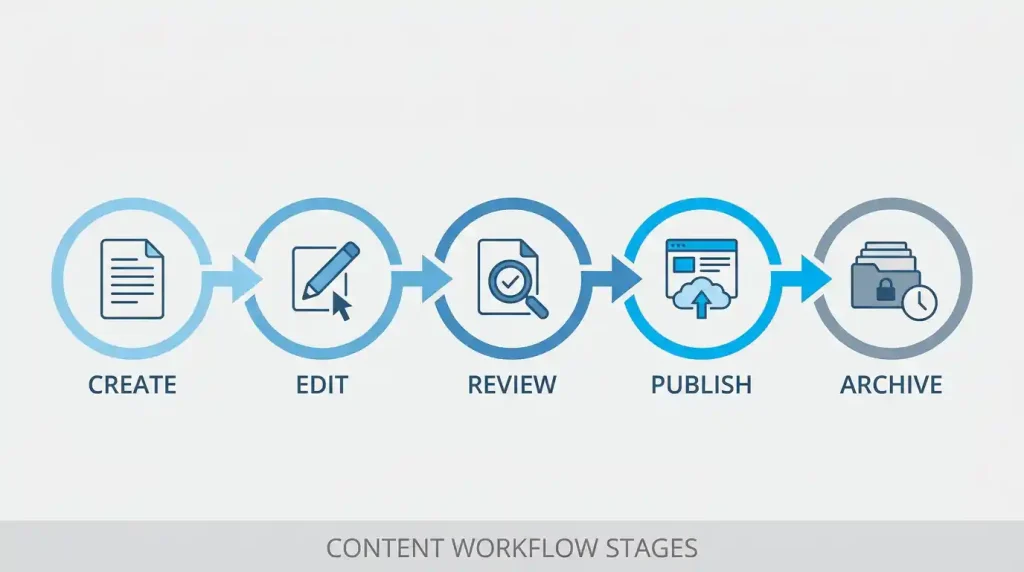
For a website CMS, users typically sign in to an administrative dashboard, create or edit content, add images, organize pages, and publish changes. The platform then makes the content available to visitors through the website.
A typical workflow looks like this:
- A user creates a new article or page.
- The user adds text, images, links, and other content.
- The content is organized into categories or other structures.
- An editor or administrator reviews it when approval is required.
- The content is published.
- Authorized users update or archive it when necessary.
Enterprise systems may add more steps, such as document versioning, retention rules, review schedules, audit trails, and integration with business applications.
CMS software and traditional website development
Without a CMS, a website owner may need technical assistance to make certain content changes. A CMS provides an interface that allows authorized users to manage many routine updates without editing every page’s code.
However, a CMS does not eliminate all technical work. Custom design, integrations, migrations, security configuration, and advanced functionality may still require developers or IT specialists.
3. Types of Content Management Software
Before comparing individual platforms, identify the kind of content you need to manage.
Web content management systems
A web content management system helps users build and maintain websites. Common tasks include publishing articles, updating landing pages, organizing images, managing navigation, and controlling how content appears on the site.
WordPress and Joomla are examples of open-source platforms used for website content management.
Enterprise content management systems
Enterprise content management focuses on managing information across an organization. It may include document storage, controlled access, version history, records management, approval workflows, and compliance-related processes.
These platforms are especially relevant when documents are business-critical or subject to formal governance requirements.
Document management software
Document management systems focus on creating, storing, organizing, retrieving, and controlling documents. Depending on the product, they may support check-in and check-out, version control, metadata, permissions, and document lifecycle management.
Digital asset management software
Digital asset management systems organize media such as images, videos, logos, design files, and marketing materials. They can help teams locate approved assets and manage their use across campaigns and channels.
Headless content management systems
A headless CMS manages content separately from the presentation layer. Developers can deliver that content to websites, applications, or other digital experiences through APIs.
This approach can be useful for organizations publishing across multiple channels, although it often requires more development work than a traditional website CMS.
4. Best Content Management Software Options to Consider
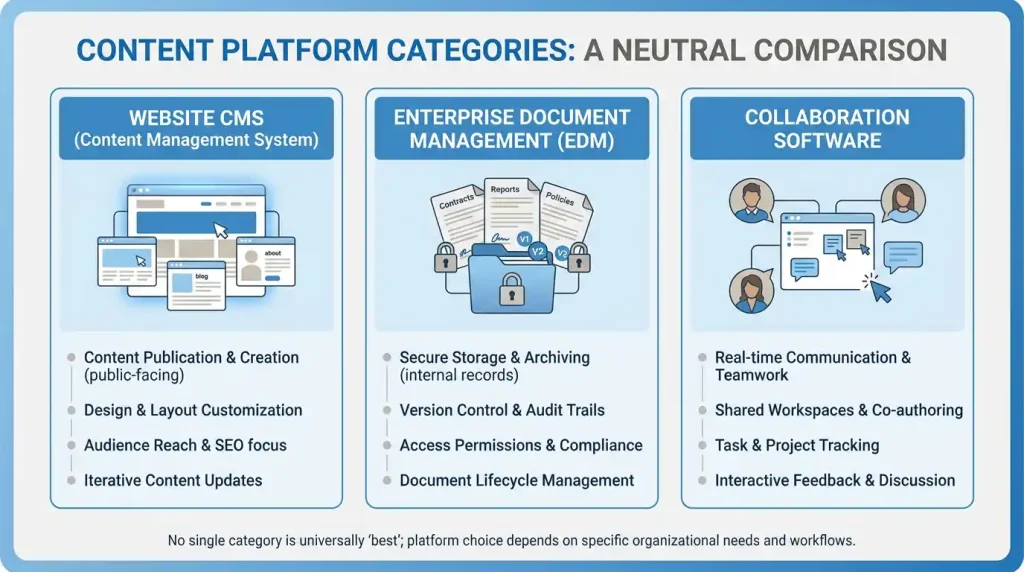
There is no single platform that is best for every organization. The most suitable option depends on the content type, technical resources, budget, and required level of control.
WordPress
WordPress is an open-source publishing platform used to build blogs, business websites, publications, and many other types of websites.
Its block editor, themes, and plugin ecosystem allow users to customize websites for different purposes. Beginners can manage much of their content through the dashboard, while developers can extend the platform when more advanced functionality is required.
Best for: Blogs, small businesses, content publishers, and websites that need flexible publishing tools.
Potential consideration: Website owners remain responsible for appropriate maintenance, updates, security, backups, and hosting arrangements when using a self-hosted installation.
Explore the official WordPress website for software information and documentation.
Click here to learn more:
WordPress SEO guide
Joomla
Joomla is a free, open-source content management system for publishing website content. It provides content organization, user permissions, templates, extensions, and multilingual capabilities.
Its content and access-control features can be useful for websites that need structured content and different permission levels. It may also suit organizations that want more built-in content organization options.
Best for: Content-rich websites, multilingual websites, and projects that benefit from structured user permissions.
Potential consideration: Users should evaluate the available templates, extensions, technical skills, and maintenance requirements before choosing Joomla.
Visit the official Joomla website to learn about its capabilities.
OpenText Documentum Content Management
Documentum is an enterprise content management offering from OpenText. It is designed for organizations that need to manage substantial volumes of important business content and maintain control over access, document lifecycle, and information processes.
Its use cases can include regulated or document-intensive environments where version control, information governance, and access to approved content matter.
Best for: Enterprises with complex document management, information governance, and workflow requirements.
Potential consideration: Enterprise platforms can involve significant planning, implementation, integration, training, and ongoing administration. Organizations should evaluate the total cost and requirements before deployment.
Learn more about OpenText Documentum Content Management.
Microsoft SharePoint
SharePoint is a collaboration and content platform that organizations use for document sharing, team sites, intranet experiences, and information management.
Its suitability depends on an organization’s existing Microsoft environment, security requirements, governance model, and integration needs.
Best for: Organizations that want collaboration, document sharing, and intranet capabilities within an integrated workplace environment.
Potential consideration: Permissions, information architecture, and governance should be planned carefully to keep content manageable as the organization grows.
Drupal
Drupal is an open-source content management platform used for websites and digital experiences that may require structured content, extensive customization, and complex permissions.
It can be a suitable choice for teams with development resources and demanding content requirements.
Best for: Complex websites, structured content projects, and organizations that need substantial customization.
Potential consideration: Implementation and ongoing development may require more technical expertise than a simpler website setup.
Quick comparison
| Platform | Primary purpose | Suitable users |
|---|---|---|
| WordPress | Website publishing | Bloggers, publishers, businesses |
| Joomla | Website content management | Content-rich and multilingual websites |
| OpenText Documentum | Enterprise content management | Large or document-intensive organizations |
| SharePoint | Collaboration and document management | Teams and enterprise workplaces |
| Drupal | Customizable website content management | Organizations with advanced web requirements |
This comparison is a starting point, not a universal ranking. Features, licensing, deployment choices, and service terms should be checked against each provider’s current documentation.
5. What Is Documentum?
Documentum is an enterprise content management platform associated with OpenText. It is designed to help organizations manage important business information across complex content environments.
Unlike a typical website CMS, Documentum is focused on enterprise information management rather than primarily publishing public-facing website pages.
Key capabilities to evaluate
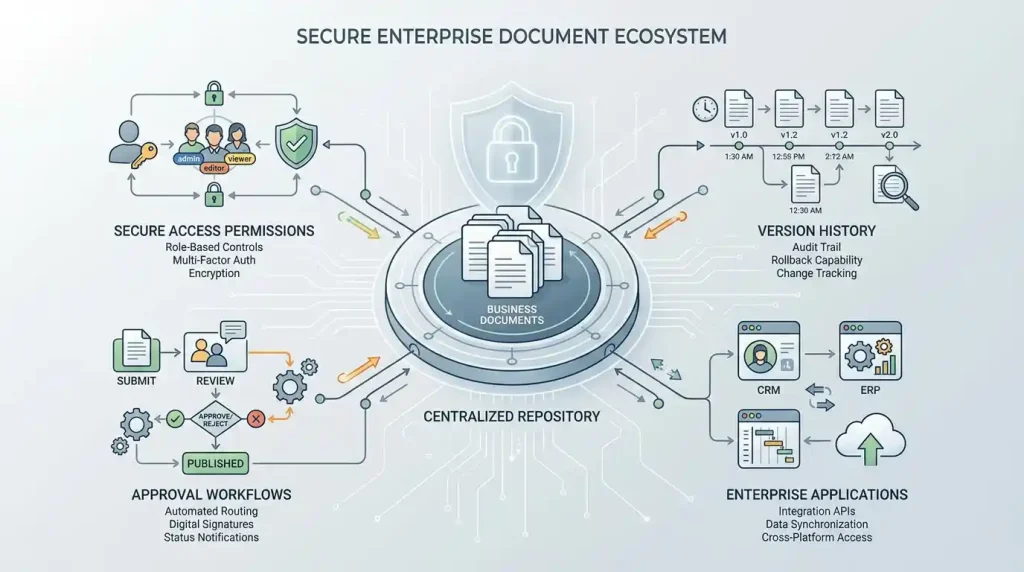
Depending on the product edition and implementation, an enterprise Documentum solution may support:
Document lifecycle management: Manage documents as they are created, reviewed, updated, approved, retained, or archived.
Version control: Help users distinguish between document versions and access the appropriate content.
Access controls: Restrict sensitive information to authorized people or groups.
Workflow support: Connect content with review and approval processes.
Information governance: Support organizational policies for handling business-critical content and records.
Integration: Connect content with other enterprise systems and business processes where supported by the implementation.
The exact capabilities available depend on the selected offering, licensing, configuration, and integrations. Organizations should confirm requirements with the vendor rather than assume every feature is included in every deployment.
Learn more: WordPress SEO plugins
Who should consider Documentum?
Documentum may be worth evaluating when an organization has large document collections, complex business processes, formal approval requirements, or strict information governance needs.
For example, a document-intensive organization may need employees to find the latest approved version of a policy without accidentally using an outdated copy. An enterprise content management platform can help establish processes for organizing, approving, and controlling that information.
However, a small blog or basic company website may not need this level of complexity. A conventional website CMS could be more practical for those use cases.
6. Joomla as a Content Management System
Joomla is an established open-source CMS that supports website content creation, organization, and publishing.
It includes features for managing articles, categories, menus, users, templates, and extensions. Its access-control capabilities allow administrators to organize user permissions, while its multilingual functionality can help support websites that publish in multiple languages.
Joomla advantages
- Open-source software with no standard software purchase price.
- Content organization through articles and categories.
- User groups and access-control options.
- Templates and extensions for customization.
- Multilingual publishing capabilities.
- Tools for managing menus and website content.
Joomla considerations
Joomla is not automatically the right choice for every website. Before adopting it, review the available extensions for your requirements, the support options, the team’s familiarity with the platform, and the technical work needed for maintenance.
If your primary goal is to publish a straightforward blog or affiliate website, compare Joomla with WordPress before making a decision. If your project requires particular access-control or multilingual features, assess how each platform handles those needs.
For current features and guidance, refer to the official Joomla documentation.
7. CMS Software vs. Enterprise Content Management
The terms CMS software and enterprise content management are related, but they do not always refer to the same set of requirements.
A website CMS is usually designed to help users publish and organize web content. Enterprise content management takes a broader view of information across an organization, often including document governance and formal business processes.
| Area | Website CMS | Enterprise content management |
|---|---|---|
| Main purpose | Create and publish website content | Manage business information across its lifecycle |
| Typical content | Pages, posts, images, media | Contracts, records, technical documents, policies |
| Publishing | Central feature | May be one part of a larger workflow |
| Access control | Depends on platform and extensions | Often designed around organizational permissions and governance |
| Versioning | May be available | Can be central to controlled document processes |
| Compliance support | Depends on implementation | May provide capabilities for specific governance requirements |
| Typical users | Bloggers, marketers, web teams | Enterprise teams, records managers, compliance and IT staff |
An enterprise platform may also include web content capabilities, and a website CMS may provide document-related features. The distinction is about the primary use case and depth of information management, not a strict rule that the systems cannot overlap.
Which one does your business need?
Choose a website CMS when your main requirement is building pages, publishing articles, and maintaining an online presence.
Consider enterprise content management when you need to control business documents, manage approvals, enforce information policies, and support organization-wide document processes.
If you need both, assess how the platforms can integrate and which system should serve as the authoritative source for each type of content.
8. Essential Features to Look For
Before choosing content management software, identify the capabilities that directly support your workflows.
Ease of use
Content creators should be able to perform routine tasks without unnecessary technical complexity. Evaluate the editing interface, content preview, navigation, and learning resources.
Content organization
Look for suitable categories, tags, metadata, folders, content types, or taxonomies. The right structure makes information easier to find and maintain.
User roles and permissions
Check whether the system can restrict actions according to each user’s responsibilities. For sensitive information, assess how permissions are configured, reviewed, and audited.
Version history and approvals
If content requires formal review, determine whether the platform supports version history, approval workflows, and clear publishing responsibilities.
Search and retrieval
A useful search experience helps users locate the information they need. Enterprise buyers should evaluate search quality against realistic document volumes, metadata, permissions, and business requirements.
Security and maintenance
Review the provider’s security practices, update process, access controls, backup and recovery arrangements, and support policies.
Integrations and extensibility
Consider whether the software connects with the tools your team already uses. Check the available APIs, extensions, connectors, and any additional licensing or development work.
Scalability and total cost
Estimate the costs of software, hosting, licensing, implementation, migration, training, support, and ongoing maintenance. A platform’s initial price does not necessarily reflect the total cost of ownership.

9. How to Choose the Right CMS
Follow these steps to narrow your options.
Step 1: Define your content needs
List the content you manage today and expect to manage in the future. Separate website pages and blog posts from controlled documents, records, media assets, and internal knowledge.
Step 2: Identify users and workflows
Determine who will create, edit, approve, publish, search, and administer content. Map out any approval steps or access restrictions that the platform must support.
Step 3: Set a realistic budget
Include implementation, migration, training, hosting, integrations, and maintenance. For enterprise projects, also consider the internal staff time needed to administer the platform.
Step 4: Shortlist suitable platforms
Compare only the platforms that match your requirements. A small website does not need an enterprise document platform simply because it offers more features.
Step 5: Test with real tasks
If possible, use a trial, demonstration, or proof of concept. Ask the team to perform representative tasks such as publishing an article, retrieving a document, updating a version, or approving a change.
Step 6: Check security and governance
Review how the system manages permissions, updates, backups, audit information, and retention requirements. For regulated environments, involve the relevant security, legal, or compliance specialists.
Step 7: Plan migration and training
Identify which content must move, how it will be organized, and who will verify its accuracy. Create a training plan so users understand the new workflow.
Step 8: Review the decision periodically
Your needs may change as your website or organization grows. Reassess whether the software remains suitable when workflows, content volume, security needs, or business goals change.
10. Frequently Asked Questions
What is content management software?
Content management software helps users create, organize, edit, store, and publish digital content. Depending on the platform, it may manage website pages, articles, documents, media assets, or enterprise information.
What is the difference between CMS and content management software?
CMS stands for content management system. The terms are often used interchangeably, although content management software can also refer more broadly to specialized tools for documents, digital assets, and enterprise information.
Which content management software is best for beginners?
WordPress is a useful option for many beginners who want to build a website or publish articles. The best choice depends on the website’s needs, available support, budget, and the user’s comfort with maintaining the platform.
What is Documentum used for?
OpenText Documentum is used for enterprise content management. Organizations may use it to manage important documents, control access, support content workflows, and maintain information governance processes.
Is Joomla a content management system?
Yes. Joomla is a free, open-source CMS used to build and manage websites. It includes features for content organization, user permissions, templates, extensions, and multilingual publishing.
What is enterprise content management?
Enterprise content management involves managing organizational information throughout its lifecycle. Depending on the solution, it may include document management, access controls, approval workflows, records handling, and governance capabilities.
Is content management software free?
Some platforms, including WordPress and Joomla, offer free, open-source software. However, hosting, premium extensions, implementation, customization, support, and maintenance may cost money. Enterprise platforms may use commercial licensing and service arrangements.
Can content management software improve productivity?
It can help teams organize information, reduce repetitive manual tasks, support collaboration, and make content easier to find. The results depend on the software, how well it is configured, and whether people follow consistent processes.
Final Thoughts
The right content management software helps you organize information, improve collaboration, and manage content more effectively. However, the best choice depends on the work you need the platform to perform.
For blogs and business websites, a website CMS such as WordPress or Joomla may provide the tools you need. For complex document workflows and organization-wide information governance, an enterprise solution such as OpenText Documentum may be more appropriate.
Start by defining your requirements, comparing relevant features, and testing real workflows. Consider long-term costs, security, support, and maintenance before committing.
A well-chosen content management platform should solve a real problem for your team and remain practical to manage as your needs evolve.