You built a site, or you’re about to, and now every page tells you to “get hosting.” What does that actually mean, and how do you pick without overpaying? Website hosting is the service that keeps your site’s files on a computer that is always online, so visitors can open it any time. This guide explains how it works, the main types, and what to check before you buy.
What Is Website Hosting?
A website is a set of files: pages, images, scripts, and a database if you use something like WordPress. Those files have to live somewhere. A hosting company rents you space on a server, which is a powerful computer that stays on and connected to the internet around the clock.
When someone types your address into a browser, the browser asks that server for your files and shows the page. No hosting means nothing for the browser to fetch.
Hosting is not the same thing as your domain name. The host is the building the address points to. If that difference is still fuzzy, our guide on web hosting vs domain name walks through it with examples.
How Website Hosting Works
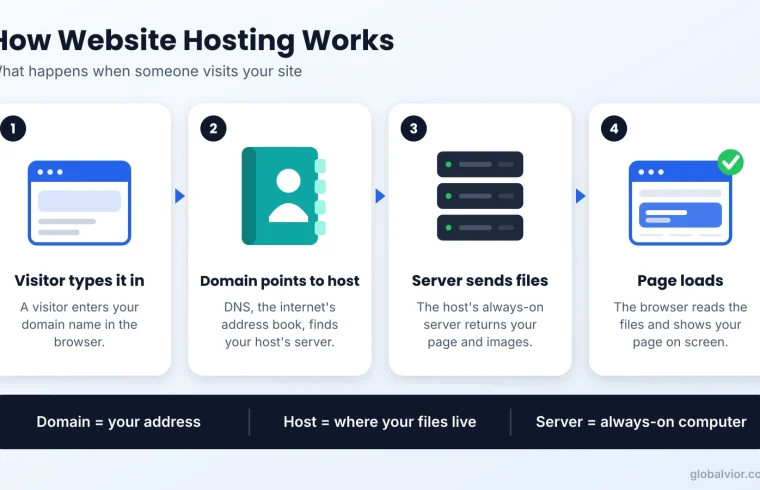
Here’s the short version of what happens when someone visits your site:
- The visitor types your domain. The browser looks up which server your domain points to.
- The browser contacts that server. This is your host’s computer.
- The server collects your page. If your site uses WordPress, the server runs PHP and asks the database for your content.
- The server sends the page back. The browser draws it on screen.
Every step happens in a moment, but the quality of the server in step 3 changes how fast the whole thing feels. That’s why not all website hosting is equal.
Types of Website Hosting
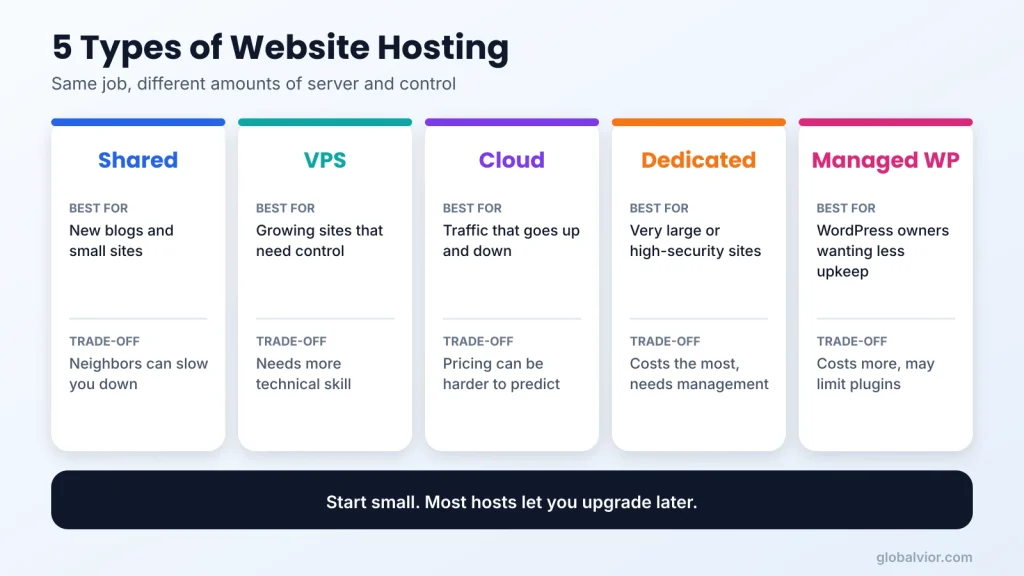
Most hosts sell the same five kinds of plans under different names. The difference is how much of a server you get and who shares it with you.
| Type | How it works | Best for | Main trade-off |
|---|---|---|---|
| Shared | Many sites share one server | New blogs, small business sites | Neighbors can slow you down |
| VPS | A private slice of a server | Growing sites, more control | Needs more technical skill |
| Cloud | Your site runs across several linked servers | Sites with changing traffic | Pricing can be harder to predict |
| Dedicated | A whole physical server just for you | Very large or high-security sites | Costs the most, needs management |
| Managed WordPress | Hosting tuned and maintained for WordPress | WordPress owners who want less upkeep | Often limits plugins and costs more than shared |
Shared Hosting
Shared hosting puts many websites on one server and splits its resources between them. It’s the usual starting point because it’s simple and the cheapest of the five.
The catch is the word “shared.” If another site on the same server gets a traffic spike, your site can slow down. For a new blog or a small brochure site, that risk is usually acceptable. For an online store with steady traffic, it’s worth looking higher.
VPS Hosting
A VPS (virtual private server) is still one physical machine, but it’s divided into separate virtual servers. You get guaranteed resources, so your site is less affected by neighbors. You also get more control over settings. The price is a steeper learning curve unless the plan is managed for you. Our list of the best VPS hosting options explains what to look for.
Cloud Hosting
With cloud hosting, your site isn’t tied to one machine. It runs on a connected group of servers, so capacity can grow when traffic does. It suits sites with uneven traffic, like a shop that gets busy around sales.
Dedicated Hosting
Dedicated means you rent a whole physical server. It gives the most power and isolation and the highest bill. Most small sites never need it.
Managed WordPress Hosting
Managed WordPress plans handle updates, backups, caching, and security tuning for you. You pay extra to spend less time on maintenance. If you use WordPress, read our guide to WordPress hosting plans before you decide.
For a longer explanation of each type, see types of web hosting.
Web Hosting Companies: What to Compare
There are hundreds of web hosting companies, and the marketing pages look alike. Instead of chasing a “best” list, compare the same few things across every company you consider.
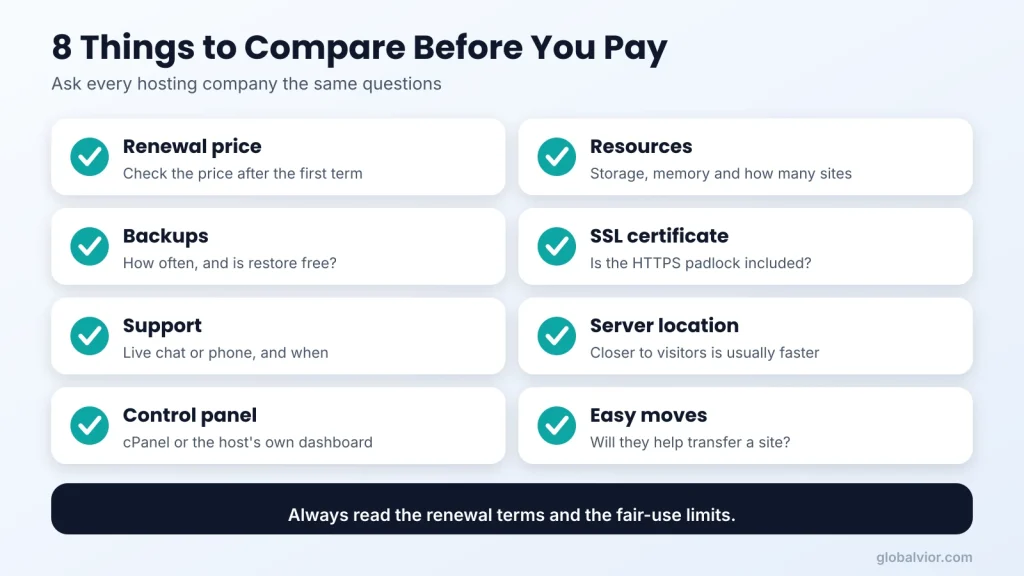
- Renewal price. Many hosts show a low first-term price, then charge more at renewal. Find the renewal price before you buy and check the billing term it applies to.
- Resources. Look at storage, memory, and how many sites the plan allows. “Unlimited” usually has fair-use limits in the terms.
- Backups. Ask how often backups run, where they’re kept, and whether restoring is free.
- SSL certificate. Visitors expect the padlock. Many hosts include a free certificate, but confirm it.
- Support. Check whether live chat or phone support is included, and when it’s available.
- Server location. A server closer to your visitors can respond faster. For a US audience, a US data center is a sensible default.
- Control panel. Many hosts use cPanel; others use their own dashboard. Our cPanel guide shows what the common one looks like.
- Easy moves. Find out if the host will help you transfer an existing site. If you’re switching, our guide on how to migrate a WordPress site covers the steps.
If you want a step-by-step process for narrowing options, use how to choose a web host.
A quick WordPress note: the official WordPress.org requirements page currently recommends PHP 8.3 or greater and MariaDB 10.11 or greater (or MySQL 8.0 or greater). Check that a host supports those versions before you sign up, since older software can limit performance and security. See the WordPress.org requirements for the latest.
Does Your Host Affect Site Speed?
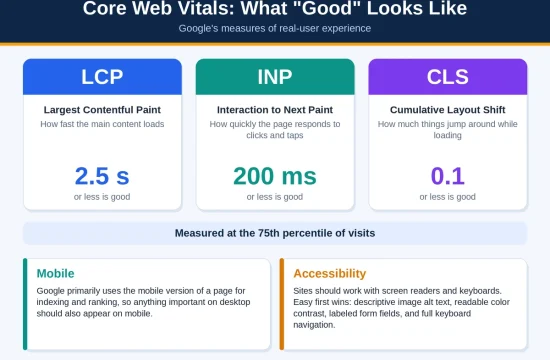
Yes, your website hosting plan matters, though it’s rarely the only factor. Google’s web.dev team describes Time to First Byte (TTFB) as the time from when a visitor starts loading a page until the first byte of the response arrives. As a rough guide, they treat 0.8 seconds or less as good and more than 1.8 seconds as poor.
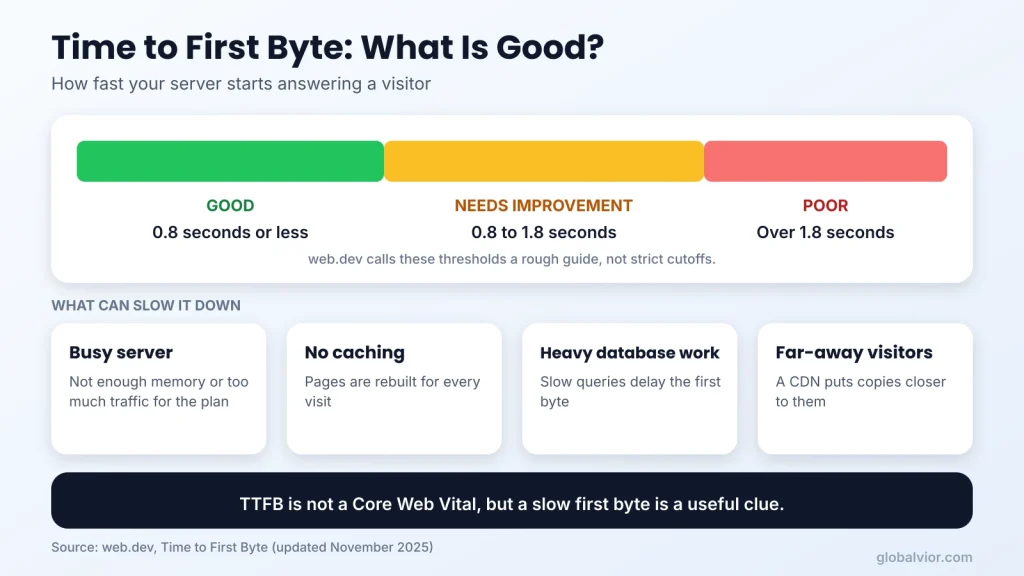
TTFB is not one of the Core Web Vitals, and web.dev says a good score isn’t strictly required if your other metrics are healthy. But it’s a useful clue: a slow first byte often points to an overloaded server, missing caching, or heavy database work. In its guidance on this, web.dev notes that shared hosting is generally slower, which can matter more for big, dynamic sites.
You can learn more in web.dev’s Time to First Byte guide.
What can you do about it? Use caching, keep your software up to date, and choose a plan that matches your traffic. If you’ve outgrown shared hosting, upgrading to a VPS or managed plan is the natural next step.
Domain Name Registrar vs Host
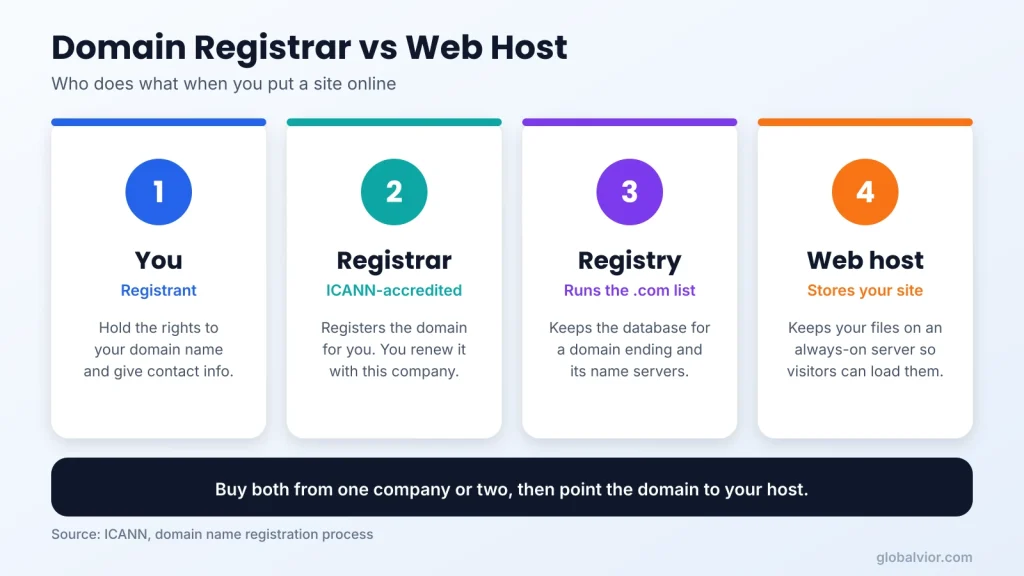
A domain name registrar is the company that registers your domain, meaning your web address, for you. According to ICANN, registrars are accredited and have agreements with the registry operators that run each top-level domain, like .com. The registrant is you, the person or business that holds the rights to the name.
Website hosting is a separate service. Some companies sell both, and bundles can be convenient. Others only sell domains. You can buy your domain in one place and host somewhere else, then point the domain to your host.
Two practical tips:
- Keep your domain account secure, because losing the registrar login can mean losing control of your address.
- Compare renewal prices for the domain just as you do for hosting.
ICANN’s page on the domain name registration process explains the roles. For options and pricing tips, see our guide to the best domain registrar for small business.
Best Minecraft Server Hosting Is a Different Product
People often search for “best minecraft server hosting” right next to regular hosting terms, so let’s clear this up. A Minecraft server is a game server, not a website. A normal shared website hosting plan is built to serve web pages, not to run a live multiplayer game.
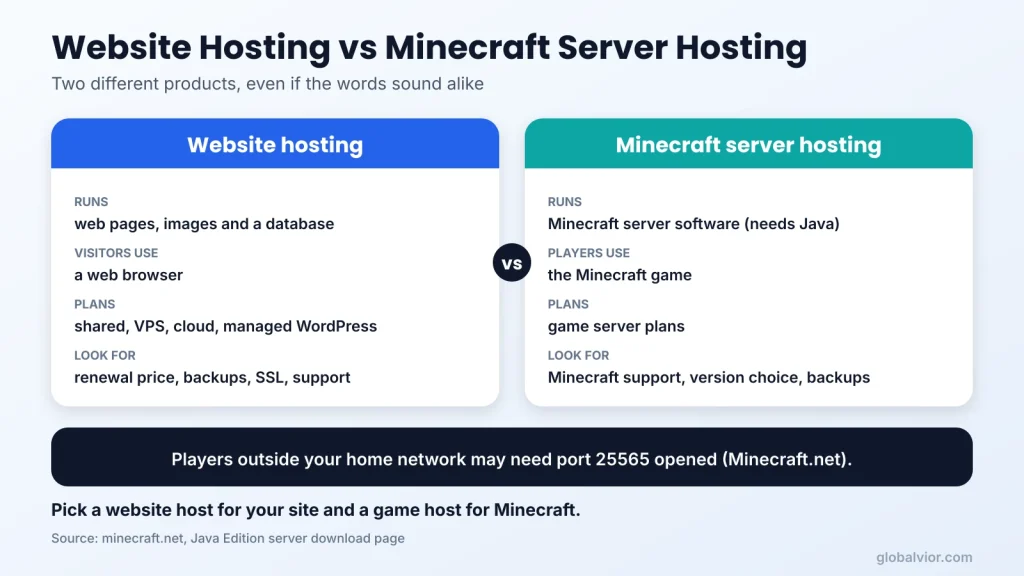
The official Minecraft download page says the Java Edition server needs a compatible Java runtime. It also says players outside your home network may need port forwarding, and it mentions opening port 25565. The page doesn’t list RAM or CPU requirements, so don’t trust any number you can’t trace to a source.
In practice, there are two routes. You can run the server on your own computer, which is free but depends on your hardware and your home network. Or you can rent a game server host, a company that sells plans made for running game servers. Look for a plan that clearly says it supports Minecraft, lets you choose the server version, and offers backups.
Because ranking well for that topic needs a full guide of its own, treat this section as a pointer. The key takeaway: choose a game host for Minecraft and a website host for your site.
Which Plan Fits Your Site?
Use these quick scenarios to match website hosting to your site. They’re guidance, not rules.
- A new blog or portfolio: shared hosting is usually enough. Focus on renewal price, backups, and an easy dashboard.
- A small business site with a contact form: shared hosting or a managed plan. Pay attention to support quality and uptime promises.
- A growing WordPress site: try managed WordPress hosting, or a VPS if you’re comfortable with more technical work.
- An online store: a VPS or cloud plan gives you more room, and you should confirm how the host handles security and backups.
- A site with sudden traffic spikes: cloud hosting is built for changing demand.
- A large or sensitive project: a dedicated server, ideally with a team that manages it.
You can always start small with website hosting. Most hosts let you move up to a bigger plan later, so don’t buy more server than you need on day one.
Common Mistakes to Avoid
- Choosing only on the first-year price. Always read the renewal terms.
- Assuming “unlimited” means no limits. Read the fair-use section.
- Skipping backups. Make sure you have your own copy, not only the host’s.
- Mixing up domain and hosting. Know where each is registered and who controls the login.
- Buying a bigger plan than you need. Upgrade your website hosting when your traffic proves it.
- Ignoring support. Test the live chat before you commit, if the host lets you.
- Using the wrong product for the job. A website plan won’t run a game server well.
FAQ
What is website hosting in simple words?
Website hosting is a service that stores your site’s files on a server connected to the internet, so people can visit your site any time.
Do I need both a domain and website hosting?
Yes. The domain is your address and hosting is where your site lives. You can buy them from the same company or from different ones.
Is shared hosting good enough for a new website?
For most new blogs and small sites, yes. If your site grows or slows down at busy times, consider a VPS or managed plan.
How do web hosting companies make money?
They charge a recurring fee, usually monthly or yearly, for server space, plus extras like domains, email, backups, and security tools.
Can I host a website for free?
Some free options exist, but they usually come with limits on storage, features, and branding. For a business or a site you care about, a paid plan is usually safer.
Can I use website hosting for a Minecraft server?
Generally not. A Minecraft server is a game server and needs a plan built to run game software. Choose a host that clearly supports Minecraft.
Can I change my host later?
Yes. You can move your files and database to a new host and point your domain there. Take a full backup first, and test the new site before switching.
Conclusion
Website hosting is the home for your site, and the right plan depends on your traffic, your skills, and your budget. For most new sites, shared hosting is a fine start. Compare the renewal price, backups, support, and software versions, then upgrade only when your site needs it. Your next step: write down what your site does today, then use our guide on how to choose a web host to shortlist two or three options.