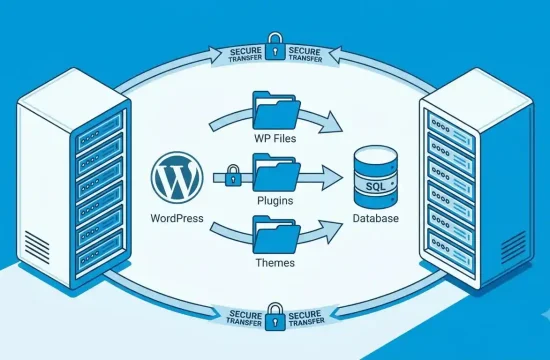
Web hosting, in simple terms, is an online service that allows you to store your files and makes your website live on the internet.
Introduction
If you want to make a website, the first point you may ask is, “What is web hosting?” That term is quite common when launching a blog, business website, portfolio, news site, or e-commerce store.
Web hosting — Hosting is like home for your website; without web hosting, no one can see your website on the internet.
Each site must have some space where the pages, images, videos, and databases are stored. That space on a server is provided by web hosting. If you were to type in your website address into a browser, your hosting server would send the files that make up your site directly to the device of that user.
This guide will cover the following web hosting topics that beginners must know: What is Web Hosting? How Does Web Hosting Work? Importance of Web Hosting. Types of Web Hosting Choosing The Right Host For Your First Website
What Is Web Hosting?
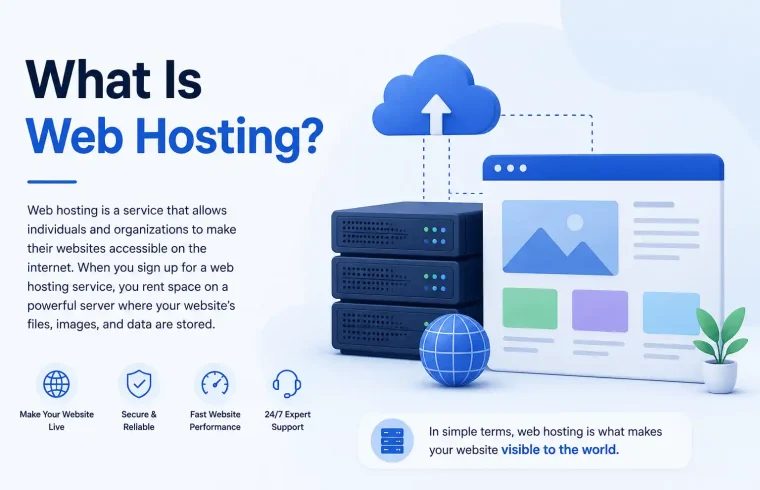
Web hosting is a service that enables individuals, bloggers, businesses, and organisations to make their websites accessible via the internet. Web hosting is a hosting service that allows you to store your web files on their server.
These website files may include:
- Text content
- Images
- Videos
- HTML files
- CSS files
- JavaScript files
- WordPress files
- Theme files
- Plugins
- Databases
If someone visits your website, their browser contacts the host and fetches these files. This process is how your website comes to be on the Internet.
An easy way to think of web hosting is to think about how you build a house. The domain name is like the address of the house; web hosting (i.e., where your website files live) is like a land/space for the house to be built on, and the website itself can be considered to be an actual house that visitors can come visit.
Hosting: You need web hosting so your site can have a place to call home on the Internet. Because of that, almost every website needs web hosting.
Why Is Web Hosting Important?
The importance of web hosting lies in the fact that it directly impacts the way your website performs. A quality hosting provider is simply one that keeps your site online, loads quickly, and remains secure.
Web Hosting Holds Your Website Online
Whenever someone wants to access your website, it should always be available. A proper hosting service is what makes sure that your website always remains online.
If your hosting server is down frequently, visitors will be unable to reach your site. User trust can decline, and your site will suffer for it.
Web Hosting Affects Website Speed
How important is website speed for user experience? If your website is slow to load, visitors may bounce off before reading anything.
By investing in quality hosting, your website can load faster with reliable servers, SSD storage, caching technology, CDN support, and optimised technology.
How Hosting Web Protects Your Website
When you choose a professional hosting provider, they will typically provide several security features, including an SSL certificate, malware protection and scans (hopefully), a firewall, and very automated backups.
Security is a matter of concern since your site may contain user information, login credentials, contact forms, comments, and much sensitive information.
Web Hosting Supports Website Growth
As the traffic continues to grow for your website, you will need more server resources. The right hosting provider permits you to upgrade your hosting when your website scales.
You can start with shared hosting and later on continue to upgrade it to VPS hosting and cloud hosting / dedicated hosting.
Web Hosting Improves User Experience
Visitors want a fast, reliable, and functional website. To offer a good experience, you need reliable hosting.
Something that will help your SEO and monetisation efforts? A better user experience.
How Does Web Hosting Work?
How does web hosting work? A server is also a powerful computer that is always turned on, constantly connected to the internet.
This is how web hosting works:
- You buy a web hosting plan.
- Just upload your website files or install a platform like WordPress.
- You link your domain name with the host account.
- Someone enters your domain in the browser.
- The browser makes a request in the direction of your hosting server.
- The web server then returns your website files to the browser.
- It gives an understanding about how the visitor sees your website on their screen.
This takes place within a matter of seconds.
When somebody lands on your blog post, the hosting server will send text, images, design, and code to the visitor’s browser. The browser will then render the page as a whole site.
Web Hosting or Your Domain Name: What is the difference?
Beginners often confuse web hosting with a domain name. This relates to, but is not identical to
A domain name is your URL address on the web. Examples include:
- example.com
- myblog.com
- yourbusiness.com
The web hosting is the online space where your website files are saved.
| Feature | Domain Name | Web Hosting |
|---|---|---|
| Main purpose | Website address | Website file storage |
| Example | example.com | Hosting server |
| Function | Helps people find your website | Keeps your website online |
| Required for a website? | Yes | Yes |
| Can be bought separately? | Yes | Yes |
In general terms—if your website is a house, the domain name is the address, and web hosting is the land where your house will stand. To build a proper website, you need both.
Types of Web Hosting
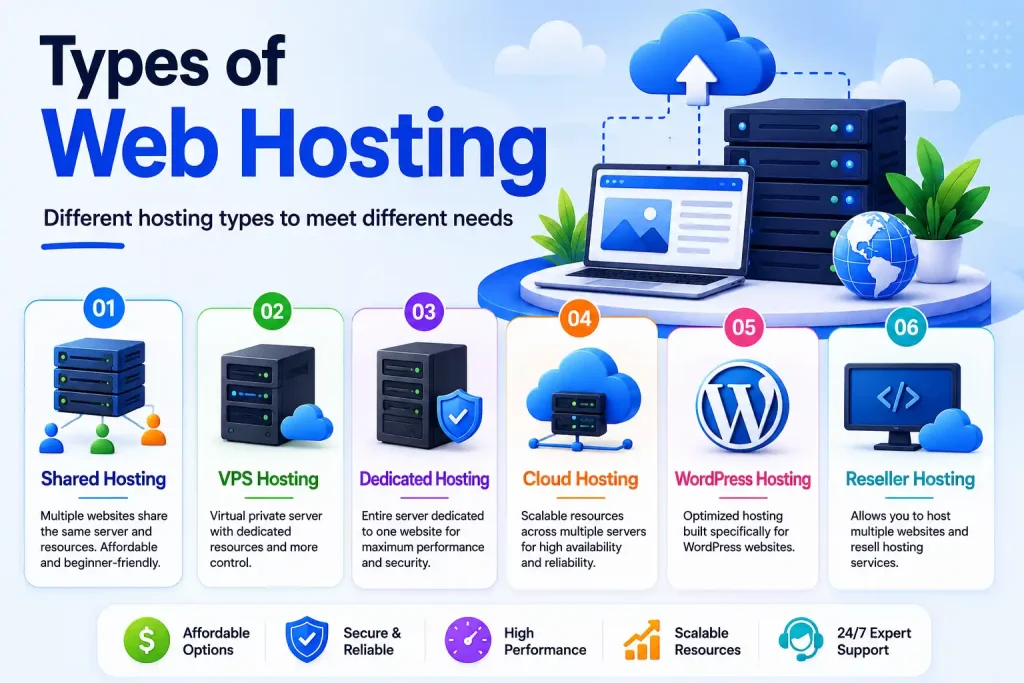
There are different types of web hosting. Developed for various needs and levels of tech expertise, each type is suited for different levels of traffic and budget.
Shared Hosting
Let us quickly touch base on shared hosting, as it is the most popular type of hosting for beginners. Shared hosting is where many websites share the same server resources.
Shared hosting is suitable for:
- New blogs
- Small business websites
- Portfolio websites
- Personal websites
- Beginner WordPress websites
Advantages of shared hosting:
- Affordable price
- Easy to use
- Beginner-friendly
- Usually includes a control panel
- Good for small websites
Disadvantages of shared hosting:
- Limited resources
- If the server is overloaded, it becomes difficult and website speed severely decreases
- Not as much control as an advanced hosting plan
If you are building your first website, shared hosting is a great way to start.
VPS Hosting
VPS means Virtual Private Server. VPS Hosting – One Physical Server is Divided into Multiple Virtual Servers Each user is allocated infrastructure resources separately from the others.
VPS Hosting stands for Virtual Private Server, which is more robust than shared hosting.
VPS hosting is suitable for:
- Growing blogs
- Medium-sized business websites
- Websites with more traffic
- Developers
- Websites that need more control
Advantages of VPS hosting:
- Better performance than shared hosting
- More control
- Dedicated resources
- Better scalability
Disadvantages of VPS hosting:
- More expensive than shared hosting
- May require technical knowledge
- Management can be more complex
Whenever your website has begun to grow and shared hosting is starting to struggle, VPS hosting does make sense.
Dedicated Hosting
Dedicated hosting allows you to own an entire server for your website. You do not share server resources/servers with other websites.
It is a very powerful hosting for bigger websites.
Dedicated hosting is suitable for:
- Large business websites
- High-traffic websites
- Enterprise websites
- Large eCommerce stores
- Websites that need advanced security
Advantages of dedicated hosting:
- Full server control
- High performance
- Strong security options
- Only resources of same website
Disadvantages of dedicated hosting:
- Expensive
- Requires technical knowledge
- More responsibility for server management
Beginners rarely require dedicated hosting. Ideal for High Traffic Websites
Cloud Hosting
Cloud hosting utilises a cluster of multiple servers instead of just one server. If a server goes down, another can help to keep the site up.
It is very flexible and reliable, as it can be used for cloud hosting.
Cloud hosting is suitable for:
- Growing websites
- eCommerce websites
- High-traffic blogs
- Business websites
- Websites that need strong uptime
Advantages of cloud hosting:
- Good uptime
- Flexible resources
- Easy to scale
- Better performance during traffic spikes
Disadvantages of cloud hosting:
- Pricing can be more complex
- May require some technical understanding
- Sometimes not required for small sites
Cloud hosting is a solid choice for websites anticipating growth.
Managed WordPress Hosting
Managed WordPress hosting is tailored specifically for WordPress sites. With a hosting provider, you offload many technical responsibilities.
These tasks may include:
- WordPress updates
- Security monitoring
- Backups
- Speed optimization
- Caching
- Technical support
Who is managed WordPress hosting for:
- WordPress bloggers
- Business websites
- Non-technical users
- Site owners who prefer lower maintenance
Advantages of managed WordPress hosting:
- Optimized for WordPress
- Better support for WordPress issues
- Improved performance
- Less technical work
Disadvantages of managed WordPress hosting:
- More expensive than simple shared flow.
- May have plugin restrictions
- Usually limited to WordPress websites
Managed WordPress hosting can be a worthwhile option if your objective is to write, create valuable content on a regular basis, and grow the site.
Key Characteristics of a Good Hosting Provider
Therefore, check the features before buying web hosting. All hosting companies are not created equal.
Good Uptime
Uptime represents how regularly your website is online. Great uptime is also something a great hosting provider should offer so your visitors can access your site whenever they want to.
If your website goes down more often, its reputation takes a hit.
Fast Server Speed
Fast hosting makes your website become fast in page load speed. It enhances the experience for users and may help in better search engine performance.
Look for hosting with:
- SSD storage
- Server-level caching
- CDN support
- Updated server technology
- Optimized performance
Free SSL Certificate
SSL protects the data as it travels between your visitors and your website. SSL retains HTTPS for its web addresses.
A professional and trustworthy look of a secure site. Most hosting providers have included free SSL certificates.
Easy Control Panel
A control panel to manage the hosting account. It enables you to make emails, manage records, establish WordPress, handle databases, and control domains.
Some of the popular control panels include cPanel and handmade hosting dashboards.
Customer Support
Great support is definitely crucial, even more so as a beginner. You need help fast if things go wrong.
Search within support options like:
- Live chat
- Email support
- Ticket support
- Knowledge base
- Tutorials
Backup System
Backups protect your website data. If your website breaks, gets hacked, or loses files, you can restore it from a backup.
Automatic or easy manual backups should be offered by a good hosting provider.
Security Features
Security: Security features protect your site from attacks and malware.
Useful security features include:
- Malware scanning
- Firewall protection
- Secure login tools
- DDoS protection
- Regular server updates
Upgrade Options
Your site can expand in the future. Select a hosting provider that permits you to upgrade easily from shared hosting on the way to VPS, cloud web hosting, and different advanced hosting plans.
What does web hosting cost?
Simply, the pricing of web hosting varies as it relates to hosting type, provider, and their features along with billing period.
Shared hosting is typically the most economical option available. This is the best focus for beginner and small websites.
The VPS hosting is more expensive than shared hosting because of the additional resources and control. Cloud hosting price may change based on usage. Usually the most expensive option is dedicated hosting, as you receive a full server by yourself.
You can check the first-year cost and the renewal cost before you purchase hosting. Intros $2-3/month but have higher renewal prices.
You also need to verify what is included in the plan, including:
- Storage
- Bandwidth
- SSL certificate
- Email accounts
- Backup
- Customer support
- Domain connection
- WordPress installation
Avoid cheap hosting just because! Pick hosting that is not only reliable and secure but also meets your website goals.
Paid and Free Web Hosting
Not only that, but some platforms provide free web hosting. Free hosting has its place, often as a testing ground or for private learning, but is most likely not suitable for any kind of professional website.
Free Web Hosting
Free hosting may include:
- Limited storage
- Limited bandwidth
- Slower performance
- Ads from the provider
- Limited support
- Less control
- No professional branding
This is useful for practice, but I personally would not recommend it for serious blogging/business websites/AdSense-focused websites.
Paid Web Hosting
Paid hosting takes a toll on you with better stability and control. This is a much better option if you want to create a website for your profession.
Paid hosting usually offers the following:
- Better speed
- More storage
- Better support
- Custom domain support
- SSL certificate
- Professional email options
- Backup features
- More security
Paid web hosting is the way to go if you are serious about your website.
Is WordPress-hosted website hosting required?
You need web hosting if you plan on using self-hosted WordPress—yes.
WordPress comes in two popular flavours.
WordPress.com
WordPress.com is a hosted platform. It hosts for you but, depending on your plan, has many limitations.
WordPress.org
WordPress.org is self-hosted WordPress. You self-host WordPress on your own hosting account. This provides you better control of your website.
Self-hosted WordPress is a popular choice for many types of professional blogs and business websites due to the increased flexibility, customisation, and ownership it gives you.
Specifically for self-hosted WordPress, you will need:
- A domain name
- Web hosting
- WordPress installation
- A theme
- Useful content
Most hosting providers enable one-click WordPress installation and therefore allow even novice users to set it up easily.
Web Hosting 2023: How to Choose the Best for Beginners
Getting web hosting can seem a bit daunting at the beginning. Yet a novice can make a more educated choice by paying attention to basic and significant elements.
Know Your Website Goal
Tip #1: Focus on your site type before purchasing the hosting.
Are you creating:
- A personal blog?
- A business website?
- A portfolio?
- An online store?
- A news website?
- A tutorial website?
A simple blog only needs shared hosting, while an online store requires more powerful hosting.
Start with a beginner-friendly plan.
So if you are new, then go with an easy hosting plan. For a beginner website, shared hosting or managed WordPress hosting is generally sufficient.
You can always upgrade when your traffic grows.
Check Renewal Prices
Look beyond the first-year discount. This is always worth checking before you purchase.
This is better, or you can later incur unexpected costs.
Read the features carefully.
Check what the plan includes. Things like SSL, backups, support, storage, and bandwidth are helpful to watch out for with WordPress installation.
Choose Reliable Support
If you are new, it only gets better (you need assistance with setup and errors). SSL, e-mail, or Word-press installation) Support is what can save you much time.
Avoid Overbuying
Cheap hosting is not needed to start a small site. In other words, use only what you need to use.
Why Should Beginners Avoid Common Web Hosting Mistakes?
The Error of Buying Hosting for Beginners Steering clear of these blunders can result in conserving cash, time, and aggravation.
Choosing Hosting Only by Price
Low-cost hosting is not entirely bad, but the cheapest may suffer from either poor performance or support. Graduates are on www.lesatletess.org and have credibility so that we can always offer a good price, but sometimes not.
Ignoring Website Speed
If your site is slow, people will leave. Depending on your hosting performance.
Not Checking Renewal Cost
Then you can find some hosting options that look very affordable in the beginning; however, the cost increases dramatically when it is time to renew. Keep in mind to look at complete pricing earlier than buying it.
Not Using SSL
If a website does not have SSL, this might become a “Not Secure” warning in browsers. This can reduce visitor trust.
Not Keeping Backups
If anything goes wrong, you will lose your website data with no backups.
Buying Advanced Hosting Too Early
So now the newcomers really do not need dedicated; the cost will be too much with these plans. Keep it simple, and build upon it as your website matures.
Ignoring Customer Support
The worst thing is that without adequate support, you might find it hard to troubleshoot the technical malfunctions. Go with one that has good support
Web Hosting and SEO
SEO can be affected indirectly by your web hosting. They want to get users to pages that load and have (what they think is) a quality experience as quickly as possible.
How does good web hosting help SEO? Good hosting can support SEO by making the following:
- Website speed
- Uptime
- Security
- User experience
- Crawl accessibility
- Technical stability
If your website takes too long to load or is frequently down, people will more than likely bounce. Uneven links within pages make it hard for search engines to crawl your pages.
Your site will not rank because of the sheer hosting. You still need good content, keyword implementation, internal links, web design, and a clear website structure. On the other hand, reliable hosting is the technical base of your website.
Web Hosting and Google AdSense
Web hosting is only part of the role if you plan to apply for Google AdSense. You are supposed to make an original website with opportunities, clean navigation sections, pages that carry significance, and a good user experience.
So, if you want an AdSense-friendly website, then look for the following:
Publish Original Content
It is prohibited to copy articles from other sites. Write a single, useful, and complete piece of content that helps the reader with information.
Avoid Thin Content
You might think a very short article with little information is unsuitable. Each article must have a proper explanation of what the topic is and common questions asked.
Create Important Pages
Important pages that a professional website should have.
- About Us
- Contact Us
- Privacy Policy
- Terms and Conditions
- Disclaimer
Use a Clean Website Design
Your website must be readable and navigable. Do not overload with excessive popups, broken layouts, or warbling menus.
Make Your Website Mobile-Friendly
Many visitors use mobile phones. Your website should be optimised for mobile, tablet, and desktop.
Fix Broken Links
Not only do broken links and error pages create a bad user experience. Regularly check your website and repair broken links.
Use Safe and Legal Images
Use your images or those that are properly licensed. Avoid copyrighted images without permission.
Improve Loading Speed
A website that loads quickly gives visitors a better experience. Optimised images use caching. Reliable hosting
Hosting well can make your website appear more established, but AdSense approval is dependent on the entire quality of your site and not just hosting.
New Website Owners, Here is the Ultimate Web Hosting Checklist, updated 22 Oct 2023
Use this checklist before purchasing web hosting:
- Hosting: The hosting plan is for your website type?
- Is the price clear?
- What is the renewal price?
- Does it include SSL?
- Does it support WordPress?
- Is customer support available?
- Are backups included?
- How easy is it to use the control panel?
- Can you upgrade later?
- Question #2: Does the Provider Offer Good Performance?
- Are security features included?
- Is there a refund policy?
How To Choose Hosting More Define Using This Checklist
Frequently Asked Questions
In simple words, what is web hosting?
Web hosting is an internet service that stores your website files and allows your website to be viewed on the internet.
Website Hosting FAQ: Is web hosting necessary when creating a website?
Yes, if you self-host an extremely fast website here, that’s the one you need for web hosting. Some website builders bundle in hosting, but a proper self-hosted site requires a hosting plan.
What is the difference between a domain name and web hosting?
A website address is your domain name, and storage space for where your website files are stored is web hosting.
What is the best for beginners to host?
Shared hosting is normally great for beginners because it is not expensive and easy to use & control.
Is free web hosting good?
Free web hosting is great for learning, but more often than not it is nowhere close to a perfect solution for a professional website because the limits users make are lower, speed tends to be lower, and control is greatly reduced.
English: Does Web Hosting Affect Website Speed→ Expand to Read More Frage auf weblig.com: 005 — Does web hosting affect website speed?
Yes. You can be only as good as where you are hosted; the quality of hosting has an impact on loading speed, uptime, and the general performance of a website.
Q: Is it possible to migrate my web hosting?
Yes, you can swap your hosting provider afterwards. We refer to this process as website migration.
Explaining the need for hosting WordPress, it is a hosted solution, but why is it needed for WordPress?
If you use self-hosted WordPress from wordpress.org, the answer is most definitely yes. For WordPress.org, you need web hosting.
Shared hosting is enough for a new blog?
Q. Is shared hosting enough for new blogs / small websites? Why not upgrade later when your traffic increases?
In my opinion, web hosting is a crucial element of success in AdSense. Legally, it is one contribution that makes you a winner as an AdSense publisher.
That you are on data until October 2023? Yes! Hosting is better speed and utilisation. But, AdSense approval depends on overall content quality, navigation from the website, policies, etc.
Conclusion
So, what is web hosting? Web hosting is the service that stores your files and makes your website usable on the Internet. It’s an integral part of creating any website.
A domain name is how people will find your website, and web hosting keeps that site accessible to viewers. These two things together make up the backbone of a professional website.
For beginners, shared hosting or managed WordPress hosting is typically the easiest route to begin with. Then, as your site grows, you can upgrade to VPS, cloud servicing, or dedicated hosting.
Check speed, uptime, SSL, backups, security & support before going for web hosting, & what will be the renewal price after a year? Don’t go for a hosting plan just because the price is low. Pick a hosting service that accommodates your website intentions.
Good web hosting and clean design with useful content all make for better SEO, visitors, and long-term growth of the site.