
What is shared hosting & how does it work? (Simple Guide)
When you intend to create your first-ever website, you will hear the word ‘shared hosting’ many times. However, you are a novice, and one of the questions I form is ‘What is shared hosting?’
To put it simply, shared hosting is a kind of web hosting that allows multiple websites to use the same server and its resources. CPU, RAM, storage and bandwidth are some of the resources.
Shared hosting is one of the most popular hosting types worldwide and a good place to start your first web project since it is extremely affordable, easy to use and well-suited for small websites. Shared hosting is the starting point for most new bloggers, small business owners, portfolio authors, and WordPress newbies.
Of course, there are downsides to shared hosting too. Due to numerous websites running off of the same server, impact is sometimes caused by server overload.
In this guide for complete beginners, you will learn what shared hosting means, how it works, its pros and cons, who uses it, and, finally, if shared hosting is the best way to host your first website or not.
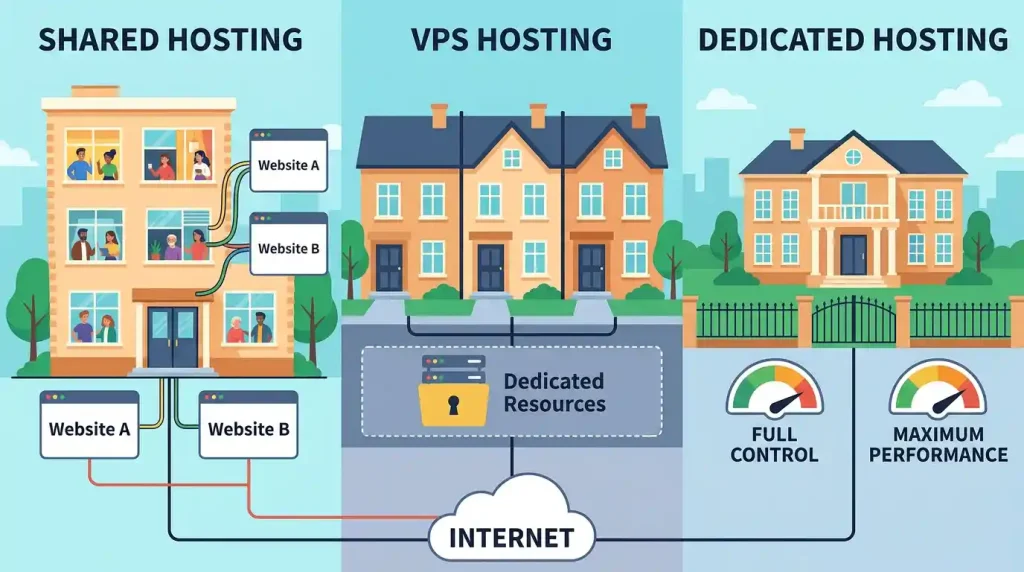
What Is Shared Hosting?
Shared Hosting is a web hosting service that allows multiple websites to be hosted on a single physical server. Websites hosted on that server share the same server resources.
These shared resources may include:
- CPU
- RAM
- Disk space
- Bandwidth
- Server software
- Database resources
A good use for a very simple example is an apartment building. A typical flat has many families living in the building and they share facilities like lift, parking space, etc. Multiple sites also share the same server in a similar manner as shared hosting.
The hosting provider typically handles the management of shared hosting. That simply means that the provider will handle server maintenance, buy servers and maintain baseline security, patching and technical setup. Also, this makes shared hosting simpler for the beginners.
How Does Shared Hosting Work?
The shared hosting places a lot of websites on the same server. Every website gets some of the server resources, but it’s not all reserved just for one.
This is how shared hosting works:
1. You purchase a shared hosting package.
2. The hosting provider will make space for your website on a shared server.
3. You link your domain name to the hosting account.
4. You upload the files for your website, or you install a new WordPress app.
5. A web browser gets a request for your domain name from a visitor.
6. You are served up your website files from the server to the browser of that visitor.
7. Visitors visit your website online.
It typically occurs in a few seconds. It is more affordable than VPS, cloud, or dedicated hosting because multiple websites are hosted on the same server in shared hosting. But sharing resources also often implies performance & control limitations.
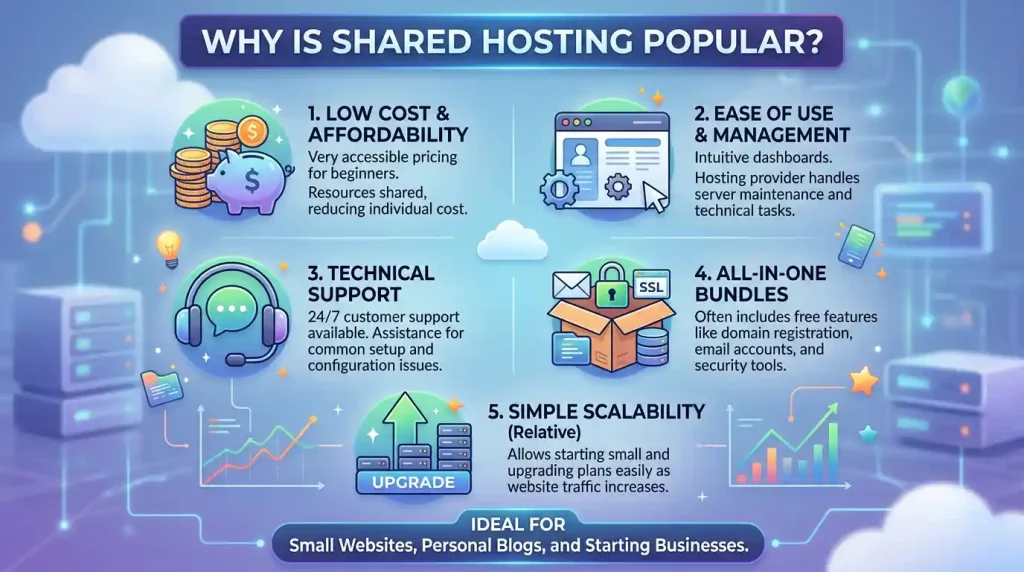
Why Is Shared Hosting Popular?
Shared hosting is the most in-demand type of web hosting because it addresses that top challenge all beginners meet: how to create a new website without advanced technology skills or high upfront fees.
Most people are not interested in managing servers, installing complicated software and configuring security settings. Setting a website up is way easier with shared hosting.
Most shared hosting plans include:
- Easy control panel
- One-click WordPress installation
- Free SSL certificate
- Email account creation
- File manager
- Database tools
- Customer support
- Basic security features
These features are generally sufficient for a novice website.
Who Should Use Shared Hosting?
It is great for small, simple websites that do not require high-end server resources.
You are a good fit for shared hosting if:
- New bloggers
- Personal websites
- Portfolio websites
- Small business websites
- Beginner WordPress websites
- Resume websites
- Small educational websites
- Local business websites
- Informational websites
Shared hosting is usually sufficient for new websites with low traffic.
Who Should Avoid Shared Hosting?
Not all websites are ideal candidates for shared hosting. Other websites require greater power, control and security.
If you have the following, you will probably require a better form of hosting:
- A high-traffic website
- A large eCommerce store
- A membership website
- An application using a lot of database
- A website with customization server settings required
- A health-related website that processes sensitive customer data
- A large news website
- A complex web application
These include VPS hosting, cloud hosting, or dedicated hosting, which will be more feasible for these types of sites.
Shared Hosting Example
Imagine you plan to start side work by opening a little retail store at a shopping mall. Everything — the common areas, your apartment and such. You even want one small space, and the building supplies a common area for other shop owners.
It’s a bit like shared hosting. Your website earns a spot on a server; however, plenty of different websites share the same server.
This could be a cheap and low-maintenance setup, but you must relinquish control compared to owning an entire building. In hosting terms, think of a fully owned building as dedicated hosting.
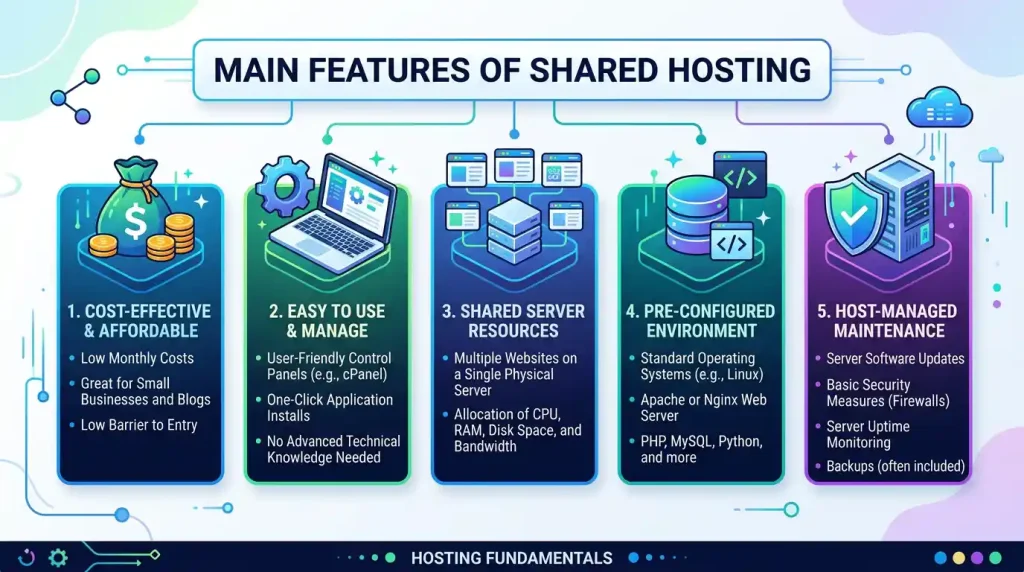
Main Features of Shared Hosting
Most shared hosting plans typically have some common elements that vary from provider to provider:
- Control Panel: A control panel is a user interface through which you manage your hosting account. From one dashboard, you can control files, databases, domains, emails and website settings. Some hosting providers use cPanel, whereas others tend to have their own dashboard.
- One-Click WordPress Installation: Shared hosting plans typically enable one-click WordPress installations. This is perfect for someone that wants to get a blog or website up and running fast.
- Free SSL Certificate: SSL encrypts data between your website and the visitors. An SSL-powered website will have HTTPS, which is more trusted. Most shared hosting services provide free SSL certificates.
- Email Accounts: Generally, one of the functions offered on shared hosting is creating professional emails with your domain (e.g., info@yourdomain.com, support@yourdomain.com, and contact@yourdomain.com).
- File Manager: An integrated file manager allows you to upload, edit, and manage website files directly from your hosting control panel.
- Database Support: If it is WordPress or any other CMS, your website requires a database. Most shared hosting environments have support for some flavour of a database, such as MySQL.
- Customer Support: Most of the shared hosting providers these days offer customer support over live chat, email or ticket systems. This is helpful for beginners.
- Backup Options: Automatic backups are offered in their packages with some shared hosting plans. If something goes wrong and you need to restore your website, backups are what will help you do it.
Advantages of Shared Hosting
There are several advantages to utilising shared hosting, particularly for novice and small website owners:
- Affordable Price: The cheapest shared hosting option available. Since a lot of users share the same server, it is more affordable for everyone. That is why shared hosting will be a great option for those who want to create their own website but with modest costs.
- Beginner-Friendly: Shared hosting is made for entry-level users. No advanced technical skills required to employ it! All hosting providers give you a pretty simple dashboard to go in and install WordPress, create emails, connect your domain, and manage files pretty easily.
- Easy Website Setup: It is easy to set up a site with shared web hosting. Most hosts have one-click WordPress installs and easy-to-follow wizards. This also helps newbies to start their website in a quick time.
- Server Maintenance Is Managed: Typically, your hosting provider is responsible for that server upkeep also, which includes running updates and regular security. You need not manage the server by yourself.
- Good for Small Websites: If you run a small website and don’t expect huge traffic, shared hosting can work well. This is ideal for blogs, portfolios, local business websites and simple information sites.
- Includes Useful Tools: If, however, you have a shared hosting plan, the bundled tools typically had in this type of package are for email, SSL, backup systems, file management and database & WordPress installation. These are the tools that will help you manage your website better.
Disadvantages of Shared Hosting
However, shared hosting has its advantages, but it comes with drawbacks as well:
- Limited Resources: Because multiple websites are hosted on the same server, your site doesn’t have resources solely dedicated to it. As your website expands and requires additional CPU, RAM or bandwidth, a shared accommodation opportunity can confine you.
- Performance Can Be Affected: If another site on the same server uses excessive resources, it may slow your own site’s speed. This is one of the biggest downsides of shared hosting.
- Less Server Control: With shared hosting, you do not have full control of the server. You typically do not have the ability to modify advanced server settings, nor are you able to install any custom software at the server level.
- Not Ideal for High Traffic: If your website is getting a good amount of traffic, then shared hosting may not work for you. This is where websites with high traffic usually require VPS hosting, cloud hosting or dedicated hardware.
- Basic Security: Shared hosting services typically include SSL with less tightening of security since multiple websites are on the same server, reducing price but also increasing risk manually for each website.
- Resource Limits: Over time, some providers will restrict how much storage, bandwidth, databases, emails you can use and CPU usage. These limits are important to check before purchasing a plan.
Shared Hosting vs. Other Hosting Types
Shared Hosting vs VPS Hosting
A lot of beginners compare shared hosting to VPS hosting. The key difference is in allocating server resources. In shared hosting, multiple websites use the same server resources. VPS hosting provides virtual private servers on a shared physical server, and each user gets dedicated virtual resources.
| Feature | Shared Hosting | VPS Hosting |
| Price | Lower | Higher |
| Ease of use | Very easy | Moderate |
| Resources | Shared | Dedicated virtual resources |
| Performance | Good for small websites | Better for growing websites |
| Control | Limited | More control |
| Security | Basic | Stronger isolation |
| Best for | Beginners and small websites | Growing websites |
The bigger and more complex your site grows, the better Shared hosting is available for beginners. VPS hosting is great for speed, control and more resources.
Shared Hosting vs Dedicated Hosting
There is an enormous difference between shared hosting and dedicated hosting. There are a lot of websites hosted on one server in shared hosting. Dedicated hosting is having one website occupying an entire server.
| Feature | Shared Hosting | Dedicated Hosting |
| Server usage | Shared with many websites | Entire server for one website |
| Price | Low | High |
| Control | Limited | Full control |
| Performance | Basic to good | Very high |
| Technical skill | Low | High |
| Best for | Small websites | Large high-traffic websites |
For beginners, shared hosting is the perfect place. Dedicated hosting provides more resources and flexibility, which is great for high-traffic websites with demanding server requirements.
Shared Hosting vs Cloud Hosting
In shared hosting, one server is used, but cloud hosting uses several interlinked servers. Cloud hosting is much more scalable and highly reliable; however, it may also be more expensive and sometimes complicated.
| Feature | Shared Hosting | Cloud Hosting |
| Server structure | One shared server | Multiple connected servers |
| Price | Low | Medium to high |
| Scalability | Limited | High |
| Performance | Good for small websites | Better for growing websites |
| Ease of use | Easy | Depends on provider |
| Best for | Beginners | Growing or high-traffic websites |
Shared web hosting is generally enough for beginners starting small websites. Cloud hosting is a better option for fast-growing sites.
How Good Is Shared Hosting for WordPress?
So yes, it is a good option for WordPress beginners. Shared hosting providers generally support WordPress and provide one-click installations.
Shared hosting is suitable for:
- New WordPress blogs
- Small business websites
- Portfolio websites
- Personal websites
- Low-traffic content websites
For starters, if your WordPress website gets slow, receive more traffic than before, or use too many heavy plugins, then you will need to go for VPS hosting or managed WordPress hosting or cloud hosting as an upgrade.

Is Shared Hosting Good for SEO?
If the hosting provider is reputable and the site itself is optimised correctly, it can be just fine for SEO.
SEO is indirectly influenced by hosting via:
- Website speed
- Uptime
- Security
- User experience
- Crawl accessibility
- Technical stability
With shared hosting, the only thing that is not responsible for your website ranking is helpful content. Appropriate keyword usage, mobile responsiveness, internal links, clean navigation and good site structure are still essential.
Slow or frequently offline shared hosting can take away from the user experience. Therefore, go for a trusted provider and boost website speed.
Can I Use Google AdSense With Shared Hosting?
As far as Google AdSense is concerned, if your website looks professional enough and loads decently quickly (and without any overlay pop-ups), shared hosting will be fine.
AdSense approval is nothing solely dependent on the hosting type. Your website should have:
- Original content
- Useful articles
- Clear navigation
- Important pages
- Mobile-friendly design
- Fast loading speed
- Legal images
- No broken links
- Good user experience
Important pages include:
- About Us
- Contact Us
- Privacy Policy
- Terms and Conditions
- Disclaimer
If you have a brand new AdSense website that is simple and fast, with good content in place, shared hosting should be sufficient.
How to Select the Best Shared Hosting
Important features to check before purchasing shared hosting:
1. Check Uptime: Select a hosting provider with good uptime. A lot of downtime from your host means visitors come to your site and are greeted with errors, meaning it’s likely that they’ll visit another website.
2. Check Speed: The user experience is also influenced by website speed. Aim for an SSD, caching and server-optimised hosting.
3. Check SSL Availability: SSL is an important chapter when it comes to trust and security. Free SSL or easy-to-install SSL is a good shared hosting feature.
4. Check Customer Support: The setups can be challenging for beginners, like the setup, WordPress installation, emails, SSL or domain connection. Choose hosting with helpful support.
5. Check Backup Options: Backups protect your website data. Opt for a plan that offers automatic backup or the option to back up easily manually.
6. Check Renewal Price: A lot of hosting plans have a cheap price for the first year but higher upon renewal. Check renewal cost before purchase.
7. Check Upgrade Options: Your site may eventually expand. Opt for a provider that offers easy upgrades to VPS, cloud hosting or better plans.
8. Check Resource Limits: Before selecting a plan, check for storage, bandwidth, database limits, CPU usage rules, and email limits.
Transitioning From Shared Hosting
Shared hosting is a good start, but you will have to go for an upgrade when your site expands.
You should consider upgrading if:
- Your website loads slowly
- Your website receives more traffic
- You receive warnings due to resource limitations
- Your website often goes offline
- You run an online store
- You need more server control
- You use many heavy plugins
- You need stronger security
In such instances, a VPS hosting, cloud hosting or managed WordPress hosting solution would be appealing.
11 Common Mistakes by Shared Hosting Beginners
1. Choosing Only the Cheapest Plan: Discount web hosting is often tempting, but extreme low-end hosting has potential issues with speed, uptime and support.
2. Ignoring Renewal Price: Always check the renewal cost. Some initially cheap plans end up being expensive later.
3. Not Installing SSL: A website that does not have SSL may get a ‘Not Secure’ message in browsers. This can reduce trust.
4. Using Too Many Plugins: Too many plugins can lead to performance issues, especially in a shared environment.
5. Not Optimising Images: Very large images can slow down your site. Please compress the images before uploading them.
6. Not Keeping Backups: Backups are necessary to ensure that if something goes wrong, you have your website data all intact.
7. Not Upgrading When Needed: If you happen to exceed shared hosting pretty early on in the lifetime of your site, remaining on such a plan will affect performance.
Shared Hosting Checklist for Beginners
Compile this checklist before opting for shared hosting:
- Is the hosting plan beginner-friendly?
- Does it include SSL?
- Does it support WordPress?
- How easy to use is the control panel?
- Is customer support available?
- Does it offer backups?
- What is the renewal price?
- Are storage and bandwidth enough?
- Can you upgrade later?
- Are security features included?
- Is there a refund policy?
- Does it provide professional email?
This checklist will help you choose shared hosting more confidently.
Frequently Asked Questions (FAQ)
Q1: What is shared hosting in simple terms?
Shared hosting is a type of web hosting in which many websites are housed on the same server and share its resources.
Q2: Is shared hosting good for beginners?
Shared hosting is perfect for beginners because it is inexpensive, user-friendly and ideal for small websites.
Q3: Is shared hosting good for WordPress?
Yes, shared hosting is good for newbie blogs, personal websites, portfolio sites and small-scale business websites using WordPress.
Q4: What is the most significant disadvantage of shared hosting?
The biggest drawback is that resources are limited. As many sites are hosted on the same server, you might experience a decrease in website performance.
Q5: Can shared hosting handle high traffic?
For sites that get high volumes of traffic, shared hosting is not the solution. If you gain significant traffic, VPS hosting or cloud hosting is necessary.
Q6: Is shared hosting safe?
Shared hosting is safe as long as there are good security features implemented by the provider. But VPS or dedicated hosting often offers better isolation.
Q7: Can you upgrade later from shared hosting?
Yes, you can upgrade from shared hosting to VPS, cloud hosting, or dedicated hosting as your website grows.
Q8: Is shared hosting good for Google AdSense?
Well, if your website is fast, clean, mobile-friendly, original, and has helpful content, then yes, shared hosting can work for AdSense.
Q9: What is the main difference between shared hosting and VPS hosting?
Shared hosting is used by multiple websites sharing the same server resources. With VPS hosting, you get dedicated virtual resources for your website.
Q10: Is shared hosting right for my first website?
Yes, shared hosting is a good place to start if you have a brand new, small and low-traffic site.
Conclusion
So, what is shared hosting? Shared hosting is where many websites are hosted on one server machine; in other words, you share the same server with others. It is the most affordable hosting and deploying option for beginners.
People use shared hosting for new blogs, personal websites, portfolios, small business websites and beginner WordPress websites. A service that comes with a control panel, an SSL solution (for website encryption) and installs WordPress itself is considered user-friendly and cost-effective.
However, there are also limitations to shared hosting: less control, limited resources, and it may not be the best fit for high-traffic or excessive-resource-intensive websites.
Shared hosting is typically a good place to start for someone building out their first website. You can also upgrade to VPS hosting, cloud hosting and, finally, managed hosting as your website grows for better performance, security and scalability. Choosing the correct shared hosting plan ensures that your website will always remain quick, safe and prepared for lengthy development.