IONOS Webmail Login: Setup Guide and Common Fixes
If you need to check your business email, the IONOS Webmail login page lets you access your mailbox through a web browser. You can read messages, send emails, manage folders, and check your contacts without installing a separate email application.
To get started, visit IONOS Webmail and sign in with your full email address and its password. If you cannot access your inbox, the problem may be related to your login details, browser settings, or email account configuration.
This guide explains how IONOS Webmail works, how to reset your password, how to access your email on a phone, and what to do when something goes wrong.
What Is IONOS Webmail?
IONOS Webmail is a browser-based email service for accessing supported IONOS email accounts. Instead of downloading messages through a desktop application, you can open the Webmail page in your browser and manage your inbox online.
It is useful for business owners, freelancers, and website administrators who use email addresses connected to their own domain. For example, a business might use an address such as contact@example.com rather than a general Gmail address.
With Webmail, you can send and receive messages, organize emails into folders, search your inbox, and manage other available email features. The options you see depend on your email product.
If you are setting up a website for your business, it also helps to understand how WordPress domain hosting works and how your domain connects to your website and email services.
If you are still building your business website, follow this guide on how to start a WordPress website to learn about the basic steps involved.
Is IONOS Webmail the Same as 1&1 Webmail?
IONOS took over from the 1&1 brand in many markets and still supports email services that were originally offered under the 1&1 name. That is why people still search for terms such as oneandone webmail, 1and1 webmail, and 1and 1 web mail.
These searches often refer to the same general need: accessing an email account managed through IONOS. However, older product names and account types can have different login requirements, so check your current email service if the usual login method does not work.
How to Log In to IONOS Webmail
You can access your inbox in a few steps. Always access your mailbox through the official login portal. Avoid unfamiliar websites that request your email password, even if their sign-in pages appear convincing.
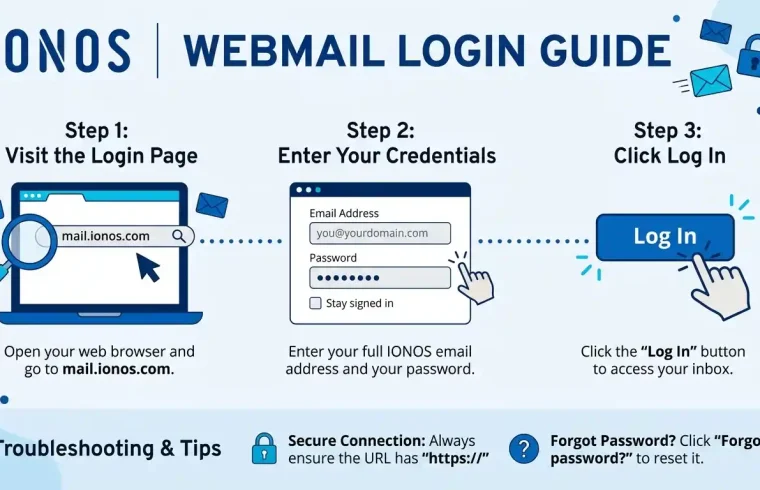
Step 1: Open the Official Login Page
Visit mail.ionos.com in your preferred browser. You can use a current version of Chrome, Firefox, Edge, or Safari.
Step 2: Enter Your Full Email Address
Type the complete email address associated with your IONOS mailbox. If your address is contact@example.com, enter the entire address, including the domain.
Using only the part before the @ symbol may cause a login error.
Step 3: Enter Your Email Password
Type in the password associated with your email account to access your inbox. Remember that the mailbox password and your main IONOS customer account password may be different.
Check that Caps Lock is off and that your keyboard is using the correct language layout.
Step 4: Open Your Inbox
Submit your login details and wait for the mailbox to load. You can then read incoming messages, compose emails, search for older conversations, and manage folders.
If you cannot sign in, do not keep trying random passwords. Recheck your email address and password for mistakes. If the problem persists, follow the account recovery procedure to regain access.
How to Reset Your IONOS Webmail Password
A forgotten password is a common reason people cannot access their inbox. If you use IONOS Mail Basic or Mail Business, you can update your mailbox password through the IONOS account responsible for managing that email address.
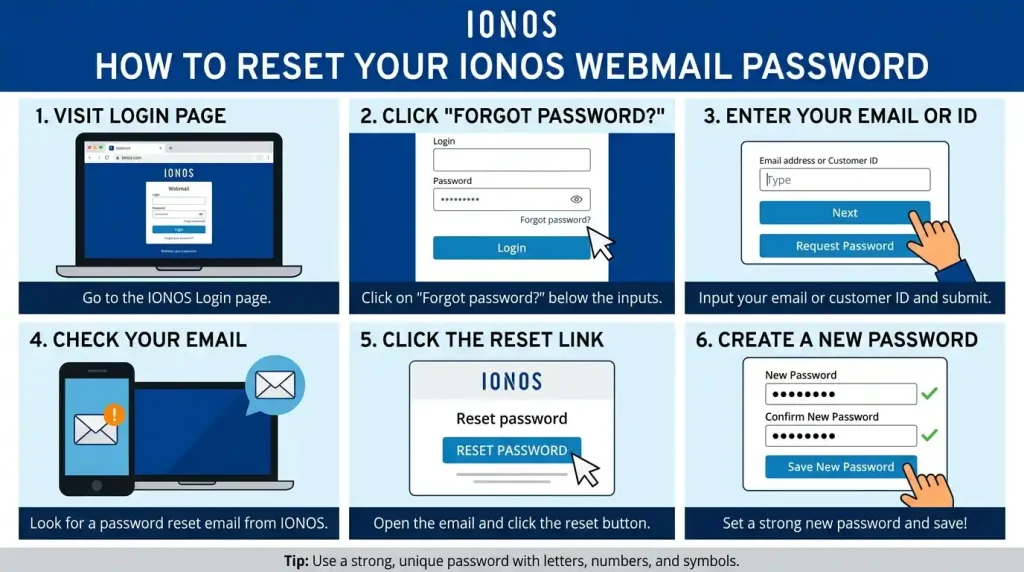
Follow these steps:
- Visit the official IONOS customer login page and sign in with the account that controls your mailbox settings.
- Open the Email section.
- Locate the email address whose password you intend to change.
- Open its action menu, choose the option for changing the password, and enter your new credentials.
- Save the changes to apply the updated password.
The exact interface may vary depending on your account and product.
For detailed instructions, see the official IONOS email password guide.
If you have forgotten the password for your main IONOS customer account, you need to recover that account separately. Changing the mailbox password does not necessarily restore access to the customer account.
After changing your email password, update the saved password in any email applications that use the same mailbox. Otherwise, Outlook or your phone may continue trying to connect with the old credentials.
How to Set Up IONOS Email on a Phone or Computer
You can use IONOS Webmail directly in a mobile browser. If you prefer a dedicated email application, you can usually add a supported IONOS mailbox using its server settings.
Access IONOS Webmail on a Phone
Open your phone’s browser and visit IONOS Webmail.
| Provide your complete email address along with the corresponding mailbox password when prompted to sign in. |
Once signed in, you can check messages and send emails without installing another application. The layout may look different on a smaller screen, but the basic purpose remains the same.
For security, avoid saving your login details on a shared or public device.
Add IONOS Email to an Email App
You can configure a supported mailbox in applications such as Microsoft Outlook, Apple Mail, or Thunderbird. During setup, choose IMAP if you want your email to stay synchronized across multiple devices.
Use these settings for supported IONOS Mail Basic and Mail Business accounts:
| Setting | Server details |
|---|---|
| Incoming protocol | IMAP |
| Incoming server | imap.ionos.com |
| Incoming port | 993 |
| Incoming encryption | SSL/TLS |
| Outgoing server | smtp.ionos.com |
| Outgoing port | 465 |
| Outgoing encryption | SSL/TLS |
| Username | Your full email address |
| Password | Your mailbox password |
IONOS also supports SMTP port 587 with STARTTLS for compatible applications. If you use POP3 instead of IMAP, the incoming server is pop.ionos.com, using port 995 with SSL/TLS.
See the official IONOS mail server settings before configuring your application. Different products, including hosted Exchange, may require different settings.
How to Fix Common IONOS Webmail Login Problems
If IONOS Webmail is not working, try to identify where the problem occurs. Can you open the login page? Are your credentials rejected? Are you able to access your mailbox but unable to send emails? Each situation needs a different solution.

IONOS Webmail Is Not Accepting My Password
Begin by verifying that your full email address and mailbox password are correct. Check for accidental spaces at either end of the information you entered, as these can interfere with sign-in.
If the password still fails, reset it through your IONOS customer account. If you recently changed it, update any saved credentials in your email applications.
If you are also locked out of your customer account, follow the official IONOS account recovery procedure to restore access.
The Webmail Login Page Will Not Open
A browser problem or network connection may prevent the page from loading.
Try these checks:
- Try accessing the official sign-in page through a different web browser to see whether the problem persists.
- Test the page in a private or incognito window.
- Temporarily disable browser extensions that may interfere with the login page.
- Check your internet connection.
- Clear the relevant browser cache and cookies if other attempts fail.
Clearing cookies may sign you out of other websites, so make sure you know how to sign back in before doing this.
If the page still will not load, check official IONOS support for any service-specific guidance.
IONOS Webmail Keeps Logging Me Out
Webmail may use cookies to maintain your login session. Browser settings that block cookies or clear them automatically can interfere with automatic login.
Check whether your browser allows the necessary cookies. If you use a privacy extension, test the page with that extension temporarily disabled.
Automatic login is best avoided on shared computers. If you regularly use a public or shared device, sign out after each session.
I Can Access My Account but Cannot Send or Receive Emails
If you can open Webmail but cannot send or receive messages, check the mailbox itself before changing browser settings.
For sending problems, look for an error message and verify that your outgoing mail settings are correct if you use an email application. The SMTP server should be smtp.ionos.com supported by an encrypted connection.
If you cannot receive messages, check your spam folder, inbox filters, and available mailbox storage. Ask the sender whether they received a delivery failure notice.
If the issue affects only Outlook or another email application, try signing in through Webmail. If Webmail works normally, the problem may be related to the application’s settings.
Emails Are Missing From the Inbox
A message may have been moved to another folder, filtered automatically, or marked as spam. Search for the sender’s address or a phrase from the subject line.
Also check your archive, deleted items, and any custom folders. If messages are missing across multiple devices, review the mailbox and its filtering rules before deleting or recreating the account in your email application.
For additional help, visit the IONOS email support documentation.
Is IONOS Webmail Safe to Use?
You can reduce the risk of unauthorized access by following a few basic security practices.

Use a unique, strong password for your mailbox. Keep your password private, and never disclose it to anyone or submit it to an unfamiliar or untrusted website. If the feature is available for your account, activate two-step verification to add another security check during sign-in.
Before providing your credentials, inspect the website address carefully to confirm that you are using the legitimate login portal.When accessing Webmail from a public or shared computer, never save your password. Sign out completely once you have finished using your mailbox.
Be cautious with unexpected emails that ask you to confirm account information or open unfamiliar links. If you receive a suspicious message about your IONOS account, visit the official website directly instead of following the link in the email.
You can find further guidance in the IONOS Webmail help center.
Frequently Asked Questions About IONOS Webmail
What Is the Official IONOS Webmail Login URL?
The direct login page is https://mail.ionos.com/. If you encounter an account-specific login issue, consult the official IONOS help documentation.
Is IONOS Webmail the Same as 1and1 Webmail?
The names are closely related because IONOS succeeded the 1&1 brand in many markets. Searches for 1and1 Webmail often refer to IONOS email access, although the exact product and login process can vary.
Can I Open IONOS Webmail on My Mobile Phone?
Yes. IONOS Webmail can be accessed through your phone’s web browser. Simply enter your email address and its corresponding password to open your inbox. You can also configure a supported mailbox in a compatible email application.
How Do I Recover My IONOS Email Password?
For supported IONOS mailbox products, sign in to the customer account that manages the email address and use the mailbox password-changing option. If you have lost access to the customer account, recover that account separately.
Why Is My IONOS Webmail Login Not Working?
Common causes include an incorrect email address, a wrong mailbox password, browser cookie restrictions, or a temporary connection issue. Check your credentials first, then test another browser and reset your password if necessary.
Is It Possible to Connect IONOS Email to Outlook or Gmail?
You can configure supported IONOS mailboxes in compatible email applications using the correct server settings. For Outlook, follow the IONOS setup instructions for your version. Gmail app support depends on the account type and the configuration options available in the app.
Conclusion
IONOS Webmail gives you a straightforward way to access your business email through a browser. Visit the official IONOS sign-in page and enter your complete email address alongside the password assigned to your mailbox. If you cannot sign in, check your credentials, reset your password if needed, and test your browser. For mobile and desktop email applications, use the correct server settings for your product. If the problem remains unresolved after trying these troubleshooting steps, reach out to IONOS customer support for further assistance with your account.