What Is a Web Host? A Complete Guide to Choosing the Right Hosting
Choosing a web host can affect your website’s speed, reliability, security, and running costs. The challenge is finding a service that fits your website without paying for resources you do not need. A small blog, a business website, and a busy online store may require very different hosting plans.
A web host stores your website’s files and delivers them to visitors when they access your domain. Before choosing a provider, you need to understand how hosting works, which server type fits your project, and what to check in the service agreement. This guide covers those decisions in practical terms.
Table of Contents
- What Is a Web Host?
- How Does a Web Host Work?
- Web Host vs. Domain Name
- Types of Web Hosting
- How to Evaluate Web Hosting Companies
- How to Choose the Right Hosting Plan
- What WordPress Users Should Check
- Common Hosting Mistakes
- Frequently Asked Questions
- Final Thoughts
What Is a Web Host?
A web host is a company or service that provides the server resources needed to make a website available online. These resources store website files, process requests, and deliver content to visitors.
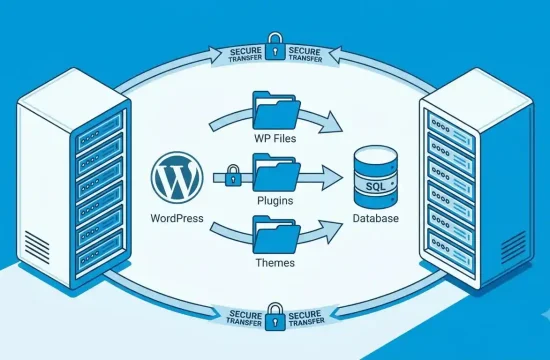
For example, a WordPress website contains posts, pages, images, themes, plugins, and database records. These files and records need an environment where WordPress can run. A hosting provider supplies that environment.
Depending on the service, a hosting account may include:
- Storage: Space for website files, images, and databases.
- Computing resources: CPU and memory for processing website requests.
- Security features: Tools such as SSL certificates, firewalls, and malware scanning.
- Backups: Copies of website files and databases for recovery.
- Control panel: A dashboard for managing files, databases, domains, and other settings.
- Technical support: Assistance with hosting-related issues.
- Email services: Business email accounts on eligible plans.
The features available depend on the hosting company and the plan you choose. Some services include automated backups and managed updates, while others require you to configure and maintain these features yourself.
Why does your choice of web host matter?
Your hosting environment affects how reliably your website operates and how easily you can manage it. A suitable plan can provide enough resources for your current needs while giving you room to grow.
However, hosting is not the only factor that affects performance. Large images, inefficient plugins, poorly optimized themes, and unnecessary scripts can slow down a website even when the server is capable.
If you use WordPress, our guide to WordPress speed optimization explains practical ways to improve loading performance.
How Does a Web Host Work?
A website needs a way to connect its domain name to the server where its content is stored. This connection involves DNS, the hosting server, and the visitor’s browser.
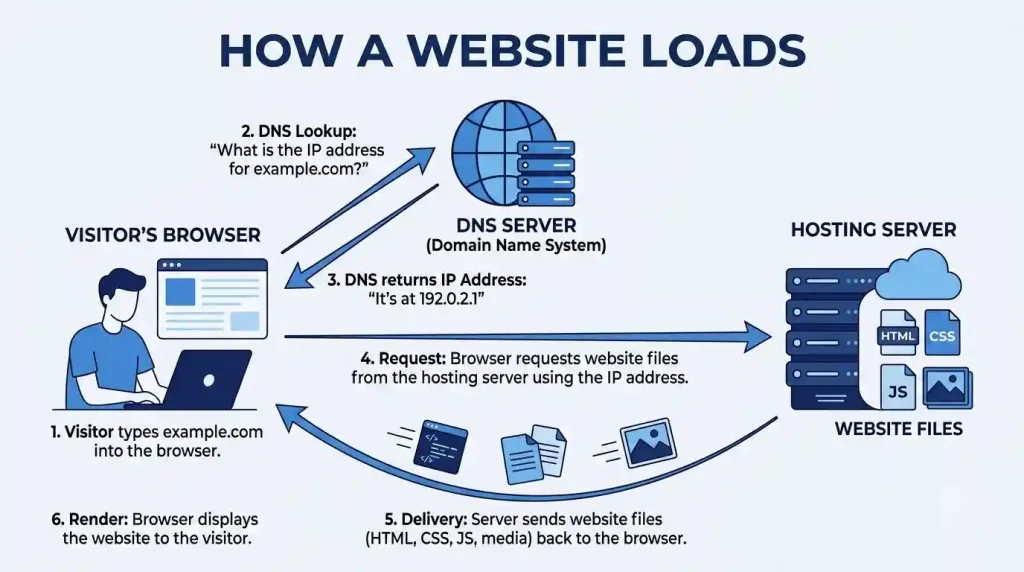
Here is the process in simple steps:
- You register a domain name, such as
example.com. - You purchase a hosting plan and upload or install your website.
- You configure the domain’s DNS settings to point to the correct hosting service.
- A visitor enters your domain in a browser.
- The browser uses DNS to locate the appropriate server.
- The server processes the request and sends the required website content back to the browser.
The browser then displays the page to the visitor. Most of this process happens automatically.
For a WordPress site, the server may need to retrieve information from a database before generating a page. The exact process depends on the website’s software and configuration.
What happens if the hosting server goes offline?
If the server becomes unavailable, visitors may be unable to access your website until the problem is resolved. The cause could be server maintenance, a technical failure, a network issue, or a problem with the website itself.
This is why reliability, support, backups, and incident communication should be part of your hosting decision. No hosting company can guarantee that technical problems will never occur, so it is useful to understand how the provider handles them.
Web Host vs. Domain Name
A domain name and a web host serve different purposes. The domain gives people an address to visit, while hosting provides the environment that stores and delivers website content.
| Feature | Domain name | Web hosting |
|---|---|---|
| Main purpose | Provides the website address | Stores and delivers website content |
| Example | example.com | A server running your website |
| Main management tasks | Registration and DNS settings | Files, databases, server settings, and backups |
| Payment | Usually renewed periodically | Billed according to the hosting plan |
| Can be purchased separately? | Yes | Yes |
You can register your domain with one company and purchase hosting from another. This can give you flexibility when changing providers, although you will need to manage the relevant DNS settings.
Before purchasing either service, compare the full cost, renewal terms, and features included in each package.
Types of Web Hosting
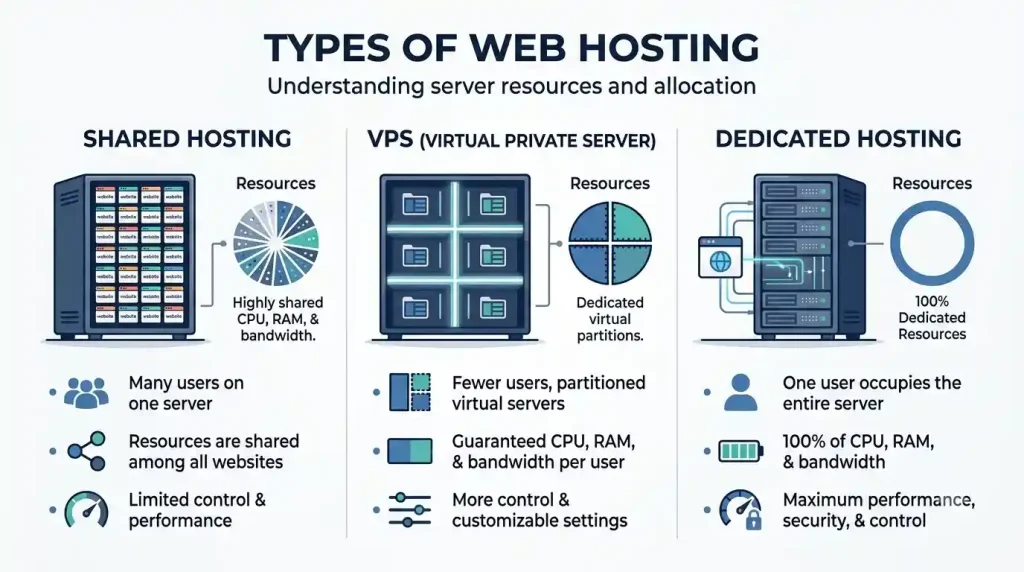
Different hosting types offer different levels of resources, control, and maintenance. The right option depends on your website’s requirements, technical skills, and budget.
1. Shared hosting
Shared hosting places multiple websites on a server that shares its resources among customer accounts. It is often suitable for personal blogs, portfolios, small business websites, and new content websites.
Advantages
- Often affordable for beginners.
- Usually easier to manage than a self-administered server.
- May include a control panel and WordPress installer.
- Can provide enough resources for a small website.
Limitations
- Resources are shared with other accounts.
- Server configuration may be restricted.
- Performance depends on the provider’s infrastructure and account limits.
A shared plan can be a sensible starting point when your website has modest requirements. You can consider upgrading later if traffic or resource use increases.
2. VPS hosting
Virtual private server (VPS) hosting divides a physical server into separate virtual environments. Each environment receives an allocated set of resources, although the details depend on the provider.
VPS hosting can provide more control than a basic shared plan. It may suit growing websites, development projects, and applications that require particular server settings.
The management model matters. An unmanaged VPS may require you to handle operating system updates, security configuration, backups, and troubleshooting. A managed VPS may include assistance with some of these tasks.
3. Dedicated server hosting
Dedicated server hosting provides access to an entire physical server for one customer. Unlike shared hosting, the server’s physical resources are not divided among unrelated customer accounts in the same way.
It can be useful for demanding applications, specialized workloads, or organizations that need extensive control over their server environment.
Before choosing dedicated server hosting, consider:
- Whether your website actually needs the additional resources.
- Whether you can manage server security and maintenance.
- Whether managed support is available.
- How backups, monitoring, and hardware issues are handled.
- Whether the total cost fits your operating budget.
A dedicated server is not automatically the best option for a small blog. Paying for unused resources can increase costs without providing a meaningful benefit.
4. Managed WordPress hosting
Managed WordPress hosting is designed for websites that use WordPress. Depending on the provider, it may include WordPress updates, backups, caching, security tools, staging environments, and WordPress-focused support.
The word “managed” can mean different things between companies. Check which tasks the provider handles and which responsibilities remain yours.
This type of hosting may suit bloggers, publishers, and small businesses that want to spend less time on server administration.
5. Cloud hosting
Cloud hosting uses cloud infrastructure to supply computing and storage resources. Depending on the platform, resources may be distributed across multiple systems or adjusted as demand changes.
Some cloud services are designed for beginners, while others require technical knowledge to configure. Pricing can also be more complex than a fixed monthly hosting plan.
Before selecting cloud hosting, review its resource limits, billing model, backup arrangements, support options, and scaling process.
How to Evaluate Web Hosting Companies
Comparing web hosting companies is easier when you use the same criteria for every provider. Rather than relying on marketing claims, look at the specific plan you intend to purchase.
1. Check the resources included
Review the storage, CPU, memory, database limits, and traffic policies available on the plan. These details help you understand whether the service can support your website.
Do not assume that an “unlimited” feature means there are no restrictions. Providers may have fair-use policies or limits on resource-intensive activity. Read the plan’s terms to understand what is actually allowed.
2. Compare the total price
The introductory price may be lower than the renewal price. Some discounts also require a longer initial billing period.
Before purchasing, check:
- The initial price and billing period.
- The renewal price.
- Domain registration and renewal fees.
- Backup or migration charges.
- Paid security features.
- Email account costs.
- Refund conditions.
Calculate the amount you will pay over the initial term and after renewal. This gives you a clearer picture than comparing promotional prices alone.
3. Review uptime and reliability
Uptime describes how long a website remains available. Frequent outages can interrupt visitors, sales, and other website activities.
Look for a written uptime commitment and check what the service agreement says about downtime, maintenance, and compensation. A stated uptime guarantee is not the same as a promise that your website will never go offline.
You should also consider how the provider communicates incidents and handles technical problems.
4. Understand security and backups
A hosting plan should provide clear information about its security features and your responsibilities as the website owner.
Check for HTTPS support, account isolation, security monitoring, and protection against common attacks. For WordPress, find out whether updates and malware scanning are included or need to be managed separately.
Backups are equally important. Ask the provider:
- How often are backups created?
- How long are they retained?
- Can you restore the entire website?
- Is restoration included in the plan?
- Are backups stored separately from the main hosting account?
Keep an independent backup of important website files and databases whenever possible. A backup is useful only if it can be restored successfully.
5. Test the support options
If your website stops working, useful technical support can save time. Check whether the company offers live chat, ticket support, phone support, or documentation.
Look at the support hours and whether assistance is included in your plan. Read recent customer feedback for repeated complaints about unresolved issues, billing problems, or slow responses.
A company with a lower price may still be a suitable choice, but make sure its support arrangements match your level of technical experience.

6. Check migration and upgrade options
Your website may eventually outgrow its current hosting plan or need to move to another provider.
Before purchasing, ask whether migration assistance is available, whether it costs extra, and what information you must provide. Also check whether you can upgrade your plan without a complicated migration.
A good hosting choice should meet your current needs and provide a practical way to handle future growth.
How to Choose the Right Hosting Plan
The best hosting plan is the one that meets your website’s requirements without unnecessary expense or management work.
Use this table as a starting point.
| Website type | Hosting option to consider | Main reason |
|---|---|---|
| Personal blog | Shared hosting | Often sufficient for a simple website |
| Small business website | Shared or managed WordPress hosting | Depends on maintenance and support needs |
| WordPress content website | Shared or managed WordPress hosting | Provides a practical publishing environment |
| Growing website with higher resource needs | VPS or suitable cloud hosting | May provide additional resources and control |
| High-demand application | Dedicated server or suitable cloud infrastructure | May support specific resource and configuration requirements |
| Development project | VPS, cloud, or dedicated hosting | Can provide greater configuration flexibility |
Follow these steps before you buy
Step 1: Define the website’s purpose. A blog, online store, business website, and custom application can have different hosting requirements.
Step 2: Estimate your needs. Consider storage, traffic, software, database use, and whether you expect to host more than one website.
Step 3: Set a realistic budget. Include renewal costs and any paid features you need.
Step 4: Compare suitable plans. Review the same features across several providers rather than comparing unrelated packages.
Step 5: Check support and recovery options. Confirm how to contact support and restore your website if something goes wrong.
Step 6: Start with a suitable level of service. You can upgrade when your website’s actual needs justify the added expense.
For many beginners, shared hosting or managed WordPress hosting is a reasonable starting point. Advanced infrastructure should solve a real technical requirement, not simply sound more professional.
What WordPress Users Should Check
WordPress users should confirm that the hosting environment supports the software and provides the tools they need to maintain their website.

The official WordPress hosting requirements recommend PHP 8.3 or greater, MariaDB 10.11 or greater or MySQL 8.0 or greater, and HTTPS support. Check the official requirements page before purchasing because technical recommendations can change.
When comparing WordPress hosting providers, review these features:
- WordPress compatibility: Confirm that the service supports a current WordPress installation.
- Easy installation: Check whether the provider offers a straightforward installation process.
- Backups: Review the schedule, retention period, and restoration process.
- Caching: Find out whether caching is provided at the server level or needs a plugin.
- Staging: Consider whether you need a separate environment to test updates.
- Support: Check whether the provider can help with WordPress-related hosting issues.
- Resource limits: Ensure the plan can handle your theme, plugins, database, and expected traffic.
- Migration: Ask whether assistance is available for moving an existing website.
You can also read our guide to WordPress hosting services for more information about hosting options for WordPress sites.
Hosting alone does not guarantee search rankings. Useful content, accessible pages, a good user experience, and technical SEO still matter. For additional guidance, read how to do WordPress SEO.
Common Hosting Mistakes
Choosing a plan only because it is cheap
A low introductory price may hide higher renewal costs or paid extras. Compare the total cost before committing.
Buying too many resources too early
A new blog usually does not need the same infrastructure as a demanding business application. Begin with a suitable plan and review actual resource use as your website grows.
Ignoring backup restoration
A provider may advertise backups without clearly explaining how long they are retained or how restoration works. Confirm the details and keep a separate copy of important data.
Assuming every WordPress plan is the same
Hosting providers differ in compatibility, caching, support, security, and resource limits. Review the actual plan rather than relying only on its name.
Expecting hosting to guarantee SEO results
Reliable hosting can support availability and performance, but it cannot guarantee search rankings. Google recommends creating useful, people-first content and following technical best practices. Read the Google SEO Starter Guide for official guidance.
Forgetting renewal terms
Record your renewal date and price. This gives you time to compare alternatives before the next billing period.
Frequently Asked Questions
1. What is a web host in simple terms?
A web host stores website files and makes them accessible online. When someone visits your domain, the hosting server delivers the content needed to display the website.
2. Do I need a web host to create a website?
A publicly accessible website needs a hosting or publishing environment. With self-hosted WordPress, you generally arrange hosting yourself. Some hosted website platforms include hosting as part of their service.
3. What is the difference between a web host and web hosting?
A web host usually refers to the company or service that provides the hosting. Web hosting refers to the service of storing and delivering website content.
4. Which hosting plan is best for beginners?
Shared hosting can be suitable for a small blog or basic business website. Managed WordPress hosting may suit people who use WordPress and prefer help with some technical tasks. Compare the plan features and total cost before choosing.
5. When should I choose dedicated server hosting?
Consider dedicated server hosting when your application needs dedicated physical resources, specific server configurations, or more control than simpler plans provide. Check the management requirements and total cost before buying.
6. How do I compare website hosting companies?
Compare the exact plan features, renewal prices, resource limits, uptime terms, security, backups, support, migration options, and upgrade policies. Read the service agreement before paying.
7. Are WordPress hosting providers different from regular hosting companies?
Some providers offer WordPress-focused services with tools or support designed for WordPress. Other hosting plans can run WordPress too. Choose based on compatibility, resources, support, and the features you need.
8. Can changing my web host improve website speed?
It can help if your current hosting service is limiting performance. However, website speed also depends on themes, plugins, images, caching, scripts, and other technical factors. Identify the cause of slow performance before paying for a more expensive plan.
Final Thoughts
Choosing a web host starts with understanding your website’s needs. Compare resources, reliability, security, backups, support, migration options, and renewal costs rather than choosing based on an introductory discount.
For a small blog or business website, a suitable shared plan may be enough. WordPress users who want help with maintenance can consider managed WordPress hosting, while projects with specific resource or configuration needs may require VPS, cloud, or dedicated infrastructure.
Before purchasing, read the plan terms and confirm how support and backups work. The right hosting plan should give your website a dependable foundation without making you pay for resources you do not need.