
Why Is My Website Not Showing Up on Google?
Why is my website not showing up on Google? If you have recently launched a website or published new content, it can be frustrating when you search for your site and cannot find it anywhere in Google’s results.
That can be frustrating, especially when you have spent hours creating your website and writing content. You may wonder whether something is broken or whether Google has simply ignored your site. The good news is that this problem is often fixable.
A website may not appear on Google for several reasons. Sometimes Google has not discovered or indexed the page yet. In other cases, technical settings, crawling problems, or content issues may be affecting its visibility.
In this guide, you’ll learn why your website is not showing up on Google and how to fix the most common problems step by step.

1. Your Website Is Still New
One of the most common reasons a website does not appear on Google is that it is still new.
Publishing a website does not mean it will immediately appear in Google Search. Google first needs to discover your pages, crawl them, and decide whether they should be indexed.
New websites can take time to build a presence in search.
How to Fix It
Make sure that:
- Your website is publicly accessible.
- Important pages are not blocked from search engines.
- Your sitemap is available.
- Your pages have useful internal links.
- You continue publishing genuinely helpful content.
You can use Google Search Console to monitor how Google discovers and indexes your website.
2. Google Has Not Indexed Your Page Yet
Google discovering a page and indexing a page are not the same thing.
A page may be known to Google but still not be included in Google’s searchable index.
A simple way to get a basic idea is to search:
site:yourdomain.com
You can also inspect individual URLs inside Google Search Console.
How to Fix It
Use the URL Inspection tool to check whether Google can access the page.
If appropriate, request indexing after publishing a new page or making important updates.
However, requesting indexing does not guarantee that Google will immediately index or rank the page.
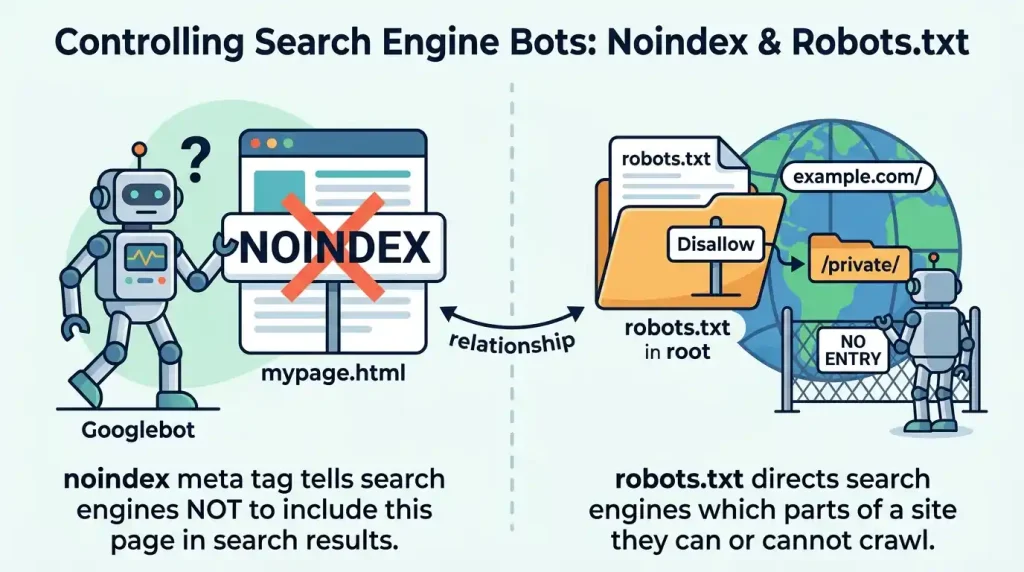
3. Your Website Is Blocking Search Engines
Sometimes website owners accidentally block search engines from accessing their websites.
This can happen because of:
- Robots.txt rules
- WordPress visibility settings
- SEO plugin settings
- Server configuration
If Google cannot access important pages, it may not be able to crawl and index them properly.
How to Fix It
Check your robots.txt file and SEO settings carefully.
If you use WordPress, make sure your website has not accidentally been set to discourage search engines.
You can also review Google Search Central for official information about how Google crawls and indexes websites.
4. Your Page Has a Noindex Tag
A noindex directive tells search engines not to include a page in search results.
This can be useful for certain pages, but it can also be accidentally applied to important articles.
How to Fix It
Check the robots settings for the individual page inside your SEO plugin.
If the page should appear in Google, remove the noindex directive.
After making the change, allow Google time to crawl the page again.
5. Your Sitemap Has Not Been Submitted
A sitemap helps search engines discover important pages on your website.
It does not guarantee rankings, but it can make your website structure easier for search engines to understand.
How to Fix It
Create or locate your XML sitemap and submit it through Google Search Console.
Then regularly check Search Console for sitemap errors or indexing problems.
If you are new to website infrastructure, understanding what DNS is can also help you understand how domains and websites connect online.
6. Your Website Has Crawl Errors
Google needs to access your pages before it can understand their content.
If your website returns errors, Google may have difficulty crawling important pages.
Common problems include:
- Server errors
- Broken pages
- Incorrect redirects
- Access restrictions
- DNS problems
How to Fix It
Use Google Search Console to identify affected URLs.
Then check whether each page:
- Loads correctly
- Returns a normal response
- Redirects properly when necessary
- Has a working server connection
If the problem is related to your domain connection, review your DNS configuration carefully.
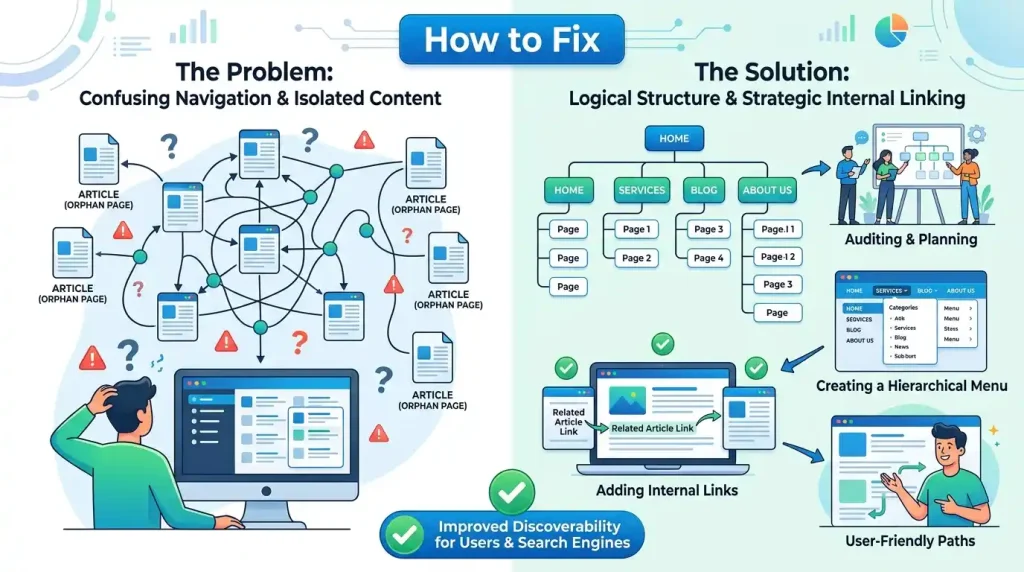
7. Your Website Is Too Difficult to Navigate
A confusing website structure can make it harder for both visitors and search engines to discover important pages.
For example, an article may exist on your website but have no internal links pointing to it.
How to Fix It
Create a clear website structure using:
- Navigation menus
- Categories
- Internal links
- Related articles
- Clear headings
For example, you can link relevant articles to guides explaining what web hosting is and other related topics.
8. Your Content Is Too Thin or Unhelpful
Not every published page provides enough value to perform well in search.
Very short pages, copied information, or content that adds little useful information may struggle to gain visibility.
How to Fix It
Ask yourself:
- Does this article answer the visitor’s question?
- Does it solve a real problem?
- Does it include useful explanations?
- Is the content easy to understand?
- Does it provide something genuinely helpful?
Focus on creating useful content instead of publishing a large number of weak pages.
9. Your Content Is Too Similar to Other Pages
Publishing multiple articles with nearly identical topics can make it difficult for search engines to understand which page is most relevant.
How to Fix It
Review similar content on your website.
You may decide to:
- Combine similar articles
- Improve one main article
- Change the search intent of another article
- Use internal links to show the relationship between related topics
Each article should have a clear purpose.
10. Your Website Has Technical Problems
Technical problems can affect how search engines access and understand your website.
Examples include:
- Broken redirects
- Server errors
- Incorrect canonical tags
- HTTPS problems
- Mobile usability issues
How to Fix It
Check your website regularly and use Google Search Console to identify important problems.
Test your website on both desktop and mobile devices.
Fix serious technical issues before spending too much time on keyword optimisation.
11. Your Website Loads Too Slowly
A very slow website can create a poor experience for visitors and may also affect how efficiently search engines access your pages.
Common causes include:
- Large images
- Too many plugins
- Poor hosting performance
- Unoptimised code
- Too many scripts
How to Fix It
Start with the basics:
- Compress large images
- Use modern image formats
- Remove unnecessary plugins
- Use caching properly
- Choose reliable hosting
For websites with visitors in different locations, a Content Delivery Network may also help deliver content more efficiently. Learn more in our guide on what a CDN is.
12. Your Website Does Not Have Enough Quality Signals Yet
New websites usually have limited history and fewer signals that help search engines understand their content.
They may have:
- Few external mentions
- Limited backlinks
- Few returning visitors
- A small amount of published content
This does not mean a new website cannot grow.
How to Fix It
Focus on building your website naturally.
Publish useful content consistently and promote genuinely helpful resources where appropriate.
Avoid buying spammy backlinks or using manipulative link-building techniques.
13. You Are Targeting a Very Competitive Keyword
Your website may already be indexed but still not rank high enough to appear where you expect.
This is especially common when targeting broad, highly competitive keywords.
How to Fix It
Start with specific questions and long-tail keywords.
Instead of targeting only:
web hosting
You might create a detailed article answering:
Why is my website slow after changing hosting?
Specific searches often have clearer user intent.
14. Google Has Not Found Your Important Pages
Google discovers pages through links, sitemaps, and other signals.
An isolated page with few connections may take longer to be discovered.
How to Fix It
After publishing a new article:
- Add it to the appropriate category.
- Link to it from relevant older articles.
- Add relevant internal links within the article.
- Include it in your sitemap when appropriate.
- Check it using Google Search Console.
This helps create a stronger content structure.
15. Your Website Is Indexed but Not Ranking Yet
Sometimes the problem is not indexing at all.
Your website may already be indexed, but it ranks too low for you to easily find it in search results.
How to Fix It
Instead of checking only through your browser, use Google Search Console to review:
- Impressions
- Clicks
- Search queries
- Average position
These metrics can show whether Google is already displaying your pages for relevant searches.
You can also explore Google Search Central for official guidance about how Google discovers, crawls, and indexes websites.
How to Check Whether Your Website Is on Google
A basic method is to search:
site:yourdomain.com
For example:
site:example.com
You can also inspect individual pages in Google Search Console for more detailed indexing information.
A Simple Checklist Before Requesting Indexing
Before requesting indexing for an important page, check:
- Is the page publicly accessible?
- Is the page allowed to be indexed?
- Is it blocked by robots.txt?
- Does the page load correctly?
- Does it contain useful and original information?
- Does it have relevant internal links?
- Is it included in your sitemap when appropriate?
- Does it work properly on mobile devices?
How Long Does It Take for Google to Show a New Website?
There is no guaranteed timeframe.
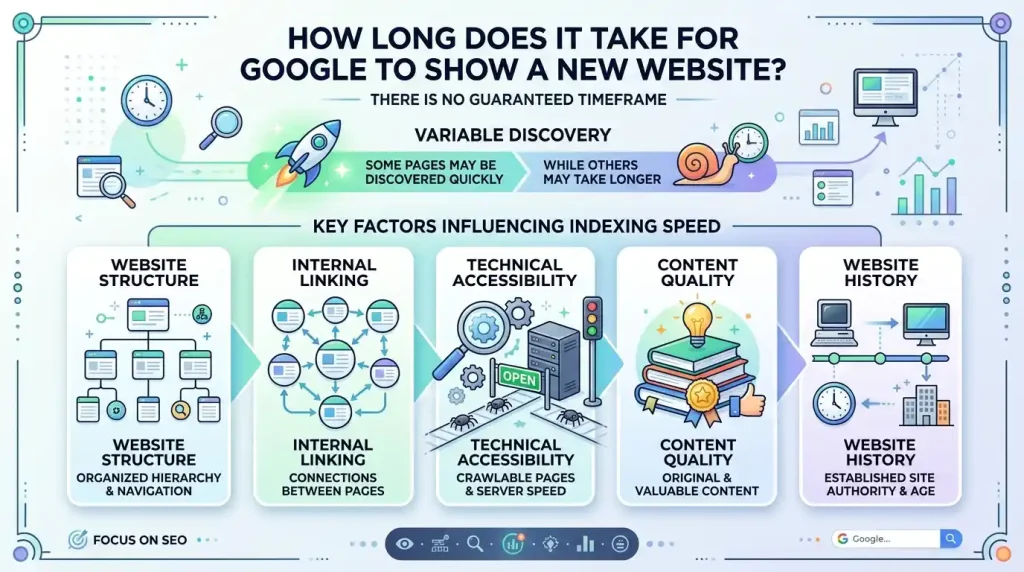
Some pages may be discovered quickly, while others may take longer.
The timing can depend on:
- Website structure
- Internal linking
- Technical accessibility
- Content quality
- Website history
The best approach is to make your website easy to crawl and continue publishing genuinely helpful content.
When Should You Worry?
You should investigate further if your website has been publicly available for a reasonable amount of time and important pages still cannot be crawled or indexed.
Pay special attention to:
- Noindex settings
- Robots.txt restrictions
- Server errors
- DNS problems
- Incorrect redirects
Google Search Console is usually the best place to start investigating these issues.
Frequently Asked Questions
Why Is My New Website Not Showing Up on Google?
New websites often need time to be discovered and indexed. Make sure your website is publicly accessible, not blocked from indexing, and connected to Google Search Console.
How Do I Get My Website to Appear on Google?
Create useful content, make sure Google can crawl important pages, submit your sitemap, use internal links, and monitor indexing through Google Search Console.
Why Is My Website Indexed but Not Ranking?
Indexing means Google knows about your page. Ranking depends on additional factors such as relevance, competition, search intent, and the usefulness of your content.
Can Robots.txt Stop Google From Seeing My Website?
Yes. Incorrect robots.txt rules can prevent Google from crawling important pages.
Does Requesting Indexing Guarantee Rankings?
No. Requesting indexing does not guarantee that a page will be indexed or rank highly.
Can Website Speed Affect Google Visibility?
Website speed can affect user experience and crawling efficiency, but improving speed alone does not guarantee higher rankings.
Final Thoughts
If your website is not showing up on Google, try not to panic.
In many cases, the issue is related to indexing delays, website settings, technical problems, or the fact that your website is still new.
Start by checking whether Google can access your pages.
Then review your indexing settings, sitemap, internal links, and technical issues.
Most importantly, focus on creating useful content for real people.
SEO is rarely about one quick fix. Strong organic visibility usually develops through helpful content, a clear website structure, technical reliability, and consistent improvement.
By making your website easy for search engines to understand and genuinely useful for visitors, you can build a stronger foundation for long-term Google visibility.