
What Is DNS? A Beginner’s Guide to How DNS Works
Every time you visit a website, something important happens behind the scenes before the page appears on your screen.
You type a domain name such as example.com into your browser, but computers do not communicate with websites using easy-to-remember domain names. They use numerical IP addresses.
So how does your browser know where to find the website?
The answer is DNS.
DNS is one of the essential systems that helps the internet work smoothly. Without it, you would need to remember long numerical IP addresses instead of simple website names.
In this beginner-friendly guide, you’ll learn what DNS is, how DNS works, why it matters, and how DNS records help connect domains to websites and online services.
What Is DNS?
DNS stands for Domain Name System.
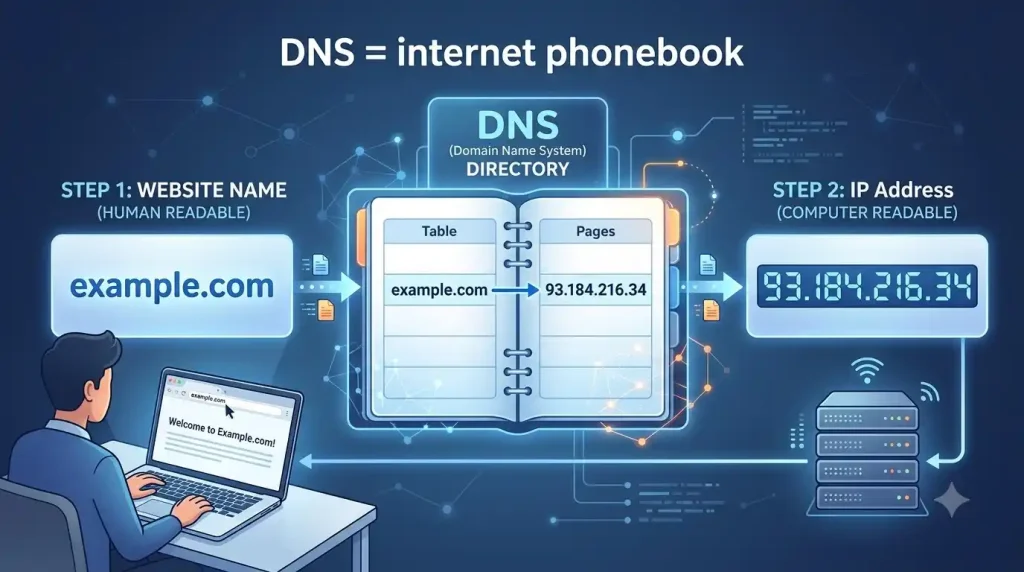
You can think of DNS as the internet’s phonebook.
When you enter a domain name into your browser, DNS helps translate that human-readable name into an IP address that computers can understand.
For example, people can remember a name like:
example.com
But the server hosting that website uses an IP address.
DNS helps connect the domain name with the correct server.
For additional information about the internet’s domain name system and domain management, you can visit the ICANN website.
Without DNS, using the internet would be much more difficult because people would need to remember numerical addresses for every website they wanted to visit.
How Does DNS Work?
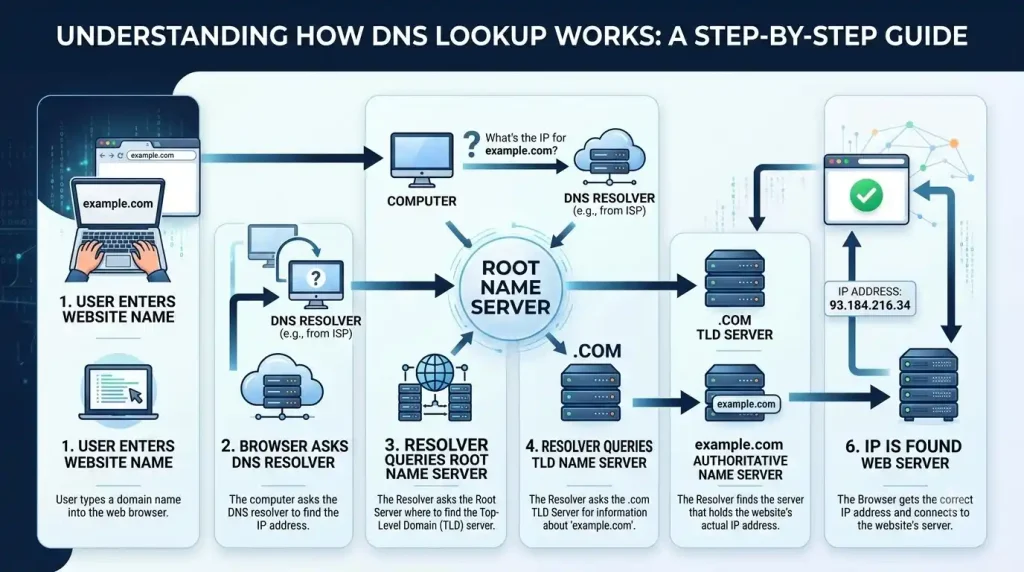
The DNS process usually happens within seconds.
Although the technical system behind DNS can be complex, the basic process is easier to understand.
Here’s a simplified explanation:
Step 1: You Enter a Domain Name
You type a website address into your browser.
For example:
example.com
Your browser needs to find the correct IP address connected to that domain.
Step 2: The Browser Checks Existing Information
Before making a new request, your browser or device may check whether it already has a recent DNS record stored in its cache.
If the information is available and still valid, the browser may use it immediately.
Step 3: A DNS Resolver Looks for the Answer
If the information is not available locally, a DNS resolver begins looking for the correct DNS information.
The resolver may communicate with other DNS servers to locate the correct record.
Step 4: DNS Finds the Correct IP Address
Once the correct DNS record is found, the IP address is returned to your device.
Step 5: Your Browser Connects to the Website
Your browser can now connect to the correct server and request the website.
All of this normally happens very quickly.
Why Is DNS Important?
DNS is important because it makes the internet easier for people to use.
Imagine trying to remember a different string of numbers for every website you visit.
Domain names are much easier to remember than IP addresses.
DNS also plays an important role in connecting domains to different online services.
For example, DNS records can help connect your domain to:
- A website hosting server
- Email services
- Subdomains
- Website verification services
- Security and authentication tools
Correct DNS configuration is essential for keeping these services working properly.
What Is a DNS Server?
A DNS server is a server that stores or helps locate DNS information.
Different DNS servers have different responsibilities.
Some help direct requests to the correct location, while others store authoritative information about specific domains.
The DNS system uses multiple levels to find the correct answer efficiently.
This distributed structure helps the internet handle an enormous number of requests every day.
What Are DNS Records?
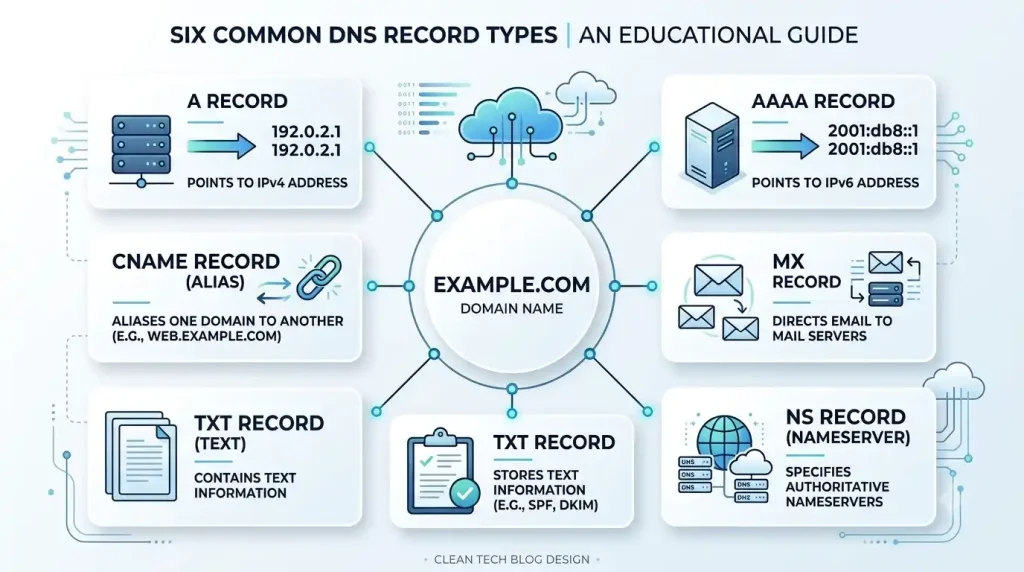
DNS records are instructions connected to a domain name.
They tell internet services where different parts of your domain should point.
Several types of DNS records are commonly used.
A Record
An A record connects a domain name to an IPv4 address.
For example, it can tell browsers which server should handle requests for your website.
AAAA Record
An AAAA record connects a domain name to an IPv6 address.
It works similarly to an A record but uses the newer IPv6 addressing system.
CNAME Record
A CNAME record points one domain or subdomain to another domain name.
It is commonly used for aliases and certain service configurations.
MX Record
An MX record helps direct email sent to your domain.
If you use a custom business email address, MX records are an important part of the configuration.
TXT Record
A TXT record stores text-based information related to a domain.
It is often used for:
- Domain verification
- Email authentication
- Security settings
- Service verification
NS Record
An NS record identifies the nameservers responsible for a domain’s DNS information.
Nameservers are an important part of DNS management because they tell the internet where to find the authoritative DNS records for your domain.
DNS vs Domain Name: What Is the Difference?
A domain name and DNS are closely connected, but they are not the same thing.
Domain Name
A domain name is the address people type into a browser.
Examples include:
- example.com
- example.org
DNS
DNS is the system that helps translate the domain name into the information computers need to find the correct server.
In simple terms:
The domain name is the address people remember.
DNS helps direct that address to the correct destination.
If you’re choosing a domain for a new website, you can also read our guide on how to choose a domain name.
DNS vs Web Hosting
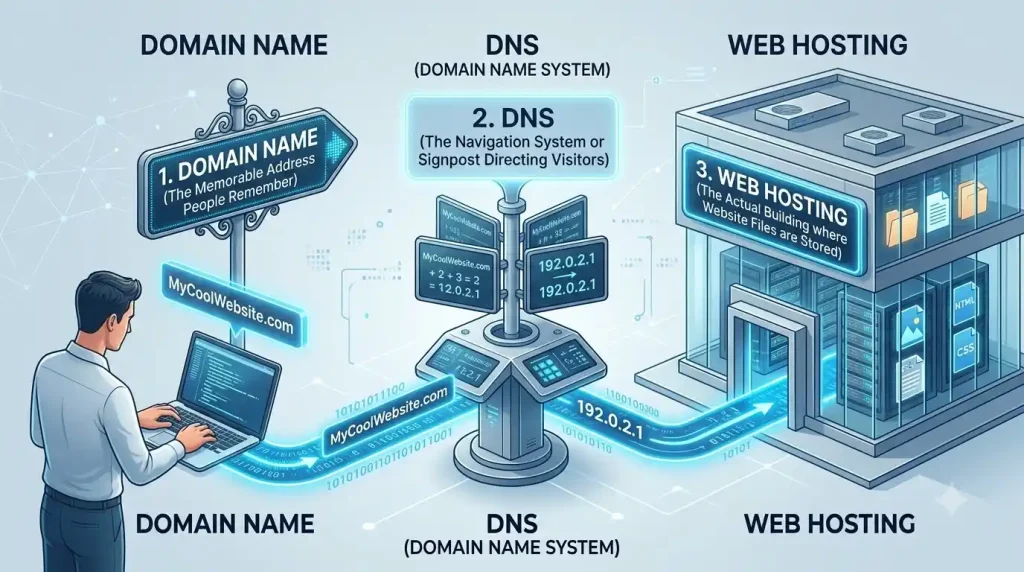
DNS and web hosting also have different roles.
DNS
DNS helps direct visitors and services to the correct destination.
Web Hosting
Web hosting provides the server environment where your website files and applications are stored.
For example, when someone visits your website:
- DNS helps locate the correct server.
- The browser connects to the server.
- The hosting server sends the website files.
- The website appears in the visitor’s browser.
You can learn more in our beginner’s guide explaining what web hosting is.
What Are Nameservers?
Nameservers are servers that manage or direct DNS information for your domain.
When you register a domain, your domain registrar may provide default nameservers.
You can sometimes change nameservers if you want another company or service to manage your DNS.
For example, a website owner may use:
- The registrar’s nameservers
- The hosting provider’s nameservers
- A dedicated DNS provider
Changing nameservers should be done carefully.
Incorrect nameserver settings can prevent your website or email services from working correctly.
What Is DNS Propagation?
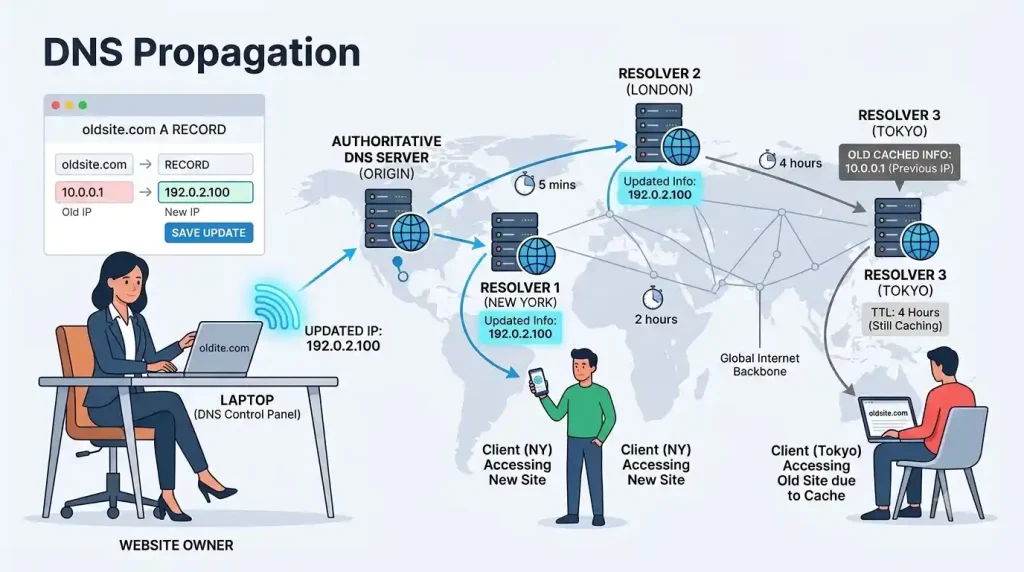
After you change certain DNS settings, the new information may not appear everywhere immediately.
This process is commonly called DNS propagation.
Different DNS systems and internet providers may update their cached information at different times.
As a result, some people may see the new configuration before others.
The amount of time can vary depending on factors such as caching and TTL settings.
This is why it is important to plan DNS changes carefully, especially for active websites and business email services.
What Is DNS Cache?
DNS caching helps speed up the process of finding DNS information.
Instead of searching for the same information repeatedly, devices and DNS services may temporarily store previously requested records.
This can make future requests faster.
However, cached information can also mean that DNS changes do not appear immediately everywhere.
Eventually, cached information expires and new DNS information can be requested.
Common DNS Problems
DNS problems can sometimes prevent a website or email service from working properly.
Here are some common issues.
Incorrect DNS Records
A wrong IP address or incorrectly configured record can send visitors to the wrong destination.
Incorrect Nameservers
If a domain is connected to the wrong nameservers, the correct DNS records may not be found.
Missing MX Records
Incorrect or missing MX records can cause problems with business email delivery.
DNS Propagation Delays
After making changes, different users may temporarily receive different results while cached information updates.
Expired Domain
If a domain registration expires, DNS-related services may stop functioning properly.
How to Change DNS Settings Safely
DNS settings are powerful, so it is important to make changes carefully.
Before changing DNS records, follow these steps.
1. Save Your Existing DNS Records
Before making changes, take a screenshot or copy your existing records.
This makes it easier to restore the previous configuration if something goes wrong.
2. Understand What You Are Changing
Do not delete records unless you understand what they do.
Some records may be necessary for your website, email, or verification services.
3. Change One Thing at a Time
Avoid making many unrelated DNS changes at once.
Changing one setting at a time makes troubleshooting easier.
4. Check Your Website and Email
After making changes, test your:
- Website
- Important pages
- Contact forms
- Business email
- Subdomains
5. Allow Time for DNS Updates
Remember that DNS changes may not appear immediately for everyone.
Be patient and avoid repeatedly changing settings before the previous changes have had time to update.
How Does DNS Affect Website Speed?
DNS is only one part of website performance.
Before a browser connects to your website, it may need to complete a DNS lookup.
A fast and reliable DNS system can help reduce delays during this process.
However, DNS alone will not solve every website speed problem.
Other important factors include:
- Hosting performance
- Image optimization
- Website code
- Caching
- Server location
- Content delivery
For websites with visitors from different countries, you may also find our guide on what a CDN is helpful.
A CDN can work alongside DNS and hosting to improve how website content is delivered.
DNS and Website Security
DNS configuration can also be important for website security.
Incorrect DNS settings may create problems or expose services unnecessarily.
Website owners should:
- Use strong account passwords
- Enable two-factor authentication
- Keep registrar accounts secure
- Review DNS records regularly
- Remove unused records when appropriate
DNS security is only one part of protecting a website, but proper management can help reduce avoidable risks.
Frequently Asked Questions
What Is DNS in Simple Words?
DNS is a system that translates domain names into IP addresses so browsers can find the correct website server.
Is DNS the Same as a Domain?
No. A domain is the website address people use, while DNS helps connect that domain to the correct server or online service.
What Happens If DNS Is Not Working?
Your browser may be unable to find the correct website server, and your website or other services may become inaccessible.
Can I Change My DNS Provider?
Yes, many domain owners can choose where their DNS is managed. However, changes should be made carefully to avoid disrupting websites or email services.
How Long Does DNS Propagation Take?
The timing varies depending on DNS caching and record settings. Some changes may appear quickly, while others can take longer.
Do I Need DNS for My Website?
Yes. DNS is generally necessary to connect your domain name with your website hosting and other online services.
Final Thoughts
So, what is DNS?
The Domain Name System is one of the essential systems that helps people use the internet without memorizing complicated IP addresses.
DNS connects human-friendly domain names with the technical information needed to locate websites and online services.
Understanding the basics of DNS can help you manage your website more confidently.
Whether you’re connecting a new domain to hosting, setting up a business email address, or troubleshooting a website problem, knowing how DNS works can make the process much easier.
The most important thing is to make DNS changes carefully, keep a record of your existing settings, and always test your website and services after making updates.