Google Workspace vs. Microsoft 365 for Small Business: Which One Is Better?
Choosing the right productivity suite is an important decision for any small business. Whether you run a startup, local service company, online store, agency, consulting business, or remote team, you need reliable tools for professional email, cloud storage, document creation, video meetings, calendar management, team communication, and secure file sharing.
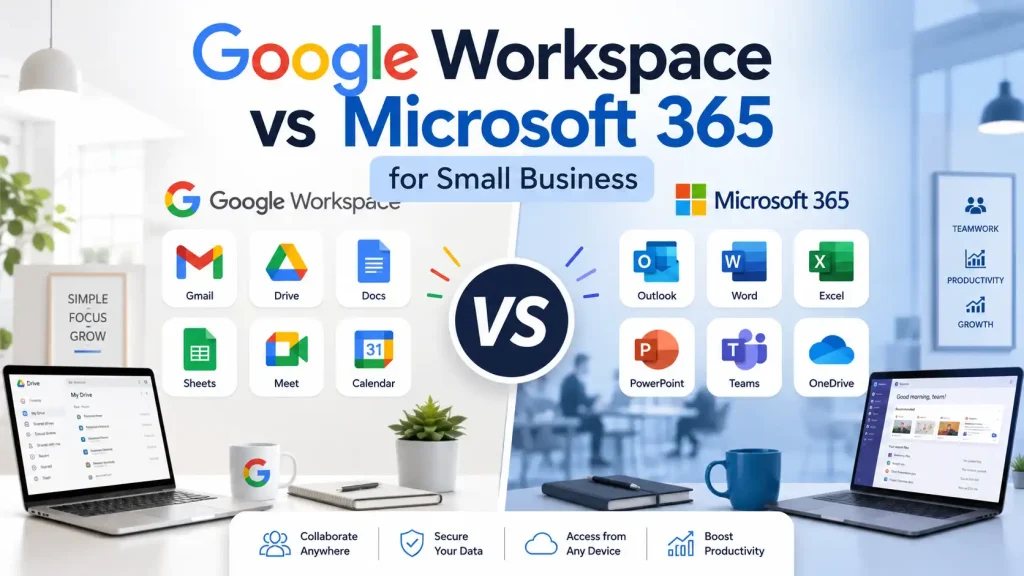
Two of the most popular options are Google Workspace and Microsoft 365. Both platforms are trusted by businesses worldwide, but they are built in different ways. Google Workspace is known for Gmail, Google Drive, Google Docs, Google Sheets, Google Meet, and simple cloud-based collaboration. Microsoft 365 is known for Outlook, Word, Excel, PowerPoint, OneDrive, Microsoft Teams, and powerful Office apps.
So, when comparing Google Workspace vs. Microsoft 365 for small businesses, which one should you choose?
The answer depends on your budget, team size, working style, email preference, storage needs, and whether your business depends more on cloud collaboration or desktop Office apps. In this guide, we will compare Google Workspace and Microsoft 365 in detail so you can make the right decision for your business.
What Is Google Workspace?
Google Workspace is Google’s business productivity suite. It includes tools such as Gmail, Google Drive, Google Docs, Google Sheets, Google Slides, Google Meet, Google Calendar, and Google Chat.
The main strength of Google Workspace is simplicity. It is designed for cloud-based work, which means your team can access files, edit documents, join meetings, and communicate from almost anywhere with an internet connection.
For small businesses, Google Workspace is especially useful because many people already know how to use Gmail and Google Drive. This makes setup and training easier.
For example, instead of using a free email address like
yourbusiness@gmail.com
You can use a professional business email like
contact@yourbusiness.com
This looks more professional and helps build trust with customers.
Google Workspace is a good choice for small businesses that want simple tools, fast setup, easy file sharing, and strong online collaboration.
What Is Microsoft 365?
Microsoft 365 is Microsoft’s business productivity platform. It includes Outlook for business email, OneDrive for cloud storage, Microsoft Teams for meetings and communication, and Office apps such as Word, Excel, PowerPoint, and OneNote.
The biggest advantage of Microsoft 365 is its powerful Office tools. Many businesses already use Word, Excel, and PowerPoint for reports, invoices, presentations, contracts, spreadsheets, and business documents.
Microsoft 365 is also useful for businesses that need offline access. Depending on the plan, users can install desktop apps and continue working even without an internet connection.
For small businesses that already use Windows computers and Microsoft Office files, Microsoft 365 can feel familiar and powerful.
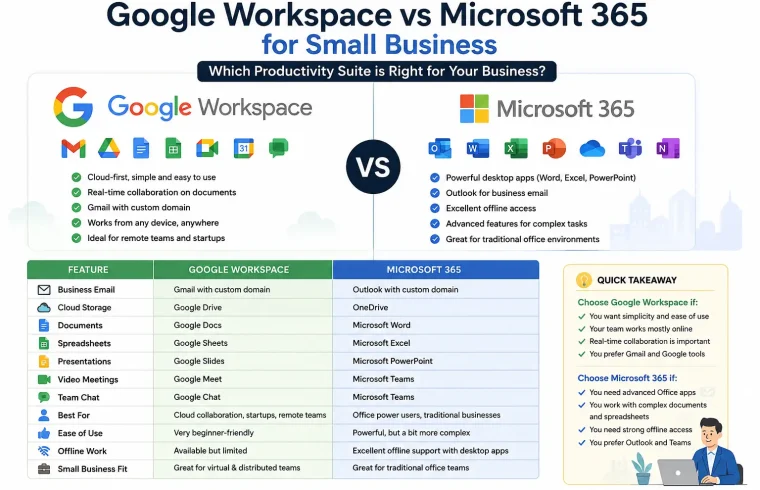
Google Workspace vs Microsoft 365: Quick Comparison
Both Google Workspace and Microsoft 365 offer business email, cloud storage, video meetings, document tools, and security features. However, the user experience is different.
Google Workspace is usually better for teams that want simple online collaboration. Microsoft 365 is usually better for teams that need advanced Office apps and offline work.
| Feature | Google Workspace | Microsoft 365 |
|---|---|---|
| Business Email | Gmail with custom domain | Outlook with custom domain |
| Cloud Storage | Google Drive | OneDrive |
| Documents | Google Docs | Microsoft Word |
| Spreadsheets | Google Sheets | Microsoft Excel |
| Presentations | Google Slides | Microsoft PowerPoint |
| Video Meetings | Google Meet | Microsoft Teams |
| Team Chat | Google Chat | Microsoft Teams |
| Best For | Cloud collaboration | Office power users |
| Ease of Use | Beginner-friendly | Powerful but more complex |
| Offline Work | Available with limits | Strong offline support |
| Small Business Fit | Remote teams, startups, online businesses | Traditional offices, finance, consulting, corporate teams |
Business Email: Gmail vs Outlook
Business email is one of the main reasons small businesses choose Google Workspace or Microsoft 365.
Google Workspace gives you Gmail for business. Gmail is simple, fast, and familiar to many users. It also has strong spam filtering and an easy-to-use interface. With Google Workspace, you can create professional email addresses using your own domain name.
Examples:
support@yourcompany.comsales@yourcompany.comadmin@yourcompany.com
Microsoft 365 uses Outlook for business email. Outlook is powerful, professional, and works very well with calendars, contacts, Teams, and Office apps. Many corporate users prefer Outlook because it offers advanced email organization features.
If your team already likes Gmail, Google Workspace may be the easier choice. If your team is comfortable with Outlook and Microsoft Office, Microsoft 365 may be better.
For most small businesses, both Gmail and Outlook are reliable. The better option depends on your team’s preference.
Cloud Storage: Google Drive vs OneDrive
Cloud storage is important for every small business. You need a secure place to store files, share documents, and access important business data from different devices.
Google Workspace uses Google Drive. Google Drive is simple, clean, and easy to use. You can create folders, upload files, share links, manage permissions, and collaborate on Google Docs, Sheets, and Slides.
Microsoft 365 uses OneDrive. OneDrive works very well with Windows computers and Microsoft Office apps. If your business uses Word, Excel, and PowerPoint often, OneDrive makes file syncing and sharing easier.
Google Drive is usually easier for beginners. OneDrive is better for businesses that already use Microsoft Office and Windows-based workflows.
If your team works mostly online, Google Drive is a strong option. If your team works mostly with Office files, OneDrive may be a better fit.
Collaboration: Which Platform Is Better?
Collaboration is one of the biggest differences between Google Workspace and Microsoft 365.
Google Workspace is built for real-time online collaboration. Multiple team members can open the same document, spreadsheet, or presentation and edit together at the same time. Comments, suggestions, sharing, and version history are easy to manage.
For example, a content team can write an article in Google Docs, the editor can leave comments, the manager can review the draft, and another team member can make changes in real time.
Microsoft 365 also supports collaboration through OneDrive, SharePoint, and Teams. Users can co-edit Word, Excel, and PowerPoint files online. However, Microsoft’s system may feel more complex for beginners because it includes more tools and settings.
For simple real-time collaboration, Google Workspace is usually easier. For structured team communication and Office document collaboration, Microsoft 365 is very strong.
Video Meetings: Google Meet vs Microsoft Teams
Google Workspace includes Google Meet. It is simple, fast, and easy to use. You can schedule meetings through Google Calendar and share meeting links with clients or team members.
Microsoft 365 includes Microsoft Teams. Teams is more than a video meeting tool. It includes chat, channels, file sharing, meetings, and team collaboration features.
Google Meet is better for simple meetings. Microsoft Teams is better for businesses that need a complete communication hub.
If your small business only needs basic video calls, Google Meet is enough. If your team needs organized channels, internal chat, project discussions, and frequent meetings, Microsoft Teams may be better.
Document Tools: Google Docs vs Microsoft Word
Google Docs is simple, clean, and excellent for online collaboration. It is useful for blog posts, meeting notes, content plans, proposals, basic reports, and shared documents.
Microsoft Word is more powerful for advanced formatting. It is widely used for contracts, business reports, official documents, proposals, and professional templates.
If your business creates simple documents and works online, Google Docs is a great choice. If your business needs detailed formatting and professional document layouts, Microsoft Word is better.
For bloggers, affiliate marketers, agencies, and content teams, Google Docs is often easier. For legal, finance, consulting, and corporate businesses, Microsoft Word may be more suitable.
Spreadsheet Tools: Google Sheets vs Microsoft Excel
Google Sheets is useful for basic spreadsheets, content calendars, simple budgets, task lists, and shared data. It is easy to use and works well for online collaboration.
Microsoft Excel is more powerful for advanced spreadsheet work. It is better for complex formulas, financial modeling, large data files, inventory tracking, and business reporting.
If your business only needs simple spreadsheets, Google Sheets is enough. If your business depends on advanced calculations, financial reports, or large datasets, Microsoft Excel is the stronger choice.
For most small businesses, Google Sheets works well. But for accounting, finance, and data-heavy work, Excel is usually better.
Pricing: Which One Is More Affordable?
Pricing is an important factor when comparing Google Workspace vs. Microsoft 365 for small businesses.
Both platforms usually charge per user per month. Google Workspace offers plans such as Business Starter, Business Standard, and Business Plus. Microsoft 365 offers business plans such as Business Basic, Business Standard, and Business Premium.
At the entry level, both platforms can be close in price depending on country, billing type, and plan. However, value depends on what your business actually needs.
Google Workspace may feel more affordable if your business mainly needs Gmail, Drive, Docs, Meet, and simple collaboration.
Microsoft 365 may offer better value if your business needs desktop apps like Word, Excel, PowerPoint, and Outlook.
Before choosing, calculate the total yearly cost based on your number of users. Also check whether monthly billing or annual billing is better for your business.
Ease of Use for Beginners
Google Workspace is usually easier for beginners. The interface is clean, simple, and familiar. Most users can quickly learn Gmail, Drive, Docs, Sheets, and Meet.
Microsoft 365 has more features, but it can feel more complex. Tools like Teams, SharePoint, OneDrive, Outlook, and admin settings may take more time to learn.
If you are a freelancer, blogger, startup owner, affiliate marketer, or very small team, Google Workspace may feel easier.
If your team already knows Microsoft Office, Microsoft 365 may feel natural.
The best productivity platform is not always the one with the most features. It is the one your team can use properly every day.
Security and Admin Control
Security matters for every business. Both Google Workspace and Microsoft 365 include account protection, admin controls, user management, and two-step verification.
Google Workspace has strong spam protection, phishing protection, and admin features. Gmail’s spam filtering is one of its strongest advantages.
Microsoft 365 also provides strong security features, especially in higher-tier plans. It is often preferred by businesses that need advanced identity, compliance, and device management.
For most small businesses, both platforms are secure when configured correctly. Business owners should enable two-factor authentication, use strong passwords, review user access, and remove accounts that are no longer needed.
Good security depends not only on the platform but also on how carefully your business manages accounts.
Best Option for Remote Teams
Google Workspace is a strong option for remote teams. It is cloud-based, simple, and easy to access from different locations. Team members can create documents, share files, join meetings, and communicate online without needing complex setup.
Microsoft 365 is also useful for remote teams, especially with Microsoft Teams. Teams can work as a central place for chat, meetings, files, and project discussions.
Choose Google Workspace if your remote team wants simple cloud collaboration.
Choose Microsoft 365 if your remote team needs structured communication, Teams channels, Office files, and advanced collaboration tools.
Both platforms support remote work, but Google Workspace feels lighter and simpler, while Microsoft 365 feels more powerful and structured.
Best Option for Freelancers and Solopreneurs
For freelancers, bloggers, affiliate marketers, and solopreneurs, Google Workspace is often easier to start with. It gives you professional Gmail, Google Drive, Docs, Sheets, Calendar, and Meet.
A freelancer can use Google Workspace to manage client communication, write proposals, store files, schedule calls, and create content.
Microsoft 365 is also a good choice for freelancers who need Word, Excel, PowerPoint, and Outlook. If your clients often send Microsoft Office files, Microsoft 365 may be more convenient.
For online business owners and content creators, Google Workspace is usually easier. For consultants, accountants, and professionals who depend on Office documents, Microsoft 365 may be better.
Best Option for Agencies and Growing Teams
Both platforms can work well for agencies.
A marketing agency may prefer Google Workspace because it makes content collaboration simple. Writers, editors, designers, and clients can review documents and leave comments in real time.
A consulting or finance agency may prefer Microsoft 365 because it provides stronger document formatting, advanced Excel features, and Teams for internal communication.
If your agency focuses on content, SEO, marketing, and client collaboration, Google Workspace is simple and effective.
If your agency works with reports, presentations, spreadsheets, and structured internal teams, Microsoft 365 may be more powerful.
Offline Work: Which One Is Better?
Microsoft 365 is better for offline work. With the right plan, users can install desktop versions of Word, Excel, PowerPoint, and Outlook. They can continue working without an internet connection and sync changes later.
Google Workspace has offline options, but it is mainly designed for cloud-based work. It works best with a stable internet connection.
If your business often works offline, travels frequently, or needs desktop software, Microsoft 365 is the better choice.
If your business works mostly online through a browser, Google Workspace should be enough.
Google Workspace Pros and Cons
Pros
Google Workspace is easy to use and beginner-friendly. It is simple to set up, and many people already understand Gmail and Google Drive.
It is excellent for real-time collaboration. Multiple users can work on the same file, leave comments, suggest edits, and track changes easily.
Google Workspace is also a good choice for remote teams, startups, bloggers, agencies, and small businesses that want a clean cloud-based workflow.
Cons
Google Workspace is less powerful than Microsoft 365 for advanced document formatting and complex spreadsheet work.
Offline work is more limited compared to Microsoft desktop apps.
If your business depends heavily on Word, Excel, and PowerPoint files, Google Workspace may feel less powerful.
Microsoft 365 Pros and Cons
Pros
Microsoft 365 includes powerful business tools such as Word, Excel, PowerPoint, Outlook, Teams, and OneDrive.
It is excellent for offline work, advanced spreadsheets, professional presentations, and detailed document formatting.
Microsoft Teams is also a strong tool for meetings, chat, file sharing, and internal communication.
Cons
Microsoft 365 can feel more complex for beginners. Some small businesses may not need all the features.
The admin area and collaboration structure may require more learning, especially when using Teams, SharePoint, and OneDrive together.
For simple online collaboration, Google Workspace may feel faster and easier.
Which Is Better for Small Business?
There is no single answer for every business. Both Google Workspace and Microsoft 365 are reliable productivity platforms.
Choose Google Workspace if:
- You want a simple and easy-to-use system
- Your team works mostly online
- You prefer Gmail
- You need real-time collaboration
- You run a remote team
- You are a freelancer, blogger, startup, or agency
- You do not need advanced desktop Office apps
Choose Microsoft 365 if:
- You need Word, Excel, PowerPoint, and Outlook
- Your team uses Office files every day
- You need strong offline access
- You use Windows computers
- You need advanced Excel features
- You want Microsoft Teams for communication
- Your business needs traditional office software
For many small businesses, Google Workspace is easier to start with. For businesses that need advanced tools and offline apps, Microsoft 365 may be the better long-term choice.
Final Verdict
When comparing Google Workspace vs. Microsoft 365 for small businesses, both platforms are strong choices. The right option depends on how your team works.
If your small business needs simple email, easy file sharing, online collaboration, and beginner-friendly tools, Google Workspace is a great choice.
If your small business needs powerful Office apps, advanced spreadsheets, desktop software, and strong offline access, Microsoft 365 is a better choice.
The easiest way to decide is to ask one question:
Do you prefer Gmail and simple cloud collaboration, or do you need Outlook and powerful Microsoft Office apps?
Once you answer that question, choosing between Google Workspace and Microsoft 365 becomes much easier.
Frequently Asked Questions
Is Google Workspace better than Microsoft 365 for small businesses?
Google Workspace is better for small businesses that want simple cloud-based collaboration, Gmail, Google Drive, Google Docs, and easy sharing. Microsoft 365 is better for businesses that need Word, Excel, PowerPoint, Outlook, and desktop apps.
Which is cheaper: Google Workspace or Microsoft 365?
Both platforms have business plans with monthly or annual pricing. The cheaper option depends on your country, billing cycle, number of users, and required features.
Can I use my own domain with Google Workspace?
Yes, Google Workspace allows you to use your own domain for professional business email, such as info@yourbusiness.com.
Can I use my own domain with Microsoft 365?
Yes, Microsoft 365 also supports custom domain business email through Outlook and Microsoft’s business email services.
Gmail vs. Outlook: Which is better for business email?
Gmail is simple, fast, and beginner-friendly. Outlook is powerful, professional, and works well with Microsoft Office and calendar tools. The better choice depends on your team’s preference.
Is Microsoft 365 good for small businesses?
Yes, Microsoft 365 is a strong option for small businesses that need Word, Excel, PowerPoint, Outlook, OneDrive, and Teams.
Is Google Workspace good for remote teams?
Yes, Google Workspace is excellent for remote teams because it makes online collaboration easy. Team members can edit documents, share files, schedule meetings, and communicate from different locations.
Which platform is better for collaboration?
Google Workspace is usually easier for real-time document collaboration. Microsoft 365 is also strong, especially with Teams and OneDrive, but it may take more time to learn.
Which platform is better for offline work?
Microsoft 365 is better for offline work because many business plans include desktop Office apps. Google Workspace has offline options, but it is mainly designed for cloud-based work.
Which one should I choose for my business?
Choose Google Workspace if you want simplicity, Gmail, and cloud collaboration. Choose Microsoft 365 if you need Office apps, Outlook, Excel, Teams, and offline access.