
7 Best AI Plugins for WordPress in 2026
If you want to save time managing a WordPress website, AI plugins for WordPress can help with content, SEO, website design, chatbots, automation, and other repetitive tasks.
But installing every plugin that includes an “AI” feature is not a good strategy. Different plugins solve different problems, and some may require an external API, additional costs, or more server resources.
In this guide, we compare the 7 best AI plugins for WordPress in 2026, explain what each plugin is useful for, and show you how to choose the right one for your website.
Quick answer: For general AI features, AI Engine is one of the most flexible options. For SEO, Rank Math and All in One SEO are stronger choices. Elementor is a better fit if you already use Elementor for website design.
Table of Contents
- What Are AI Plugins for WordPress?
- How Do AI WordPress Plugins Work?
- 7 Best AI Plugins for WordPress in 2026
- How to Choose the Best AI Plugin for WordPress
- Are AI Plugins Safe for WordPress?
- Can AI Plugins Slow Down WordPress?
- AI Plugins vs External AI Tools
- Common Mistakes to Avoid
- Frequently Asked Questions
- Final Thoughts
What Are AI Plugins for WordPress?
AI plugins for WordPress add artificial intelligence features directly to your website or WordPress dashboard.

Depending on the plugin, you may be able to use AI to:
- Generate or rewrite content
- Create SEO titles and meta descriptions
- Generate images
- Build website sections
- Create chatbots
- Translate content
- Automate repetitive tasks
- Generate code
- Analyze website content
- Assist with SEO
The important thing to understand is that an AI plugin is not necessarily an AI model itself. Many plugins connect WordPress to external AI services through an API.
That means the plugin may be free while AI usage can have separate limits or costs.
Before installing an AI plugin, always check its pricing, API requirements, privacy policy, update history, and compatibility with your WordPress setup.
How Do AI WordPress Plugins Work?
Most AI WordPress plugins follow a simple process.
- You install the plugin.
- You configure its settings.
- You connect an AI provider if required.
- You enter a prompt or choose an AI function.
- The plugin sends the request to an AI service.
- The AI generates a response.
- You review and edit the result.
- You publish or use the result on your website.
For example, an AI content plugin may generate a draft from a topic. An AI SEO plugin may suggest a title or meta description. An AI website builder may generate a page layout from a natural-language instruction.
The amount of control you get depends on the plugin.
7 Best AI Plugins for WordPress in 2026

1. AI Engine
Best for: General AI features, chatbots, content generation, automation, and advanced AI workflows.
AI Engine is one of the most flexible options if you want to add several AI capabilities to WordPress.
According to its current WordPress.org listing, AI Engine can connect WordPress with multiple AI providers and can be used for chatbots, content generation, AI forms, image generation, and automation. It also provides tools for more advanced WordPress AI workflows.
Key features
- AI chatbots
- Content generation
- AI forms
- Image generation
- Multiple AI provider connections
- Translation
- AI-powered workflows
- Developer APIs
- MCP support
One advantage is flexibility. You are not limited to a single AI-related task.
The downside is that beginners may find the number of settings overwhelming.
AI Engine also requires you to consider the AI provider you connect and its API usage. The plugin’s official listing explains that users need their own API keys for supported AI services.
Best for: Website owners who want an all-purpose AI toolkit inside WordPress.
2. Rank Math SEO
Best for: AI-assisted WordPress SEO.
If your main reason for using AI is SEO, you may not need a general-purpose AI plugin.
Rank Math combines WordPress SEO tools with AI-assisted features. Its WordPress.org listing currently describes features for content optimization, schema, internal links, keyword targeting, and SEO checks.
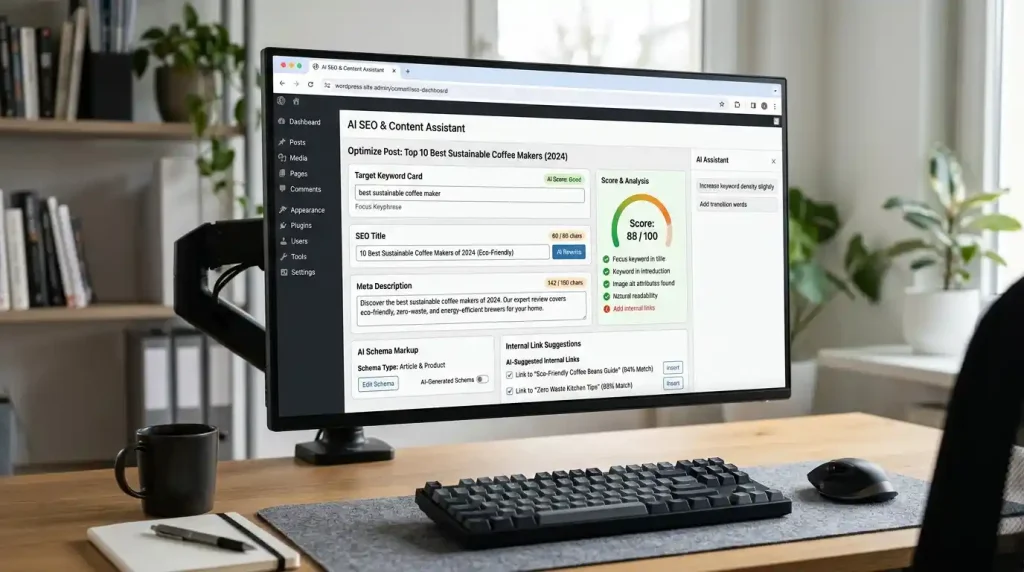
You can use an SEO plugin to manage:
- SEO titles
- Meta descriptions
- Schema markup
- XML sitemaps
- Focus keywords
- Internal linking
- Redirects
- On-page SEO
For GlobalVior, this is particularly relevant because you are already using Rank Math to optimize articles.
You can also read our detailed guide on WordPress SEO plugin to understand how to choose an SEO plugin for your website.
Why use Rank Math for AI-assisted SEO?
AI can make repetitive SEO work faster, but you should still review every suggestion.
For example, an AI-generated title may contain the target keyword but still be weak from a reader’s perspective.
The goal should be a useful title first and keyword optimization second.
3. All in One SEO
Best for: Beginners who want SEO and AI features in one plugin.
All in One SEO, also known as AIOSEO, is another established WordPress SEO plugin.
Its current WordPress.org listing describes AI-assisted features for generating SEO titles, meta descriptions, FAQs, articles, images, and schema markup. It also includes standard SEO features such as XML sitemaps, redirects, keyword tracking, and internal linking tools.
Why consider AIOSEO?
- Beginner-friendly SEO setup
- AI-assisted SEO features
- XML sitemap
- Schema markup
- SEO analysis
- Internal linking tools
- Redirect management
- Google Search Console integration
AIOSEO is worth considering if you want a broad SEO toolkit with AI features.
However, you generally should not run multiple full SEO plugins on the same WordPress website.
Choose one primary SEO plugin and configure it properly.
4. Elementor
Best for: AI-assisted WordPress website design.
Elementor is primarily a WordPress website builder, but its current version also includes AI-related functionality.
The official WordPress.org listing says Elementor now includes agentic AI capabilities, including the ability to use natural-language instructions to create editable website structures, layouts, widgets, and WordPress snippets.
What can Elementor AI help with?
Depending on the available features and plan, you can use AI to assist with:
- Website layouts
- Page sections
- Content
- Code
- Design workflows
- Website components
This is especially useful if you already use Elementor.
If you are using another page builder, installing Elementor only because of its AI features may not be worthwhile.
Best for: Users who want AI assistance while designing and editing WordPress pages.
5. Jetpack AI Assistant
Best for: AI-assisted writing inside the WordPress editing workflow.
Jetpack AI Assistant is designed to help WordPress users with content-related tasks directly inside the WordPress environment.
It can be useful for:
- Creating drafts
- Rewriting paragraphs
- Changing writing tone
- Creating lists
- Improving existing text
- Generating content ideas
The main advantage of this type of plugin is convenience.
Instead of moving between your WordPress editor and a separate AI application for every small task, AI assistance can be available closer to the content you’re editing.
However, AI-generated text should still be reviewed before publishing.
That is especially important for factual articles, product reviews, tutorials, and technical guides.
6. Uncanny Automator
Best for: WordPress automation and connecting different website actions.
Not every AI workflow is about writing articles.
For larger WordPress websites, automation can be more useful.
Tools such as Uncanny Automator can connect actions between WordPress plugins and services. This can reduce repetitive work involving forms, users, memberships, content workflows, and other website functions.
Automation becomes particularly useful when your website has many repetitive tasks.
For example, instead of manually performing the same action every time a user completes a form, an automation workflow can trigger another action automatically.
Best for: Advanced WordPress websites that need workflow automation.
7. WordPress AI
Best for: Exploring AI functionality within the WordPress ecosystem.
The official WordPress AI plugin is another option worth watching.
Its WordPress.org listing provides AI-related functionality and experiments designed around WordPress. Because this area is changing quickly, you should check the plugin’s current documentation and supported features before depending on a specific feature for a production website.
This can be a useful option for WordPress users who want to explore AI capabilities without relying entirely on third-party WordPress tools.
Best for: Users interested in WordPress-focused AI features and experiments.
Best AI Plugins for WordPress: Quick Comparison
| Plugin | Best For | Difficulty |
|---|---|---|
| AI Engine | General AI, chatbots, content, automation | Advanced |
| Rank Math | SEO and content optimization | Beginner–Intermediate |
| All in One SEO | SEO + AI features | Beginner |
| Elementor | AI-assisted website design | Beginner–Intermediate |
| Jetpack AI Assistant | Writing and editing | Beginner |
| Uncanny Automator | Automation | Intermediate–Advanced |
| WordPress AI | WordPress AI features | Beginner–Intermediate |
The best choice depends on your specific requirement. You do not need all seven plugins.
How to Choose the Best AI Plugin for WordPress
Before installing an AI plugin, answer one simple question:
What do I actually want AI to do on my website?
If you need AI for SEO
Choose an established SEO plugin such as Rank Math or All in One SEO.
If you are working on your site’s SEO, our guide on how to do WordPress SEO can help you build a complete SEO process instead of relying only on AI.
If you need AI for content
Look for a plugin that can help with drafting, rewriting, outlining, or editing.
But don’t publish AI output without reviewing it.
If you need AI for website design
Elementor may make more sense if you already use Elementor.
AI should help you build faster, but you should still control the site’s layout, navigation, branding, and user experience.
If you need an AI chatbot
Look for a plugin designed specifically for chatbot functionality.
AI Engine is one option worth considering because its current plugin listing includes chatbot functionality.
If you need automation
Look for workflow and automation features rather than simply choosing a plugin because it contains an AI writing tool.

Are AI Plugins Safe for WordPress?
An AI plugin is not automatically safe or unsafe.
You should evaluate it like any other WordPress plugin.
Before installation, check:
- Developer reputation
- Plugin reviews
- Active installations
- Update frequency
- Support activity
- WordPress compatibility
- Required permissions
- External API connections
- Privacy policy
- Pricing and usage limits
Download plugins from trusted sources whenever possible.
The official WordPress Plugin Directory provides information about plugin development, support, reviews, compatibility, and other details that can help you evaluate a plugin.
Also keep your WordPress core, themes, and plugins updated.
Can AI Plugins Slow Down WordPress?
Yes, some AI plugins can affect performance.
The impact depends on how the plugin works.
For example, a plugin that adds a chatbot to every page may load additional scripts. An AI image or automation plugin may also make external requests.
If you notice that your website becomes slower after installing a new plugin, test the site before and after the installation.
You can also follow our guide on WordPress speed optimization to improve loading performance and identify common performance problems.
Do not install several optimization plugins just to compensate for one unnecessary plugin.
A simpler WordPress setup is usually easier to maintain.
AI Plugins vs External AI Tools
You do not always need an AI plugin.
AI plugin advantages
- Works directly inside WordPress
- Less copying and pasting
- Can access WordPress workflows
- Can automate repetitive tasks
- Convenient for regular website management
AI plugin disadvantages
- Adds another plugin to your website
- May require an API key
- May create additional server or external requests
- Some features require paid plans
- Plugin conflicts are possible
External AI tool advantages
- Does not add another WordPress plugin
- Easy to test different AI models
- Keeps WordPress installation simpler
- Useful for research and planning
External AI tool disadvantages
- More manual work
- Copying and pasting between tools
- Less direct WordPress integration
- Harder to automate certain tasks
If you only need AI occasionally, an external tool may be enough.
If you repeatedly perform the same AI task inside WordPress, a dedicated plugin may save time.
Common AI WordPress Plugin Mistakes
Installing Too Many AI Plugins
You do not need five different plugins for five small AI features.
Start with the plugin that solves your biggest problem.
Publishing AI Content Without Editing
AI can produce incorrect or outdated information.
Google’s current guidance specifically recommends manually reviewing AI-generated content for accuracy and trustworthiness.
Always fact-check important information before publication.
Choosing a Plugin Only Because It Says “AI”
The word “AI” does not automatically mean a plugin is better.
Look at the actual feature, user reviews, support, updates, and compatibility.
Ignoring API Costs
Some plugins connect to external AI providers.
The WordPress plugin may be free while API usage is billed separately.
Always check how much your expected usage could cost.
Ignoring Website Performance
A new AI feature is not worth keeping if it creates unnecessary performance problems.
Monitor your website after installing a new plugin.
Using AI Only for Search Rankings
This is one of the biggest mistakes.
Google says using generative AI to produce many pages without adding value can violate its scaled content abuse policies. Google recommends focusing on accuracy, quality, relevance, originality, and people-first content.
Use AI as a tool to improve your workflow, not as a shortcut for producing large amounts of low-value content.
Frequently Asked Questions
What is the best AI plugin for WordPress?
There is no single best AI plugin for every website. AI Engine is a flexible choice for general AI functionality, while Rank Math and All in One SEO are more appropriate for SEO-related tasks. Elementor is a strong option for users who want AI-assisted website design.
Are AI plugins free?
Some AI plugins have free versions, but certain features may require a paid plan or external API usage. Always check the current pricing and usage limits before installing a plugin.
Can AI plugins write WordPress articles?
Yes. Some AI plugins can generate drafts, outlines, paragraphs, and other content. However, you should fact-check and edit the output before publishing.
Can AI plugins improve WordPress SEO?
Yes. AI can assist with SEO titles, meta descriptions, content suggestions, schema, and other tasks. However, AI should support your SEO strategy rather than replace it.
Will AI plugins hurt SEO?
Using AI does not automatically hurt SEO. Google focuses on the quality and usefulness of the content rather than simply whether AI was involved in creating it. Content created primarily to manipulate search rankings is a different matter.
Should I install multiple AI plugins?
Usually, no.
Install a plugin when it solves a real problem. Avoid installing several plugins that perform the same function.
Can AI plugins slow down WordPress?
Some can. Chatbots, external API requests, image generation, and automation can add additional resources or requests. Test your website after installing a new plugin and remove tools you do not need.
Final Thoughts
The best AI plugins for WordPress depend on what you want to accomplish.
For general AI functionality, AI Engine is a flexible option. For SEO, Rank Math and All in One SEO are stronger choices. If you build websites with Elementor, its AI capabilities can help with design and development. For automation, workflow-focused plugins can be more useful than general AI writing tools.
You do not need every AI plugin available.
Start with one clear goal, choose the plugin that solves it, and monitor your website after installation.
Most importantly, do not let AI replace your own judgment.
Use AI to research, organize, draft, automate, and speed up repetitive tasks. Then review the final result yourself.
Google’s current guidance continues to emphasize useful, original, reliable, people-first content. Its current guidance for AI search also says that foundational SEO practices remain important for visibility in Google Search and AI features.