
Have you ever visited a website that took several seconds to load, even though your internet connection was working perfectly?
Sometimes the problem is not your device. The website’s files may simply be located far away from you, which can increase the time needed to deliver pages, images, videos, and other content.
This is one of the problems a Content Delivery Network (CDN) is designed to help solve.
A CDN can help websites deliver content from servers located closer to visitors. Instead of relying entirely on one server in one location, a CDN uses a distributed network to make content available more efficiently.
But what exactly is a CDN, how does it work, and does every website need one?
In this beginner-friendly guide, you’ll learn the basics of CDNs, how they can improve website performance, and what to consider before using one.
What Is a CDN?
CDN stands for Content Delivery Network.
A CDN is a network of servers distributed across different geographic locations. Its main purpose is to help deliver website content to visitors efficiently.
When someone visits a website, they may need to download files such as:
- Images
- CSS files
- JavaScript files
- Videos
- Fonts
- Other static website resources
Without a CDN, these files may be delivered directly from the website’s main server.
With a CDN, certain content can be delivered through a server that is geographically closer to the visitor.
This can help reduce the distance data needs to travel and may improve loading performance.
How Does a CDN Work?
Imagine your website’s main server is located in the United States.
A visitor from Canada may be relatively close to that server, while someone visiting from Asia or Europe may be much farther away.
Without a CDN, every visitor may need to request content from the same main server.
A CDN changes this by using multiple locations, often called edge servers or points of presence (PoPs).
When a visitor requests content, the CDN can deliver cached files from a nearby location when available.
A simplified process looks like this:
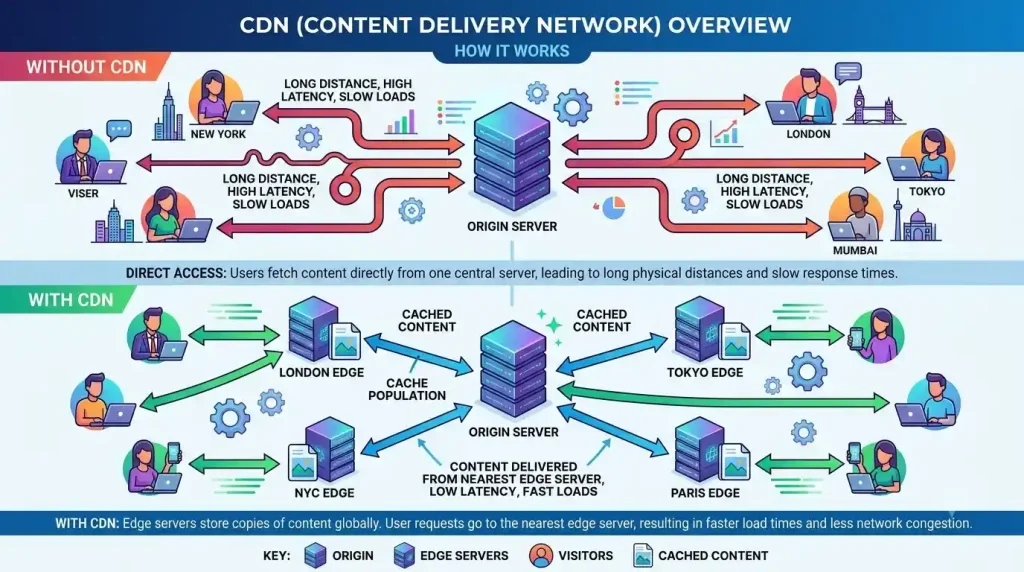
- A visitor opens your website.
- The request is directed through the CDN.
- The CDN checks for a nearby server.
- Cached content is delivered from that location when available.
- The visitor receives website resources more efficiently.
The exact process can vary depending on the CDN provider and how the website is configured.
What Is CDN Caching?
Caching is one of the most important parts of how many CDNs work.
A cache is a temporary stored copy of content.
For example, your website may have an image that appears on thousands of pages.
Instead of requesting that same image from the main server every time someone visits, a CDN may store a cached copy at different locations.
When another visitor requests the same image, the CDN may be able to deliver the cached version.
This can reduce unnecessary requests to the origin server and help websites handle traffic more efficiently.
However, caching needs to be configured carefully.
If a cached page is not updated correctly, visitors may temporarily see older content. This is why cache rules and cache clearing are important parts of website management.
How Can a CDN Improve Website Speed?
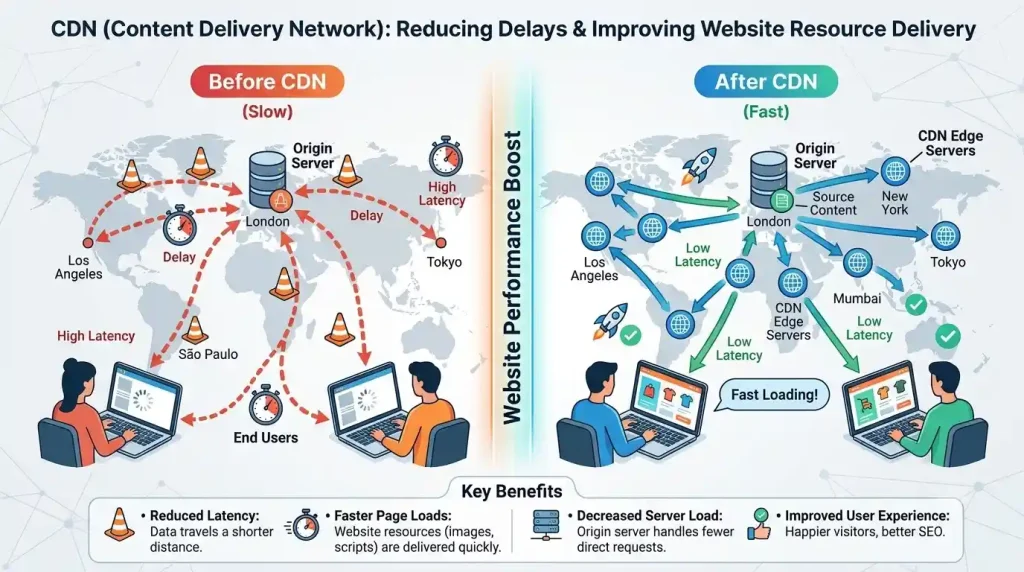
A CDN cannot magically fix every performance problem.
For example, a poorly optimized website with huge images and inefficient code may still be slow.
However, a properly configured CDN can help improve certain aspects of website delivery.
1. Content Can Be Delivered Closer to Visitors
One of the main benefits of a CDN is geographic distribution.
When content is delivered from a server closer to the visitor, the connection may require less distance to travel.
This can help reduce latency.
2. It Can Reduce Pressure on Your Main Server
If many visitors request the same static files, a CDN can serve cached copies instead of sending every request directly to the origin server.
This can reduce the workload on your main hosting environment.
3. It Can Handle Traffic More Efficiently
A sudden increase in visitors can create pressure on a single server.
A CDN may help distribute requests across its network, depending on the provider and configuration.
This can be useful for websites that receive visitors from multiple locations.
4. Static Files Can Be Delivered More Efficiently
Images, stylesheets, JavaScript files, and fonts can account for a significant part of a webpage.
A CDN can help deliver these resources efficiently when caching is properly configured.
CDN vs Web Hosting: What Is the Difference?
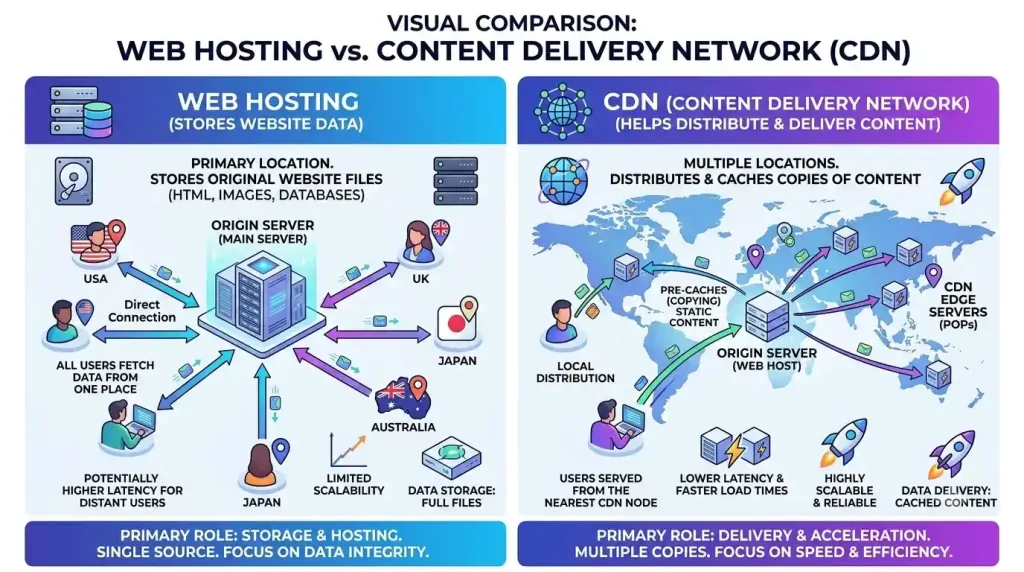
A CDN and web hosting are related, but they do different jobs.
Web Hosting
Your hosting provider stores your website and makes its core resources available online.
This may include:
- Website files
- Databases
- Applications
- Email services, depending on the plan
CDN
A CDN helps distribute and deliver certain website content through a network of servers.
In most cases, a CDN does not completely replace your web hosting.
Instead, it works alongside your hosting environment.
If you’re new to website building, you can also read our guide on what web hosting is to understand the basics.
Can a CDN Improve Website Uptime?
A CDN is not a complete replacement for reliable hosting, but it may contribute to website availability in some situations.
For example, a CDN can help reduce pressure on the origin server by handling cached content.
Some CDN services also include additional infrastructure and security features that can help manage certain types of traffic.
However, if your origin server experiences a serious failure, the CDN may not always be able to keep every part of your website functioning.
Website reliability depends on several factors, including hosting quality, server infrastructure, backups, security, and monitoring.
For more information, you can also read our guide about website uptime and why it matters.
CDN and Website Security
Many CDN providers offer security-related features.
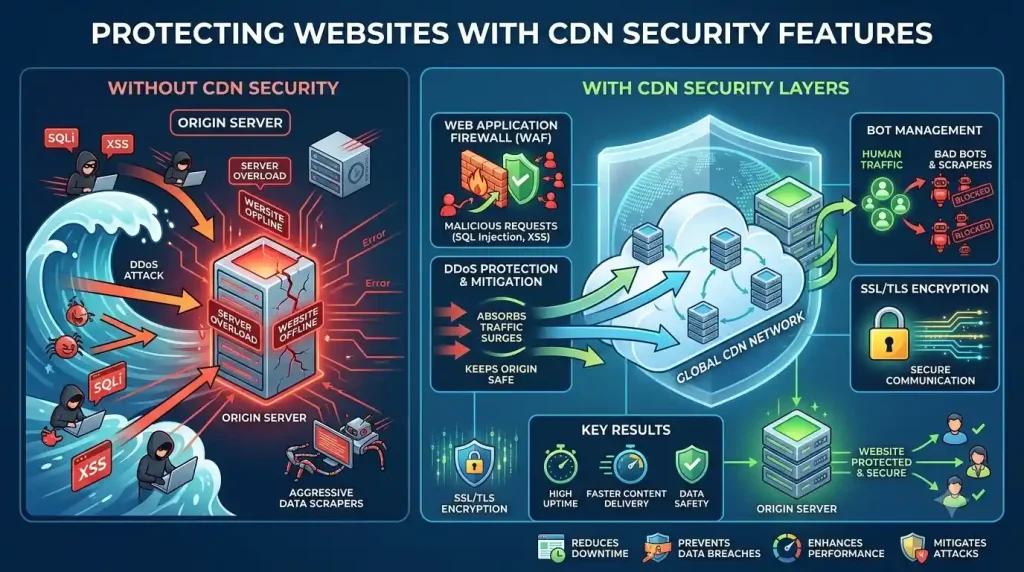
Depending on the service, these may include:
- DDoS mitigation
- Web application firewalls
- Bot management
- Traffic filtering
- SSL/TLS support
These features can help protect websites from certain types of malicious or unwanted traffic.
However, using a CDN does not mean you should ignore website security.
You should still:
- Use strong passwords
- Keep software updated
- Enable two-factor authentication
- Create regular backups
- Remove unnecessary plugins and themes
Security works best when multiple layers are used together.
Do Small Websites Need a CDN?
Not every small website absolutely needs a CDN.
If your audience is located mainly in one region and your hosting server is nearby, you may already get acceptable performance without one.
However, a CDN can still be useful for:
- Websites with international visitors
- Image-heavy websites
- Growing blogs
- Online stores
- Websites receiving traffic from multiple countries
The decision should depend on your website’s needs.
You should not install a CDN simply because it is popular.
First, check your website’s performance and identify whether content delivery is actually a problem.
What Types of Websites Can Benefit From a CDN?
Many different websites can potentially benefit from a CDN.
Blogs and Content Websites
Blogs often contain images, CSS, JavaScript, and other static resources.
A CDN can help distribute these files efficiently to readers in different locations.
Online Stores
E-commerce websites may receive visitors from different regions and experience traffic spikes during promotions.
Efficient content delivery can improve the visitor experience.
Business Websites
A business with customers in multiple countries may benefit from faster content delivery across different geographic regions.
Media Websites
Websites with many images, videos, or downloadable files can place significant demands on hosting resources.
A CDN may help reduce some of that pressure.
Does a CDN Improve SEO?
A CDN does not directly guarantee higher Google rankings.
However, website performance can affect user experience.
If a CDN helps improve loading performance, it may contribute to a better experience for visitors.
Search engine optimization involves many factors, including:
- Helpful content
- Technical accessibility
- Mobile usability
- Page experience
- Website security
- Site performance
A CDN should be viewed as one possible technical tool rather than a shortcut to higher rankings.
Google provides useful information about website performance and page experience through its web performance documentation.
How to Choose a CDN
Different websites have different requirements.
Before choosing a CDN, consider the following factors.
1. Server Locations
Look at the provider’s geographic network.
If most of your visitors are located in North America, Europe, or Asia, it can be useful to understand how well the CDN covers those regions.
2. Performance Features
Compare available features such as:
- Caching
- Image optimization
- Content delivery
- Compression
- Performance monitoring
Only pay attention to features that are useful for your website.
3. Security Features
Some CDNs include additional protection tools.
Consider whether you need:
- DDoS protection
- Firewall features
- Bot protection
- SSL support
4. Ease of Setup
Beginners should consider how difficult the service is to configure.
Some CDNs require DNS changes and advanced settings, while others provide beginner-friendly dashboards.
5. Pricing
Free options may be suitable for some websites, while larger businesses may require paid services.
Always understand:
- Monthly costs
- Usage limits
- Additional charges
- Feature restrictions
Don’t choose a CDN based only on the cheapest price.
How to Set Up a CDN for a Website
The setup process depends on your hosting provider and CDN service.
In many cases, the general process looks like this:
Step 1: Choose a CDN Provider
Compare providers based on your website’s audience, features, and technical requirements.
Step 2: Add Your Website
You may need to add your domain name to the CDN dashboard.
Step 3: Update DNS Settings
Some CDN services require you to change DNS settings.
Be careful when changing DNS records because incorrect settings can temporarily make your website inaccessible.
Step 4: Configure Caching
Set appropriate caching rules for your website’s content.
Static files can often be cached differently from pages that change frequently.
Step 5: Test Your Website
After setup, test important parts of your website.
Check:
- Homepage
- Images
- Navigation
- Forms
- Login areas
- Dynamic content
If you notice problems, review your cache and DNS settings.
Common CDN Mistakes to Avoid
Caching Everything Without Testing
Some pages should not be aggressively cached.
For example, login pages, shopping carts, and personalized pages may require different cache rules.
Forgetting to Clear the Cache
After making website changes, visitors may temporarily see an older cached version.
Learn how to clear or purge the cache when necessary.
Ignoring Image Optimization
A CDN can help deliver images, but extremely large images can still affect website performance.
Optimize image dimensions and file sizes before uploading them.
Changing DNS Without Understanding the Settings
DNS changes can affect your website and email services.
Always keep a record of your existing DNS configuration before making major changes.
CDN Checklist for Beginners
Before using a CDN, ask yourself:
- Does my website have visitors from multiple regions?
- Is my website slow for visitors located far from my hosting server?
- Do I have many images or static files?
- Does my website experience traffic spikes?
- Does my CDN provide useful security features?
- Do I understand the DNS changes required?
- Have I tested my website after setup?
Answering these questions can help you decide whether a CDN makes sense for your website.
Frequently Asked Questions
What Is a CDN in Simple Words?
A CDN is a network of servers that helps deliver website content from locations closer to visitors.
Does Every Website Need a CDN?
No. Some small websites may perform well without one. Whether you need a CDN depends on your visitors, hosting, content, and performance requirements.
Is a CDN the Same as Web Hosting?
No. Web hosting stores and runs your website, while a CDN helps distribute and deliver content through a network of servers.
Can a CDN Make My Website Faster?
A CDN can improve the delivery of cached content and reduce latency for some visitors. However, it cannot fix every website speed problem.
Does a CDN Replace My Hosting Provider?
Usually, no. A CDN generally works alongside your hosting provider.
Can a CDN Improve Website Security?
Many CDN providers offer security features such as DDoS mitigation and traffic filtering. The available features depend on the provider.
Is a Free CDN Good Enough?
A free CDN may be suitable for some personal websites and small projects. Larger websites may require additional features or resources.
Final Thoughts
So, what is a CDN?
A Content Delivery Network is a distributed network that helps websites deliver content more efficiently to visitors in different locations.
A CDN can potentially improve content delivery, reduce pressure on your main server, and provide useful security features.
However, it is not a replacement for good hosting, website optimization, or proper security practices.
The best approach is to understand your website’s needs first.
If you have visitors from different parts of the world, use many images or static resources, or want to improve how your website delivers content, a CDN may be worth considering.
When combined with reliable hosting and good website optimization, a CDN can become a useful part of a faster and more reliable website.