
If you are wondering what is managed VPS hosting and whether your website needs it, you are in the right place. If you’ve been running a website for a while, there comes a point where standard shared hosting simply isn’t enough. Pages take longer to load, a sudden traffic surge makes the site crash, or you start feeling limited by what you can do behind the scenes.
Table of Contents
That is usually the exact moment site owners start looking into VPS (Virtual Private Server) hosting. However, when you start shopping for options, you immediately run into a major decision: managed VPS hosting vs. unmanaged VPS hosting.
If you don’t have a background in Linux administration, server management, or command-line terminal commands, choosing a managed VPS hosting solution is almost always the right path.
In this guide, we’ll break down exactly how it works, what the web host actually handles for you, and whether it’s worth your investment.
Types of Web Hosting:
Depending on your site size and traffic, web hosting comes in different shapes and sizes:
- Shared Hosting: Multiple websites share a single server’s resources. It is the most affordable option, making it great for absolute beginners on a tight budget. Read our complete guide to shared hosting to learn how it works.
- VPS Hosting: Virtual dedicated resources on a shared server. If you want a managed solution where the host handles setup and security, check out our complete guide on managed VPS hosting.
- Managed WordPress Hosting: Hosting specifically optimised for WordPress performance and security.
- Dedicated Server: You rent an entire physical server for your site alone (best for massive enterprise platforms).
What Is Managed VPS Hosting?
To understand managed VPS, it helps to break it down into two parts:
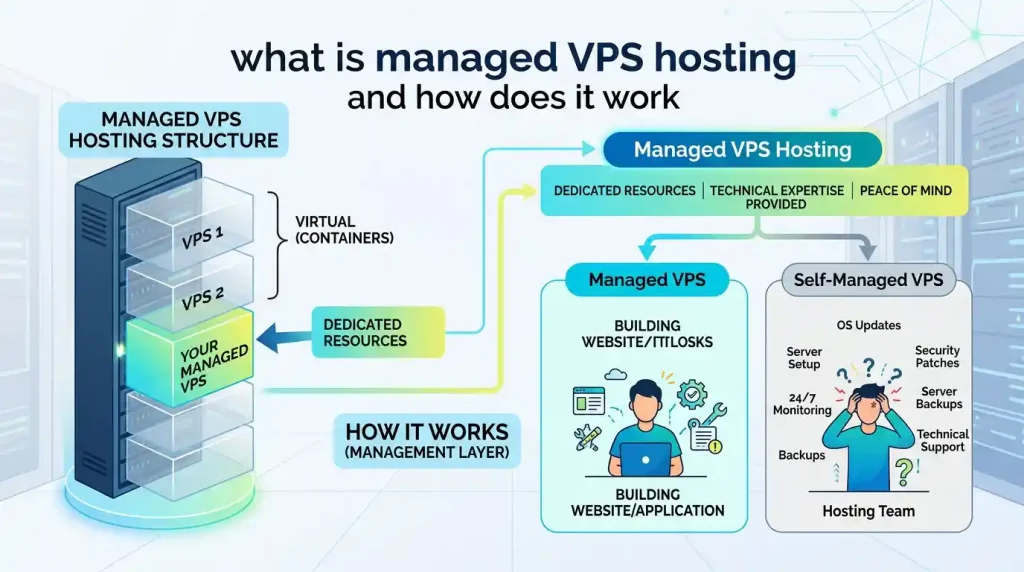
- VPS (Virtual Private Server): A physical server is divided into several virtual compartments using virtualisation technology. Unlike shared hosting, where you share resources like RAM and CPU with hundreds of other websites, a VPS gives you dedicated, isolated resources that belong solely to your site.
- 2. VPS Hosting: Virtual dedicated resources on a shared server. If you want a managed solution where the host handles setup and security, check out our complete guide on managed VPS hosting.
Simply put, managed VPS gives you the power and speed of a dedicated server environment with the simplicity of basic shared hosting. You focus on your content, business, and marketing, while system administrators take care of server health, security patches, and performance tuning.
| Feature | Managed VPS Hosting | Unmanaged VPS Hosting |
|---|---|---|
| Server Setup | The provider handles it | The user handles it |
| Updates & Patches | The provider manages them | The user manages them |
| Security & Backups | Managed/Supported by provider | The user is responsible |
| Technical Skill | Low skill required | High skill required |
| Technical Support | Full server support | Limited/Basic support |
| Cost | Higher | Lower |
| Best For | Website owners & businesses | Developers & sysadmins |
- Managed VPS Hosting: Gives you VPS power without complex server administration.
- Unmanaged VPS Hosting: Best for developers who need maximum flexibility at a lower cost.
Top 3 Shared Hosting Providers in 2026
If shared hosting matches your current project requirements and budget, here are three proven hosts:
- Hostinger: Outstanding value for money, fast LiteSpeed web server technology, and an intuitive custom control panel (hPanel).
- Bluehost: Officially recommended by WordPress.org, offering effortless one-click setup processes for beginners.
- SiteGround: Slightly pricier, but delivers exceptional client support, built-in speed-caching modules, and top-notch security features.
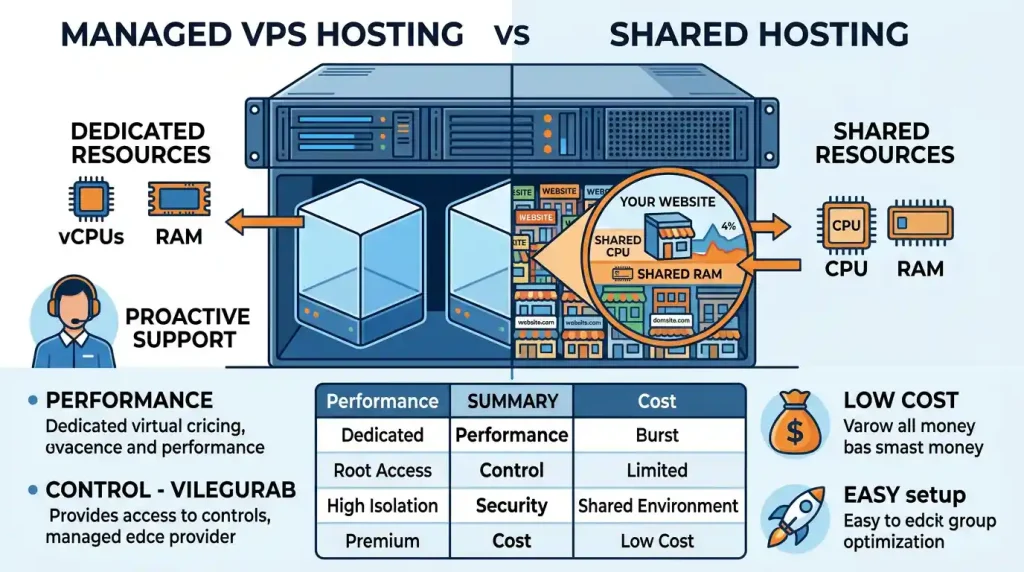
Managed VPS Hosting vs. Shared Hosting
| Feature | Shared Hosting | Managed VPS Hosting |
|---|---|---|
| Resources | Shared with many websites | Dedicated virtual resources |
| Performance | Basic (Good for small sites) | High (Better for growing sites) |
| Security | Basic | Stronger & Isolated |
| Control | Limited | More control |
| Ease of Use | Very Easy | Easy to Moderate |
| Price | Lower | Higher |
| Best For | Beginners & low-traffic sites | Growing sites & businesses |
Note: Shared hosting is good for brand-new websites, but managed VPS hosting is necessary when your site demands more speed, stability, and resources.
Beware of the “Unlimited” Marketing Trap & Renewal Costs
When shopping for shared hosting, you will notice marketing terms like “Unlimited SSD Storage” or “Unlimited Bandwidth”. It is important to understand that in web hosting, there is no such thing as true unlimited resources.
The Inode Limit
In the small print of any “unlimited” hosting agreement, you will find a restriction known as “inode limits”. An inode represents a single file or folder on the server. Even if you have “unlimited disc space”, if you hit the host’s maximum file count limit (usually 100,000 to 250,000 files), you won’t be able to upload any more content or receive new emails.
The Introductory Price Trap
Many hosting providers offer deep discount rates—such as $1.99/month—when you pay upfront for 3 or 4 years. However, when your initial contract expires, the renewal price can jump by 200% to 400% (e.g., renewing at $9.99 to $14.99/month). Always check the renewal rates before committing long-term.
External Resources & Benchmark Tools
- Check official website setup recommendations and guidelines directly at WordPress.org.
- Test your current website speed and performance metrics using Google PageSpeed Insights.
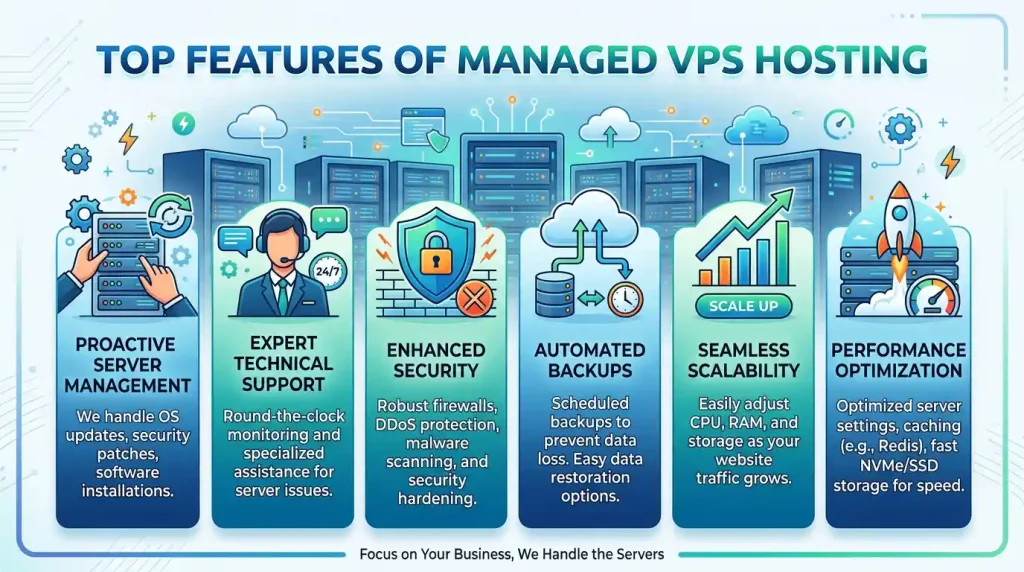
What Does the Web Host Actually Do for You?
When you buy a fully managed VPS plan, you aren’t just paying for server hardware; you are paying for hands-on technical support.
When you sign up, the web host installs the operating system (such as Ubuntu), sets up the web server (Nginx or Apache), and configures database systems. You don’t need to touch a terminal or write SSH commands to get started.
Here is what a quality-managed VPS provider handles behind the scenes:
1. Server Setup and Configuration
When you sign up, the web host installs the operating system (usually a Linux distribution like Ubuntu, AlmaLinux, or Rocky Linux), sets up the web server (Nginx, Apache, or LiteSpeed), and configures database systems (MySQL/MariaDB). You don’t need to touch a terminal or write SSH commands to get started.
2. Routine Maintenance and OS Updates
Operating systems and server software require continuous updates to fix bugs and close security vulnerabilities. On a managed VPS, system administrators apply core updates, kernel patches, and software upgrades automatically without breaking your site.
3. Proactive Security and Malware Scanning
Security is one of the biggest risks of managing your own server. With managed VPS, the host sets up automated firewalls, installs DDoS protection modules, conducts regular malware scans, and monitors traffic for suspicious intrusion attempts.
4. Automated Backups and Disaster Recovery
If an update goes wrong or a plugin corrupts your site, you need a quick way to restore it. Most managed VPS providers include automated daily or weekly off-site backups, allowing you to restore your server to a healthy state with a single click or a quick message to support.
5. Performance Tuning and Caching
A raw VPS needs to be optimised for your specific software (like WordPress or WooCommerce). Managed hosts tweak server-level caching mechanisms (such as Redis, Memcached, or Varnish) and optimise database queries to ensure your pages load instantly.
6. 24/7 Priority Technical Support
If your website goes down at 2:00 AM, you don’t have to troubleshoot server log files yourself. You can open a ticket or hop on live chat, and a trained sysadmin will investigate and resolve the infrastructure issue for you.
External Resources to Learn More
- To check domain availability, you can search via Namecheap.
- For web performance recommendations, see official resources from WordPress.org.
Real-World Benefits: Why Choose Managed VPS?
1. Zero Technical Headache
If terms like these sound intimidating, unmanaged hosting will cause endless frustration. Managed VPS removes the technical barrier entirely.
2. Better Uptime and Peace of Mind
Because experienced sysadmins are proactively monitoring server health, hardware resource usage, and traffic anomalies, potential server crashes are often fixed before you even notice them.
3. Maximum Speed for Complex Websites
E-commerce stores running WooCommerce or dynamic membership sites consume high amounts of server RAM and CPU. A properly configured managed VPS handles resource-heavy requests smoothly without slowing down checkout pages.

Are There Any Drawbacks?
While managed VPS hosting is ideal for most site owners, there are two minor trade-offs to keep in mind:
- Higher Cost: Managed VPS plans generally start around $20 to $50+ per month compared to raw unmanaged VPS plans, which can start as low as $5 per month. You are paying for human expertise.
- Slightly Restricted Control: To keep the server environment stable and secure for non-technical users, some providers may restrict certain low-level kernel modifications or risky custom software scripts.
Who Should Use Managed VPS Hosting?
Managed VPS is the sweet spot for:
Small Business Owners: Who want high performance but don’t have an in-house IT team.
Growing Bloggers & Publishers: Who need faster load times and higher traffic limits than shared hosting allows.
WooCommerce & E-Commerce Owners: Where website speed directly impacts sales and security is non-negotiable.
Agencies & Freelancers: Who manage multiple client websites and need a stable, reliable environment without spending hours playing server admin?
Final Verdict
If your website has outgrown shared hosting and you want top-tier performance, bulletproof security, and zero server management stress, Managed VPS hosting is worth every penny. It lets you spend 100% of your time building your business while industry experts handle the infrastructure behind the scenes.